What Is Customer Service Automation for Social Care
"Discover what is customer service automation for social care. Learn how AI orchestrates triage, routing, and SLAs to empower human agents across social"
70% of organizations were at least piloting automation in one or more business functions in 2022, and 71% of executives say they're aiming for fully autonomous, touchless handling of support inquiries by 2027. In social care, what is Customer Service Automation? It's the orchestration layer that filters noise, classifies intent, and routes high-stakes issues to people, not a machine that replaces judgment.
On a Monday morning, that matters fast. X fills with outage complaints, Instagram DMs bury billing disputes, Telegram starts spitting out spam and scam mentions, and a Discord thread turns into a PR risk before anyone on shift has finished coffee. The team doesn't need another inbox, it needs a way to separate repeatable work from the cases that actually need a human.
Table of Contents
- The Reality of Social Care and the Orchestration Thesis
- Core Components of Modern Support Automation
- Real-World Use Cases for Enterprise Social Teams
- Measuring ROI and Path-Specific KPIs
- Bridging the Gap Between AI Strategy and Execution
- Designing Your Orchestration First Workflow
The Reality of Social Care and the Orchestration Thesis
Social care breaks down when every channel behaves like its own emergency room. A billing complaint in a reply, a feature request hiding in a DM, and a trust issue in a community thread all need different handling, but they arrive as one uninterrupted stream. Manual triage turns into reviewer fatigue, and reviewer fatigue turns into missed escalations.
The old assumption is that automation means standing up a rigid bot to deflect tickets. That model made sense when customer service automation was mostly about call routing and basic information retrieval, but the field has moved toward AI-driven, omnichannel support that can understand language, predict needs, and generate responses Ringy's history of customer service automation. In practice, that means automation should support the service workflow, not sit outside it.
Orchestration beats deflection
The useful version of automation filters out the noise first. Spam, duplicate mentions, routine “where's my order” messages, and simple how-to questions can be tagged, grouped, or drafted into a reply before a human ever sees them. The point isn't to hide work, it's to make the hard work visible sooner.
Practical rule: if a conversation can be resolved by applying a policy, pulling a known answer, or completing a routine account action, automate that path. If it involves brand risk, exceptions, or a customer who's already angry, route it to a person.
That framing changes how teams operate across X, Instagram, TikTok, Discord, Telegram, WhatsApp, and forums. It also changes what “good” looks like. Instead of asking whether a bot contained a conversation, the better question is whether the system got the right issue to the right owner without delay or false closure.
Modern social care automation succeeds when it reduces queue load and shortens response and resolution times while giving human agents space for edge cases. It fails when it treats every message as if it deserves the same answer, because social channels aren't a single support queue, they're a live mix of public pressure, private requests, and internal coordination.
Core Components of Modern Support Automation
A strong automation stack in social care usually comes down to four mechanics working together. Strip one of them out and the whole thing gets brittle. Keep them connected and the workflow starts feeling less like inbox chaos and more like controlled routing.
Unified inbox and context-aware triage
A shared inbox is a single place where multiple team members can access, manage, and respond to customer communications instead of working out of separate inboxes HubSpot's shared inbox overview. In social care, that centralization matters even more because the “inbox” includes replies, mentions, comments, DMs, and community posts that would otherwise be handled in silos.
The triage layer is where modern systems outperform old keyword rules. Basic bots used to match a phrase and fire a canned answer. Context-aware systems look for intent, urgency, channel, and language, then tag the message accordingly. That's how a slang-heavy complaint in WhatsApp can be treated as a billing issue while a product feature request in Discord gets queued for product, not support.
Routing, drafting, and escalation
Routing is the part that restores order. A feature request buried in a DM doesn't belong with finance, and a trust and safety risk shouldn't sit in a generic support queue. Social media customer service software usually combines a unified inbox, routing and assignment rules, AI reply drafts, and reporting that rolls response time, resolution time, sentiment, and volume into one view Featurebase's software breakdown.
Response generation is useful only when the draft respects brand voice and policy. A good draft saves time, but a bad draft creates cleanup work. That's why the human-in-the-loop step still matters. People should approve, edit, or override anything sensitive, and the system should hand off escalation paths cleanly when an issue needs legal, comms, engineering, or finance.
If you want a broader primer on how automation functions outside social care, automation for local businesses is a useful adjacent reference, especially for the workflow logic behind intake and routing.
A clean mental model helps here:
- Unified inbox: gathers every social and community signal into one working surface.
- Intent classification: identifies what the customer is asking for.
- Response generation: drafts replies that humans can review quickly.
- Escalation protocols: push high-stakes cases to the right owner without delay.
The structure matters because each layer removes a different kind of friction. Without all four, teams drift back into manual sorting, copy-paste replies, and missed handoffs.
A short video walkthrough can help teams visualize the workflow mechanics:
Real-World Use Cases for Enterprise Social Teams
The best test for automation is a messy week, not a clean demo. A Telegram wave full of scam mentions, a Discord thread that starts attracting angry customers, and a launch-day flood of multilingual replies will expose weak routing immediately. If the system can't sort that, it isn't ready for enterprise social care.
What automation should absorb first
Repeated questions are the easiest win. “Where's my order?”, “How do I update billing?”, and “Is the service down?” all create noise that a team shouldn't have to triage by hand all day. Automation can tag those messages, draft the first response, or close the loop when the answer is already in policy or the knowledge base.
High-volume support surges are a different problem. During an outage, customers will post in public and private channels at the same time. The machine should cluster the duplicates, surface the most urgent threads, and route the possible PR or engineering issues to the people who can act.
A useful way to think about that is to compare repeatable work with exception work.
| Work type | What automation should do | What humans should do |
|---|---|---|
| Repetitive FAQs | classify, draft, auto-close when safe | spot-check quality |
| Billing complaints | tag, route, attach context | decide exceptions and refunds |
| PR risk in mentions | surface immediately | approve messaging |
| Spam and scam waves | filter, suppress, group | review patterns and abuse cases |
Where humans still need to stay close
The hardest problems are usually the ones with reputational stakes. A local complaint inside a Discord community can snowball into wider distrust if nobody notices the pattern early. A multilingual launch can create false negatives when tone, slang, or mixed-language phrasing confuses a brittle workflow.
That's why good automation doesn't hide the queue, it sorts it. A support lead should be able to see which issues were auto-closed, which ones were escalated, and which conversations need a second look. The goal is not to remove human judgment, it's to keep humans focused on the conversations where judgment matters.
When automation is tuned properly, the team stops burning time on noise and starts spending it on exceptions, recovery, and prevention.
For teams trying to reduce ticket load at the source, Splash Access has a practical overview of ticket reduction tactics that lines up well with the idea of deflection plus routing, not deflection alone.
Measuring ROI and Path-Specific KPIs
Automation gets misread when teams only look at blended averages. A faster first response time can hide repeated contacts. A higher containment rate can hide frustrated customers who had to come back through another channel. The better way to judge performance is by resolution path, not by one blended number.
The metrics that actually show whether automation works
The most useful starting point is simple: measure the same workflow before and after launch, then compare like for like. Baseline the volume, average handle time, and second-touch rate first, because that gives you a clean reference point. After deployment, track whether the same issues are closing faster and with fewer handoffs.
The operational metrics below are the ones I'd trust first in a social care environment.
| Metric | Definition | Why It Matters |
|---|---|---|
| Full resolution rate | Share of conversations resolved without extra back-and-forth | Shows whether automation actually solved the issue |
| Escalation rate | Share of conversations handed to a human or another team | Reveals false containment or good judgment, depending on context |
| Repeat contact rate within seven days | Customers returning with the same issue soon after closure | Exposes weak automation and incomplete fixes |
| First response time | Time to reply to the first message | Measures speed at the start of the interaction |
| Next response time | Time to reply to each later customer message | Shows whether threaded conversations stay controlled |
| Cost per resolution | Total support effort per resolved case | Helps teams assess efficiency without relying on deflection alone |
| Agent handle time reduction | Drop in time agents spend on repeatable work | Shows whether automation is freeing people for harder cases |
Customer-service platforms often let teams set explicit SLA targets for first response time and next response time directly inside the inbox workflow Intercom's SLA setup guide. That matters because service discipline has to live where the work happens, not in a separate spreadsheet nobody checks.
Measurement rule: don't celebrate containment until you've checked escalation rate, repeat contact rate, and CSAT by resolution path.
For a broader framing on measurement discipline, marketing measurement best practices offer a useful reminder that attribution and operational reporting both depend on clean baselines and consistent definitions.
What good measurement catches
Path-specific reporting shows whether the automation is being too aggressive or too cautious. If it deflects too hard, customers boomerang back with the same complaint. If it escalates too early, the system doesn't earn enough savings to justify itself. That calibration loop is the difference between a polished demo and a stable operation.
A mature setup also ties outcomes to workflow. If a billing issue is resolved by a knowledge article, that's one path. If the same issue needs finance intervention, that's another. Mixing those together hides the true source of value and the true source of failure.
Bridging the Gap Between AI Strategy and Execution
Plenty of teams have an AI plan, but far fewer have a working end-to-end workflow. In customer service, that gap is still obvious. Recent reporting says 67% of contact centers still rely on manual processes or limited workflow automation, while only 2.5% have fully automated AI-driven workflows SuccessKPI survey coverage. The ambition is there, the execution usually isn't.
Why the gap stays open
The first problem is scope. Teams often start with chat response ideas, not with complete service journeys. If the automation can classify intent but can't retrieve the right policy, update a record, or pass clean context to a human, the workflow still breaks.
The second problem is control. Enterprise teams need role-based permissions, auditability, CRM sync, and clear approval boundaries before automation can be trusted at scale. Without those controls, people are afraid to let the system touch real customer work, so the pilot stays a pilot.
The third problem is calibration. The best returns come from automating repeatable workflows that can reliably identify intent, retrieve the right knowledge article, and complete routine actions without escalation. If the model is too loose, it creates false containment. If it's too cautious, the team gets little more than a fancy sorter.
The real win isn't a bot that answers faster. It's a workflow that closes routine work cleanly and hands everything else to the right person with enough context to act.
That's where orchestration becomes the operating principle. AI filters the volume, tags the intent, drafts the routine response, and passes the edge cases to humans. Humans keep the judgment calls, the approvals, and the accountability.
A separate 2026 industry survey found 99% of CX organizations use automation, yet only 24% say it delivers very positive customer experiences BusinessWire survey coverage. That gap reinforces the point, automation on its own isn't the outcome, orchestration is.
Designing Your Orchestration First Workflow
Start with the inbox, not the bot. If your team is still sorting DMs, comments, and community posts by hand, the first move is a unified view, clear intent categories, and a routing map that matches the actual owners inside the business. Support, comms, product, trust and safety, finance, and engineering all need different triggers.
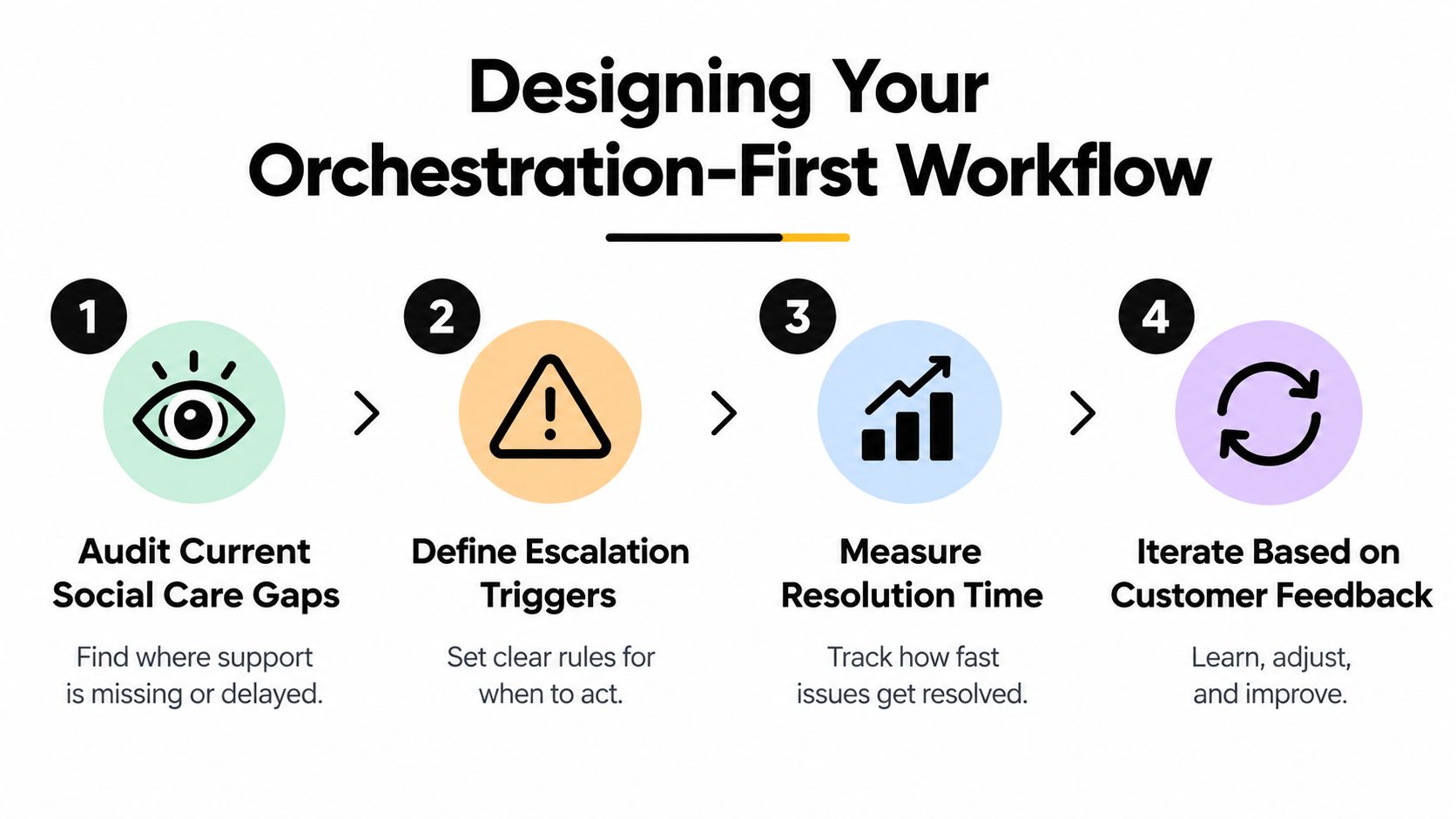
The next step is to make escalation explicit. Define which issues can auto-close, which ones need human approval, and which ones should jump immediately to a specialist. Then tie that to SLA targets so the team knows what “fast enough” means in practice.
The checklist that keeps teams honest
- Audit current gaps: find where manual triage is slowing down response or hiding risk.
- Define escalation triggers: spell out what stays with automation and what reaches a person.
- Measure resolution time: compare before-and-after results by workflow, not in a blended average.
- Iterate from customer feedback: fix the paths that create repeat contact or bad handoffs.
Sift AI fits this model as one platform option for social and community operations, because it unifies channels, tags intent, routes conversations to the right team, and drafts replies for human review. That combination is what orchestration looks like when it's built for social speed instead of generic ticketing.
If you're ready to replace inbox chaos with a workflow your team can trust, visit Sift AI and see how a unified inbox, context-aware routing, and human-in-the-loop automation can fit your social care operation. It's the clearest path to reducing reviewer fatigue without losing control of the conversations that matter.