CRM Social Media: The Enterprise Guide
"Master CRM social media workflows for enterprise support. Learn how AI orchestration, unified inboxes, and smart routing reduce agent fatigue and protect SLAs."
A service outage starts on X with a short complaint, spreads through Instagram comments, and then becomes a running argument in Discord. Your listening tool captures everything: genuine reports, duplicate posts, sarcasm, memes, scam links, and customers replying to one another. The feed grows faster than agents can classify it, while finance, engineering, communications, and trust and safety each see only part of the incident.
That's the operational problem behind CRM social media. Social channels aren't just places to publish updates or collect engagement metrics. They're public support surfaces where customer intent arrives in messy, multilingual, multimodal formats and must be interpreted, prioritized, routed, answered, and measured. The job of a modern social CRM is to orchestrate that work so automation absorbs noise while people own judgment, empathy, and escalation.
Table of Contents
- Redefining CRM Social Media for Modern Support Teams
- The Architecture of an AI-Orchestrated Workflow
- Core Features That Eliminate Agent Fatigue
- Measuring Success Beyond Vanity Metrics
- Real-World Routing and Escalation Scenarios
- Common Pitfalls in Social Care Implementation
- Vendor Selection Checklist for Enterprise Teams
Redefining CRM Social Media for Modern Support Teams
A social CRM became a distinct product category in the late 2000s, as companies began using social networks to manage customer interactions rather than relying only on email and call centers. The shift accelerated around 2009, and by 2012 commentary described social CRM as a roughly $1 billion annual market, marking the expansion of CRM from a sales database into an always-on engagement layer connected to public conversation and social listening (the evolution of CRM and social CRM).
That history matters, but the operating model has changed. A legacy social listening platform answers, “What are people saying about us?” A modern social CRM must answer, “Which signal represents a customer who needs help, what does that customer need, and who should own the next action?”
From feed aggregation to signal orchestration
The difference becomes clear during an outage. A keyword filter may group every post containing the product name, but it won't reliably distinguish a customer showing a screenshot of a failed payment from a joke about the outage, or a legitimate report from a bot repeating a scam URL. A useful system combines intent tagging, urgency detection, conversation context, language interpretation, and routing rules before the message reaches an agent.
The workflow might classify:
- Support intent, such as a billing complaint in an X reply or a locked-account DM.
- Product intent, such as a feature request buried inside a Discord discussion.
- Operational risk, such as a recurring error screenshot that points to a wider incident.
- Reputation or safety risk, such as threatening language, coordinated harassment, or a multilingual PR issue.
- Noise, including duplicate complaints, promotional replies, bot spam, and scam waves.
The objective isn't to make every reply faster. It's to prevent the wrong work from consuming the same queue as the right work.
Practical rule: Treat every social interaction as a signal that needs a disposition, not as a post that deserves a reaction.
Why support teams can't keep social in a secondary queue
More than 5.22 billion people were active on social media globally in October 2024, giving CRM systems a broad pool of customer signals to ingest and act on (social CRM adoption and market context). The same source reports that 96% of business leaders expected to integrate social data into their CRM within three years, while 88% considered social media management software critical to their technology stack.
For social care teams, this means the public channel is often the first place a service failure becomes visible. Customers don't wait for a help-center article when a payment fails, an account disappears, or an outage affects their work. They ask in the channel where they already have an audience, and other customers use the replies to confirm whether the problem is isolated.
A social CRM should therefore connect the public interaction to the customer record, support history, incident process, and internal owner. Publishing remains useful, but it's only one activity inside a larger operating layer.
The Architecture of an AI-Orchestrated Workflow
A reliable workflow moves through five stages, from public complaint to private resolution. The important design choice is not whether AI appears in each stage. It's where AI can act independently, where it must prepare work for review, and where a human must make the decision.
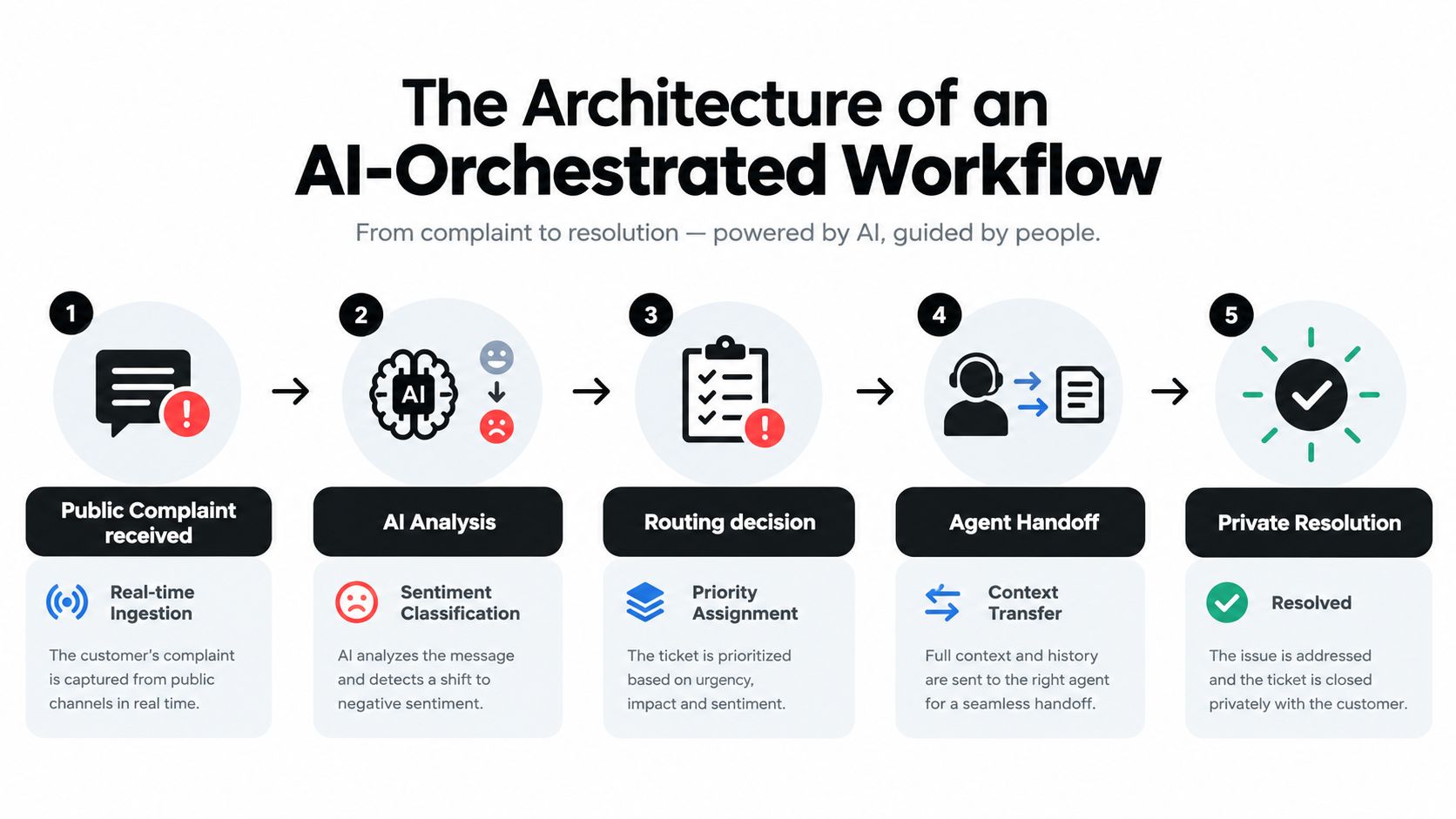
1. Receive and normalize the complaint
The system ingests mentions, replies, comments, DMs, forum posts, and community messages from channels such as X, Instagram, TikTok, Discord, Telegram, and WhatsApp. It should preserve the original message, attachments, thread context, author relationship, channel, timestamp, and any existing customer identifier.
Normalization matters because the same intent looks different across platforms. “App's cooked” on X, a screenshot of an error in an Instagram DM, and a Discord message written in slang may describe the same incident. A keyword-only rule sees three unrelated strings. A context-aware classifier can group them without erasing their channel-specific details.
2. Analyze intent, urgency, and context
AI should classify the issue before assigning it. Useful labels include billing, account access, outage, bug, feature request, abuse, spam, PR risk, and general question. Add urgency as a separate field rather than hiding it inside the intent label. A routine feature request and a feature request that reveals a security concern may share a category but require different handling.
Multilingual and multimodal analysis belong here. The system should interpret slang, sarcasm, mixed-language messages, memes, and images, then show the evidence behind the classification. An agent needs to know whether the model recognized a screenshot as an error message or merely matched the word “failed.”
3. Route according to ownership and consequence
Routing should combine intent, urgency, customer context, channel, geography, language, and current incident state. A billing complaint can go to finance, while a public version of the same complaint may also create a communications task if it gains visibility. A product issue can route to engineering with the relevant screenshot and conversation history instead of forcing an agent to copy details manually.
Avoid routing everything to a general queue. That creates reviewer fatigue and makes urgent items compete with low-value work. Use explicit fallback rules for uncertain classifications, missing ownership, and conflicting signals.
4. Prepare the human handoff
The agent should receive a compact context transfer, not a raw transcript. Include the customer's recent interactions, detected intent, urgency rationale, language, sentiment direction, prior case status, suggested next action, and a draft response that follows the approved brand voice.
The draft is a starting point, not a decision. Agents should be able to edit it, reject it, request more context, change the route, and record why they overrode the recommendation. Those overrides become valuable training and quality data.
5. Resolve privately and close carefully
A public reply may acknowledge the issue, while the actual investigation continues in a DM or connected helpdesk case. The workflow should link the public thread to the private conversation and preserve the audit trail. It should also prevent an agent from promising a refund, technical change, or timeline that the responsible team hasn't approved.
Auto-closure works for clear, low-risk interactions, such as resolved duplicate questions or confirmed acknowledgments. It shouldn't close a conversation merely because the customer stopped replying. Define closure conditions, reopen signals, and sampling rules so automation reduces queue volume without hiding unresolved demand.
Core Features That Eliminate Agent Fatigue
A unified inbox is the starting point, not the finished architecture. It should consolidate DMs, comments, mentions, and community conversations while preserving the differences between a public reply, a private support request, and an internal escalation.
The inbox must coordinate people, not just messages
Assignment and collision detection are essential. If two agents can open the same Instagram DM and answer independently, the customer may receive contradictory instructions. The inbox should show ownership, lock or warn on active work, record handoffs, and expose unassigned items before they breach an SLA.
Configure queues around operational responsibility:
- Finance, for refunds, duplicate charges, invoices, and payment failures.
- Engineering, for reproducible bugs, outage indicators, and error screenshots.
- Communications, for public statements, sensitive announcements, and emerging PR risk.
- Trust and safety, for threats, impersonation, harassment, and coordinated abuse.
- Community or support, for routine questions, education, and follow-up.
Role-based permissions should control who can view sensitive customer data, approve a response, issue a financial remedy, change a tag, or close an escalated case. A social inbox that makes every action available to every user creates compliance and quality problems.
Design around platform reality
Social care workflows can't assume that publishing APIs provide complete access to private conversations. A widely cited review notes that Instagram's Content Publishing API allows 100 published posts per rolling 24-hour window, and that direct messages aren't part of the publishing APIs on major platforms (platform API constraints and social media management). The practical lesson is simple: evaluate care capabilities separately from scheduling capabilities.
Ask vendors how they receive DMs, comments, mentions, and forum messages; which actions require native platform handoff; what happens when an API is delayed; and how failed actions are logged. A system that can schedule content but cannot reliably expose or update support conversations isn't a complete social CRM for care teams.
Make routing multimodal and measurable
Tags should capture more than sentiment. Add fields for intent, urgency, language, customer tier, product area, incident, escalation reason, and resolution status. Image and video handling should preserve the original attachment and explain what the system detected. For sarcasm and slang, confidence scores and reviewer queues are safer than silent automation.
Messaging channels can operate at a different pace from email. A 3.4-million-message analysis found that about 70% of WhatsApp messages and 44% of Instagram messages were answered within five minutes (analysis of WhatsApp and Instagram response behavior). That doesn't mean every team should promise a five-minute SLA. It does mean channel expectations should inform queue design, staffing, escalation thresholds, and the difference between an acknowledgment and a full resolution.
Measuring Success Beyond Vanity Metrics
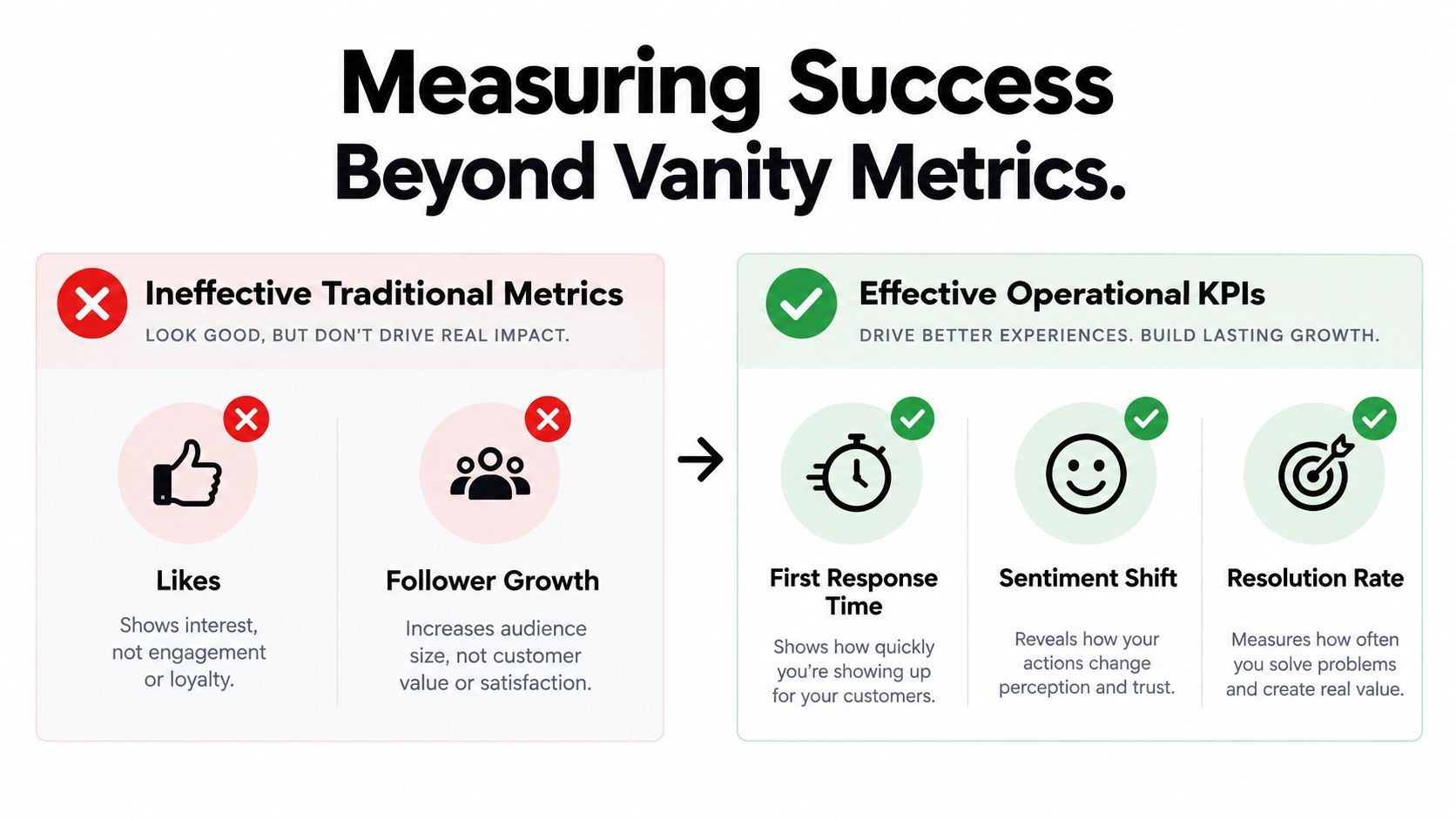
Follower growth and likes can help a marketing team understand distribution, but they don't tell a support leader whether customers received the right help. A post can earn strong engagement while the care operation misses urgent DMs, duplicates replies, or sends unresolved complaints into auto-closure.
The useful comparison is between attention metrics and service outcomes:
| Attention-oriented view | Operational CRM view |
|---|---|
| Likes and follower growth | First-response time and SLA attainment |
| Impressions and reach | Resolution time and first-contact resolution |
| Comment volume | Support-request volume by issue type |
| Engagement rate | CSAT and sentiment shift |
| Published content output | Auto-closure quality and escalation avoidance |
Measure the queue and the outcome
Social care guidance recommends tracking response time, resolution time, CSAT, sentiment in support interactions, and support-request volume, with competitor benchmarking used to put response performance into context (social media analytics and customer-care measurement). These measures answer different questions:
- First-response time shows how quickly a customer receives acknowledgment or initial help.
- First-contact resolution shows whether the first meaningful interaction solved the issue.
- Resolution rate reveals how many cases reach a defined outcome rather than merely receiving a reply.
- Sentiment shift helps identify whether the interaction reduced frustration or left the customer more dissatisfied.
- Auto-closure rate matters only when paired with reopen rate, quality sampling, and unresolved-contact checks.
- Escalation volume shows whether routing rules are sending the right issues to specialist teams.
A fast first reply can hide poor service if the agent sends a generic message that forces the customer to repeat the problem. Resolution and sentiment provide the necessary counterweight.
Set channel-specific expectations
About three-quarters of consumers expect a response within 24 hours or sooner, and 65% planned to use social at least as much as the previous year for customer-service questions (consumer expectations for social customer service). The same source reports that Instagram incoming messages rose from 13 to 18 per day between 2023 and 2024, while the daily response rate to social messages and comments fell from 8% to 7%.
Those figures describe pressure on the operating model, not a universal SLA. Set targets by channel, issue severity, customer segment, and operating hours. Then connect the results to business consequences, such as repeat contacts, avoidable call-center transfers, retention risk, unresolved product defects, and public escalation.
A support leader can report that social care protected revenue only when the CRM shows what happened after the reply. Did the issue resolve? Did the customer contact the company again? Did the same bug appear across channels? Did the escalation reach engineering before the incident spread?
Real-World Routing and Escalation Scenarios
Routing rules become meaningful when a message carries more than one business consequence. The right owner isn't always the person who can write the fastest reply.
A billing complaint becomes a public-risk issue
A customer replies to an X product announcement, saying they were charged twice and can't reach support. The classifier identifies billing intent, detects a public complaint, links the customer to an existing account record, and checks for similar messages during the same period.
Finance receives the case with transaction context. Support receives the customer-facing task. Communications receives an alert only if the conversation meets the team's defined public-risk threshold, such as rapid spread, multiple affected customers, or a connection to a known incident. The agent replies publicly with a concise acknowledgment and moves account-specific details into a DM.
This avoids two common failures. Finance doesn't have to monitor X for payment issues, and communications doesn't treat every billing question as a crisis. The routing logic reflects both the customer's need and the potential consequence.
A feature request is buried in Discord
A community member describes a workflow problem in a long Discord thread and suggests a product change. The message isn't phrased as a formal request, and other members respond with workarounds, jokes, and related complaints.
A useful system groups the thread context, tags the underlying feature request, identifies the product area, and sends the signal to product management. It should retain the original language and replies, because the demand's strength may be visible in the discussion rather than the first message. The community manager can acknowledge the request without promising a roadmap commitment.
Product teams benefit from this route because they receive customer evidence, not a vague count of mentions. Community teams retain ownership of the relationship, while engineering or product decides whether the request becomes work.
Multilingual PR risk appears on X
A post in slang or mixed language accuses the company of harmful conduct. Keyword matching misses the implication, while sentiment classification alone marks it merely negative. Context-aware analysis flags the post for reputation risk, detects the language, and preserves the surrounding conversation for review.
Communications and trust and safety receive the escalation, with a human reviewer deciding whether the issue involves misinformation, policy abuse, a legitimate complaint, or a developing crisis. The reviewer can involve a regional specialist before anyone publishes a response.
That separation matters. AI can surface the signal and draft a neutral acknowledgment, but it shouldn't decide the company's public position on a sensitive allegation. Humans own the interpretation, approval, and record of the final action.
Common Pitfalls in Social Care Implementation
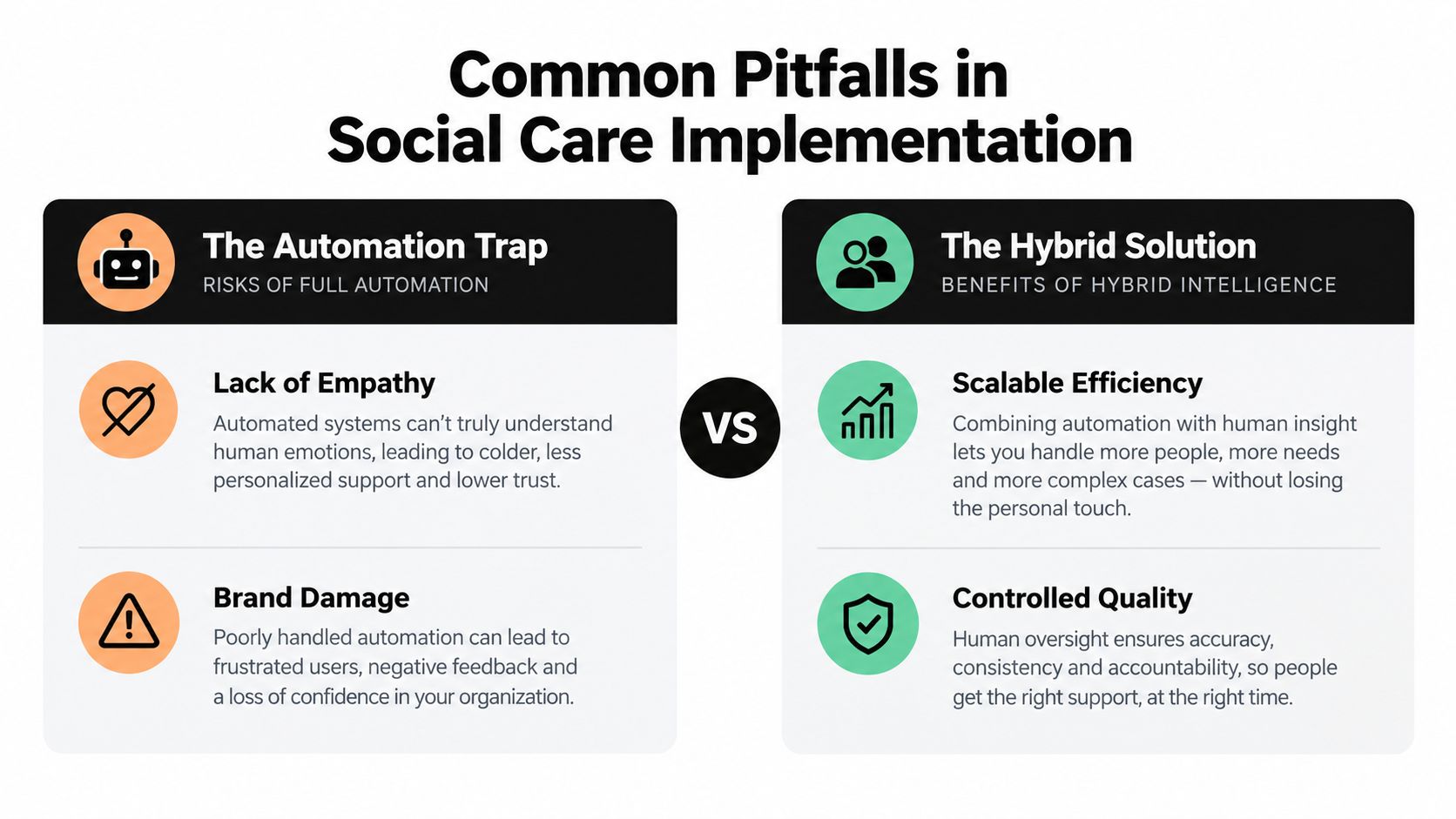
The most dangerous implementation mistake is treating full automation as the definition of success. An empty queue can mean efficient resolution, but it can also mean premature closure, missed sarcasm, unreviewed hallucinations, or customers giving up.
Automation can remove the evidence agents need
A keyword rule routes every message containing “refund” to finance, including a meme, a resolved case, and a scam post. A sentiment model labels sarcasm as praise. A response generator apologizes for an incident that hasn't been confirmed. These failures become more likely when teams optimize for volume reduction without sampling the work that automation removes.
Multimodal interpretation raises the stakes. A screenshot may contain the most important evidence, while a meme may express a genuine complaint through humor. A multilingual message may use local slang that doesn't map cleanly to a standard intent taxonomy. The system should expose uncertainty and send ambiguous cases to a reviewer instead of forcing a confident label.
Human review needs a deliberate design
Human-in-the-loop doesn't mean asking agents to approve every low-risk “thanks” message. It means reserving human judgment for actions where context, policy, empathy, or accountability matters.
Use automation for:
- Noise filtering, including duplicate posts, obvious spam, and scam waves.
- Initial tagging, when confidence is high and the taxonomy is stable.
- Context assembly, such as collecting thread history and customer records.
- Drafting, provided the draft shows its source context and policy constraints.
- Routine closure, when the customer confirms resolution and the rules are explicit.
Keep humans responsible for:
- Financial remedies, legal or policy-sensitive responses, and public crisis statements.
- Low-confidence or multilingual cases, especially when sarcasm or images change the meaning.
- Escalation decisions, where engineering, communications, or trust and safety must act.
- Brand voice exceptions, where a generic approved response would sound careless.
- Quality review, including samples of auto-closed and auto-routed conversations.
The right question isn't “How much can we automate?” It's “Which decisions can the system make safely, and which decisions must remain attributable to a person?”
Vendor Selection Checklist for Enterprise Teams
Enterprise buyers should reject feature checklists that treat scheduling, sentiment, and AI drafting as proof of social-care readiness. Start with the failure modes that would hurt your operation: lost DMs, duplicate replies, untraceable model decisions, broken CRM synchronization, unauthorized access, and API restrictions that appear only during a live incident.
Security and governance come first
Ask vendors to document their security program, data handling, retention controls, subprocessors, regional processing, incident response, and audit evidence. SOC 2 Type II certification, ISO readiness, and data sovereignty requirements should be verified through current documentation rather than accepted as marketing language.
Role-based access control needs to cover more than login permissions. Check whether the platform can restrict sensitive customer records, response approval, financial actions, exports, taxonomy changes, and administrative configuration. Every important action should produce an audit record with the user, timestamp, source conversation, change, and resulting state.
Test the integrations under real conditions
A social CRM is only useful if it connects social signals to the systems where work is completed. Test synchronization with tools such as Zendesk, Salesforce, HubSpot, and Gainsight, including customer identity matching, case creation, status updates, attachments, internal notes, and closure events.
Use a realistic evaluation set:
- Cross-channel ingestion, covering X, Instagram, TikTok, Discord, Telegram, WhatsApp, forums, comments, mentions, and DMs.
- Multilingual and multimodal interpretation, including slang, sarcasm, screenshots, memes, and mixed-language conversations.
- Routing controls, with separate paths for finance, engineering, communications, support, and trust and safety.
- Human review, including confidence thresholds, approval workflows, overrides, and reviewer feedback.
- API resilience, covering rate limits, delayed events, unavailable actions, retries, and native-platform handoff.
- Analytics integrity, with response time, resolution rate, sentiment shift, CSAT, auto-closure quality, and escalation reporting.
- Migration support, so historic conversations and existing taxonomy don't disappear during rollout.
The required vendor checklist should include SOC 2 Type II Certification, API Latency Under 200ms, Data Sovereignty Compliance, Legacy Data Migration Tools, and Role-Based Access Control. Treat these as evaluation prompts, not automatic proof of suitability. A vendor should demonstrate how each requirement works in your environment and explain where platform limitations prevent full automation.
Finally, run a controlled pilot with real historical conversations and a limited live queue. Compare model decisions with trained reviewers, inspect false negatives, measure duplicate handling, and test an outage scenario. A platform that performs well on clean examples but cannot show why it routed a sarcastic image, reopened a closed case, or escalated a multilingual complaint isn't ready for enterprise social care.
Sift AI provides a unified command center for social and community operations, combining inbox management, AI noise filtering, intent tagging, routing to teams such as finance and engineering, escalation, and human-approved reply drafting. Visit Sift AI to evaluate how an orchestration layer can connect multilingual and multimodal social signals to your CRM workflows while keeping people accountable for the hard calls.