Community Management Online: A Practical Guide for 2026
"Learn how community management online works across X, Discord, forums and DMs: roles, daily workflow, response targets and staffing."
The failure is rarely one missing reply. It's the gap between channel growth and the operating model behind it. Nobody knows who owns the billing response. Engineering has not seen the bot reports. An automated "thanks for reaching out" message closed a ticket that is still broken.
That is the daily reality of community management online when every public conversation becomes part of the service experience. Customers do not care which internal department runs X versus Discord. They expect a real answer where they posted, with enough context that they do not have to repeat themselves. According to research reported by Marketing Dive from the 2025 Sprout Social Index, roughly three in four consumers in 2025 said they'd switch to a competitor if a brand failed to respond on social media.
Capacity is the central constraint. Ops teams rarely get blank checks to hire through every volume spike, and community work often sits across support, marketing, and product. Bevy's Community Industry Report found that 44% of community professionals expected their organizations to increase community investment, down from 62% the previous year. Treat the queue as an operational workflow: clear owners, response targets, triage rules, and hard limits on what automation may close without review. I would start with ownership and escalation paths before adding tooling, because faster routing only helps when someone is accountable for the handoff.
Table of Contents
- What Community Management Online Covers Today
- How the Daily Queue Runs From Intake to Close
- Response Time Targets Each Channel Needs
- Tools a Community Team Needs in Place
- Routing Intent and Escalating the Hard Cases
- Sizing Moderator Capacity Before Queues Back Up
- Balancing Member Participation With Governance
- Confirm Your Operating Model Before You Scale
What Community Management Online Covers Today
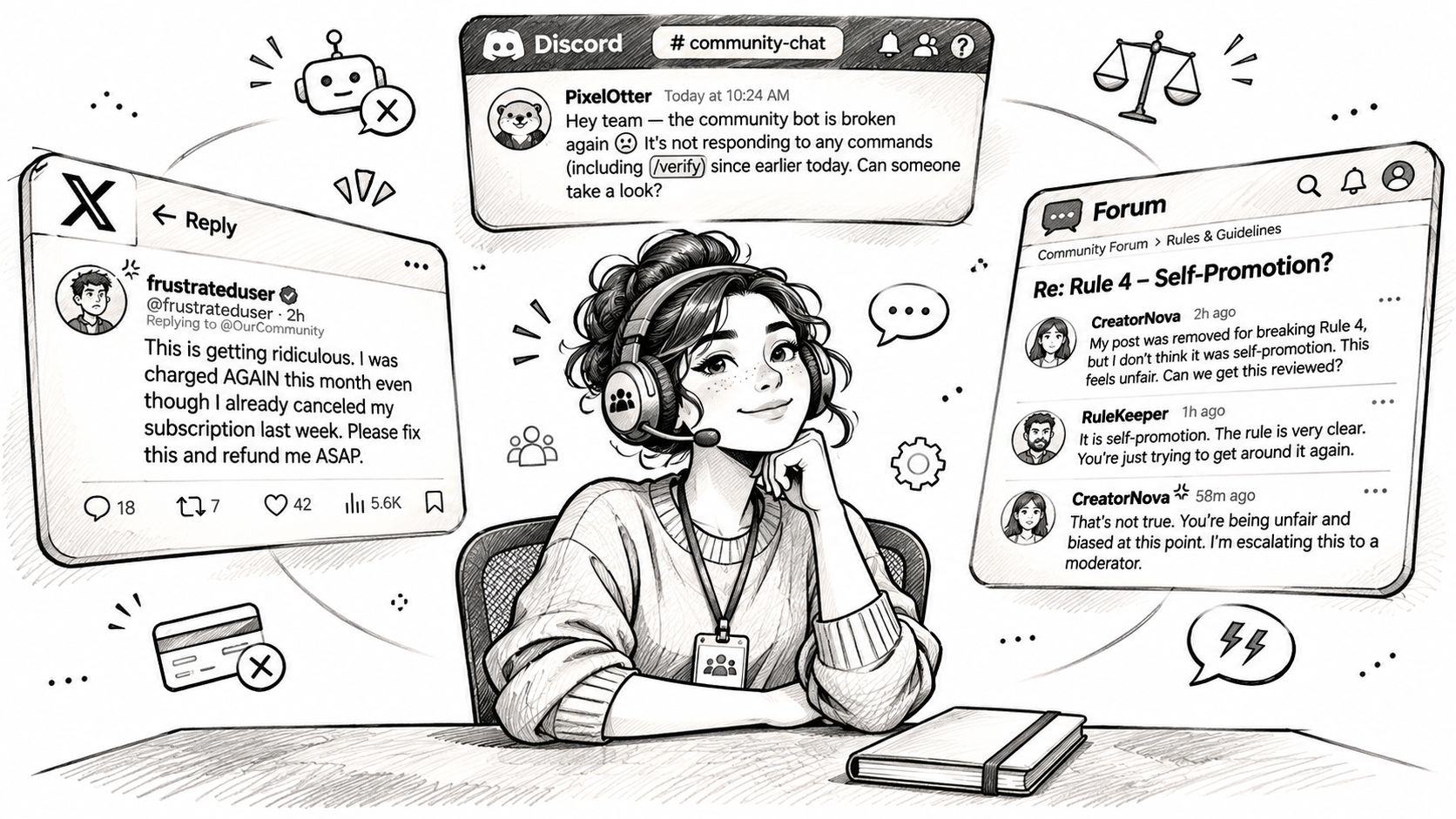
A public billing complaint on X, a broken bot reported inside Discord, and a rule dispute heating up in an owned forum: that queue is community management online in practice. The discipline covers the ongoing operation of conversations across every channel where a brand or group is present, backed by named owners, defined response standards, and clear escalation routes. Rule enforcement is only part of it. The work is a capacity problem: finite moderator hours against incoming volume that never pauses.
Headcount rarely matches channel sprawl. In CMX's 2024 Community Industry Trends Report, 16% of community teams reported having no full-time staff member dedicated to community management. Because the work is often split across support, marketing, and product folks, everyone has to agree on channel ownership before a single queue goes live. Each channel also carries its own dominant intent and its own metric worth tracking, so a shared table like the one below is usually the first artifact a new team should produce.
| Channel | Typical work | Primary owner | Metric to watch |
|---|---|---|---|
| X replies and mentions | Billing complaints, outage reports, PR-risk mentions | Social care and comms | First-response time and auto-closure rate |
| Instagram and TikTok comments | Product questions, spam, creator mentions | Social media managers | Response time and spam share |
| Discord and Telegram communities | Bug reports, feature requests, scam waves | Community managers | Queue age and resolution rate |
| WhatsApp and DMs | Account and payment issues, private complaints | Support team | Time to conclusive resolution |
| Owned forums | Peer help, rule enforcement, member disputes | Community managers | Contribution quality and repeat participation |
One small ops group often covers several rows of that table, so every channel needs a named primary owner and a backup escalation path. The metric column matters just as much as the owner column: auto-closure rate on X tells you whether automation is ending conversations too early, while repeat participation on forums tells you whether members trust the space enough to come back. Automation belongs on spam stripping, tagging, and routing. Judgment calls like member disputes, PR-risk mentions, and payment complaints belong with a person who has full context. You see this same need for structured ownership even in specialized verticals, such as youth athletics platforms focused on keeping parents and coaches connected without letting urgent updates disappear into scattered chat threads.
Why Channels Became a Standing Operating Function
This shift wasn't accidental. Community governance originally grew out of pre-Web spaces like CompuServe bulletin boards and Usenet forums, where small volunteer groups handled access, rules, and disputes by hand. As documented in Oxford Academic's history of online community moderation, massive platforms eventually had to blend member participation with centralized oversight, as seen on Reddit, which still relies on subreddit rules and volunteer moderators.
Broad public adoption cemented that operational requirement. Pew Research Center trend data shows that social networking adoption among U.S. adults climbed from 5% in March 2005 to 72% in February 2019, while a 39-country Pew survey found a median of 53% of adults using social networking sites in 2017. Once audiences became that large and persistent, informal relationship-building stopped scaling, and daily queue operations became a core business function with its own staffing math, response targets, and escalation rules.
How the Daily Queue Runs From Intake to Close
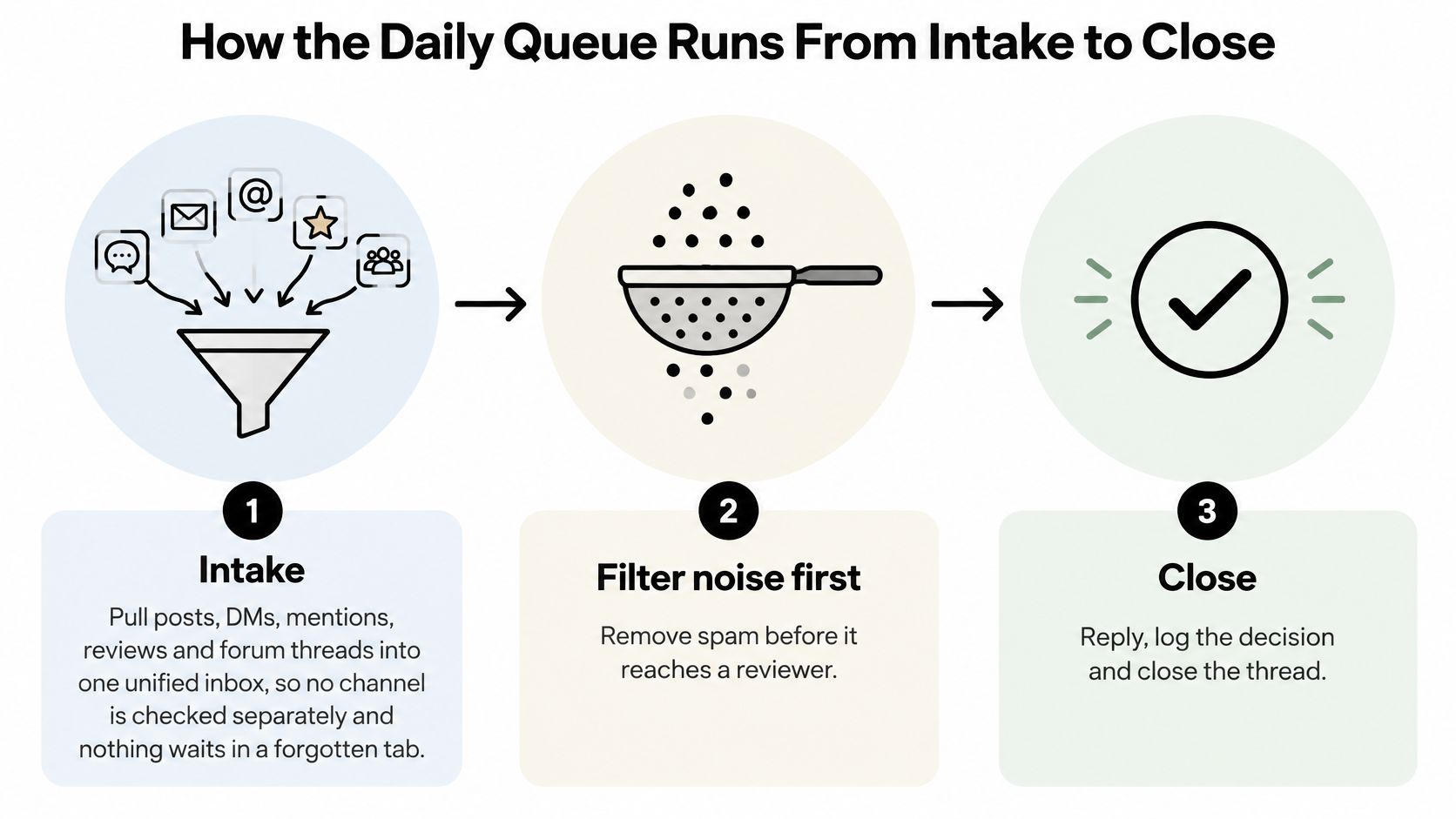
A channel map only works when your team follows the same sequence every day. Without a repeatable intake-to-close workflow, high-risk mentions sit buried under meme replies while agents spend their morning answering duplicate questions.
The infographic below outlines the three core phases of moving incoming messages from raw noise to clean resolution.
The Eight Steps From Raw Message to Clean Closure
Run your daily queue through these eight steps in order, and watch for the specific slip that usually trips up new teams at each stage.
- Pull every channel into one unified inbox. Gather X replies, Instagram comments, DMs, app reviews, Discord threads, and forum posts into a single queue. When channels live in separate browser tabs, someone always forgets to check Telegram on Friday afternoon, and an account lockout sits untouched until Monday.
- Filter noise before a human sees the queue. Strip out obvious bot spam, promotional links, repeated "first!" comments, and off-topic chatter automatically. The common slip here is leaving reviewers to eyeball raw volume, which drains focus before they ever reach a real customer complaint.
- Tag every item with your own intent taxonomy. Apply consistent labels such as
question,complaint,outage,refund,feature_request, andreputational_risk. Skipping taxonomy discipline turns downstream reporting into guesswork and leaves routing rules firing on flimsy keyword matches. - Rank priority by intent, visibility, and urgency. Sort incoming items so a public fraud claim or fast-moving login failure jumps ahead of a routine pricing question sitting in the same queue. Treating every inbound message strictly first-in, first-out is the fastest way to miss an escalating PR issue.
- Route each tagged item to its named owner. Send finance, engineering, product, comms, and trust and safety items directly to their assigned queue instead of pasting links into a general Slack channel. Hand-offs over ad hoc chat lose audit trails and create confusion over who is replying.
- Draft a reply in brand voice for human review. Use structured templates or AI drafts to get the tone, policy links, and troubleshooting steps nearly ready. The slip to avoid is letting canned text go out unedited when a customer is visibly frustrated, which reads as dismissive in a public thread.
- Require human approval on high-stakes decisions. Hold any reply that touches money, refunds, account access, compensation, or a public incident for a designated reviewer, and route low-confidence items to a person with full thread context attached. Automating final sends on sensitive topics saves two minutes and can create a legal or PR mess that takes weeks to clean up.
- Close the item only after verified resolution or duplicate confirmation. Log the final disposition code once the fix is confirmed or the thread is merged into an active incident. Closing a ticket immediately after sending a quick "we're looking into it" acknowledgment is the most common operational slip, because it hides open billing and outage cases from your SLA reports.
To see how structured community operations translate into day-to-day workflows across channels, watch the walkthrough below.
The End-of-Day Queue Audit
Wrap every shift with a ten-minute review of queue age and open backlog broken down by intent tag. If refund or outage tags are aging past two hours while question tags clear in ten minutes, your routing rules or hand-off approvals are bottlenecked. Catching that stall at 5:00 p.m. prevents a minor backlog from turning into an overnight pileup.
Response Time Targets Each Channel Needs
Setting one blanket 24-hour service-level agreement across every social platform is a guaranteed way to miss customer expectations. People treat X and DMs like real-time support desks, while they give owned forums more breathing room for detailed peer answers. Start by aligning each channel's primary work with a realistic response target and the right tracking metric.
| Channel | Typical work | Primary owner | Target first response | Metric to watch |
|---|---|---|---|---|
| X replies and mentions | Billing complaints, outage reports, PR-risk mentions | Social care and comms | Under 1 hour | First-response time and auto-closure rate |
| Instagram and TikTok comments | Product questions, spam, creator mentions | Social media managers | 1 to 4 hours | Response time and spam share |
| Discord and Telegram communities | Bug reports, feature requests, scam waves | Community managers | Under 1 hour for outages; 4 hours for general bugs | Queue age and resolution rate |
| WhatsApp and DMs | Account and payment issues, private complaints | Support team | Under 1 hour | Time to conclusive resolution |
| Owned forums | Peer help, rule enforcement, member disputes | Community managers | 4 to 6 hours for unanswered staff topics | Contribution quality and repeat participation |
Why One Global SLA Misses Real Expectations
Empirical user expectations split sharply by platform. A University of Birmingham study of social media complainants found that both a faster initial reply and a faster conclusive reply directly increased satisfaction with complaint handling, with respondents expecting answers within roughly 1 to 3 hours on Twitter and 3 to 6 hours on Facebook.
Survey benchmarks tighten that window even further. Research summarized by ICMI reports that 64% of Twitter users expect a response within one hour, while 85% of Facebook users expect an answer within six hours. On private channels, Emplifi's 2025 consumer-brand social engagement survey found that 32% of surveyed U.S. consumers expected a direct-message response from a brand within one hour.
The gap between what customers expect and what teams deliver is still wide. An earlier Emplifi consumer expectations report found that 52% of surveyed U.S. consumers expected a reply to a digital-channel message within one hour and 10% expected one within five minutes, yet two in five said brands typically took at least two hours, with some waiting past 24 hours. Similarly, a Metrigy survey published with RingCentral found slightly more than half of consumers consider a five-minute response acceptable for a social-media inquiry or mention, while only 15.6% receive a reply in that window.
Operational rule: Never let an automated acknowledgment count as a solved ticket. Fast bots boost your first-response chart while leaving angry customers waiting for an actual fix.
Metrics Your Team Must Instrument Separately
Because an instant "got it, checking now" message masks unresolved pain, always track first-response time and time to conclusive resolution as separate numbers. Instrument five operational metrics across your inbox so nothing hides behind comfortable averages:
- Median and percentile response times: Track the 50th, 90th, and 95th percentiles, because a tidy median can hide a small cluster of billing disputes waiting two full days.
- Unresolved-age distribution: Group open tickets by age buckets so leads immediately spot cases crossing their channel SLA threshold.
- Reassignment latency: Measure how long an item sits untouched after social care routes it to finance, engineering, or comms.
- Resolution time by intent and channel: Compare closure speed for a WhatsApp payment fix against a Discord bug report, segmented by language and severity.
- Post-acknowledgment escalation rate: Trigger an automatic alert whenever an initial reply goes out without a substantive follow-up inside the promised window.
Apply one simple rule across the board: define channel-specific targets, track initial speed separately from closure quality, and escalate automatically whenever a fast acknowledgment isn't followed by a verified fix.
Tools a Community Team Needs in Place
Buying software before defining your queue rules is how ops teams end up paying for three overlapping platforms while still copying screenshots into spreadsheets. Before you sign a vendor contract or configure your existing stack, run your requirements through five concrete capabilities.
- A single unified inbox across public and private channels: Your tool needs to pull X, Instagram, TikTok, Discord, Telegram, WhatsApp, and owned forum threads into one live queue. Measure it by whether any shift lead can see real-time queue age across every connected channel from one screen without switching tabs.
- Custom intent tagging and cross-team routing: Generic "positive, neutral, negative" sentiment scores don't help an ops lead move work. Check whether the tool applies your own intent taxonomy and routes items cleanly to finance, engineering, comms, or product, then measure the misrouted item share (how many tickets land with the wrong owner).
- Automated spam and duplicate filtering: During a login outage or a crypto-scam flood in Telegram, human reviewers shouldn't manually delete hundreds of identical posts. Verify that the platform groups repeated outage reports and scam variants before they hit a human queue, measured by the share of confirmed duplicates closed cleanly.
- Brand-voice drafting with mandatory human approval gates: Look for drafting tools that match your tone guidelines while letting you lock sensitive categories (refunds, account access, PR incidents) behind a named human approver. Score this capability using your team's draft approval rate and edit rate to see whether drafts save typing time.
- Executive-ready SLA and closure analytics: Ops leaders don't just need post-engagement charts; they need numbers that defend staffing requests and SLA targets. Confirm the tool rolls up first-response time, time to conclusive resolution, and auto-closure rate cleanly by channel and intent for leadership reviews.
Run a One-Week Live Queue Bake-Off
Skip polished vendor slide decks and test every shortlisted platform against one full week of your real historical messages. Feed the same noisy mix of billing replies, multilingual DMs, outage duplicates, and forum threads into each candidate tool. Score every vendor on the exact same five metrics listed above: cross-channel visibility, misrouted share, duplicate closure share, draft edit rate, and SLA roll-up clarity.
A platform that boasts dozens of native channel integrations still creates net-negative work if it misroutes billing complaints to marketing or forces agents to rewrite every drafted reply. Let your real queue data settle the comparison before you commit budget.
Routing Intent and Escalating the Hard Cases
Once your inbox ingests messages and strips out spam, routing logic decides whether a serious problem reaches the right specialist in five minutes or festers publicly for five hours. A Statista summary of a 2018 U.S. survey noted that 31% of respondents expected a reply to a social-media question or complaint within 24 hours or less, yet platform-specific urgency varies wildly by risk. Counting inbound volume alone tells you nothing about impact; your routing engine has to weigh platform, intent, public visibility, and urgency together.
| Intent | Route to | Human approval | Auto-closure |
|---|---|---|---|
| Billing or refund complaint | Finance | Yes, before any refund promise | No |
| Outage or bug report surge | Engineering, with comms holding a public line | Yes, for public replies during an incident | No, until the fix is confirmed |
| Public fraud accusation or PR-risk mention | Communications and trust and safety | Yes | No |
| Scam or spam wave | Trust and safety | Spot-check a sample | Yes, for confirmed duplicates |
| Feature request in DMs | Product | No, tag and log | Not applicable, logged for product |
| Confirmed duplicate or resolved low-risk question | Care queue | No | Yes |
| Multilingual slang or unclear intent | Care lead | Yes, when confidence is low | No |
Four Real Scenarios in Order of Risk
Walking through four everyday situations shows how priority rules keep the inbox calm when volume spikes.
1. A billing complaint in a public X reply. Say a customer replies under a product launch post claiming they were billed twice after canceling. Tag the item as refund and public_complaint, route it straight to finance with the user's handle attached, and publish a calm, brand-voice acknowledgment inviting them to verify account details privately. Never let an automated agent promise a refund or credit; a human reviewer in finance approves the payout after checking the ledger, and the ticket stays open until confirmation lands.
2. An outage surge inside Discord. Say forty users post variations of "checkout screen stuck loading" across three Discord channels within twenty minutes. Instead of replying individually forty times, group the incoming messages under one parent incident tag, escalate immediately to engineering, and have comms approve a single pinned status update. Hold all linked duplicate tickets open in a parent-child bundle and close them only after engineering confirms the fix is live and your team posts the all-clear.
3. A coordinated scam wave in Telegram. Impersonator accounts start dropping fake support links into your Telegram group. Route the pattern to trust and safety, block the repeat domains or wallet patterns, and let automation auto-close confirmed duplicate scam flags while a human specialist spot-checks a sample to make sure legitimate members aren't caught in the filter.
4. A feature request buried inside an Instagram DM. Amid fifty sizing questions, a power user writes a thoughtful paragraph asking for multi-currency invoicing. Tag it feature_request, log the verbatim quote into your product backlog queue so product managers can track demand trends, and send a polite, standard acknowledgment without tying up an engineer or support specialist.
Priority isn't first-come, first-served. A public fraud accusation, a fast-growing outage thread, or an active scam wave always jumps ahead of a routine product comment sitting in the same inbox.
Safe Auto-Closure and the Multilingual Edge Case
Auto-closure earns its keep on confirmed duplicates and resolved low-risk questions (like linking a user to your return window after they reply "got it, thanks"). Unresolved billing, safety, privacy, and crisis cases should never auto-close; they stay open with a named human owner until formally resolved.
Language nuance is the other place brittle automation breaks down. Slang, regional idioms, heavy sarcasm, and screenshot memes regularly flip the literal meaning of a sentence ("love how your app logged me out mid-payment, quite iconic"). Whenever an intent model flags low confidence on multilingual text or sarcastic phrasing, skip the guess and route the item straight to a human care lead with the original message visible alongside any translation.
Sizing Moderator Capacity Before Queues Back Up
Most organizations wait until public response times crash before they hire another community specialist. By then, trust has already eroded. Moderator workload isn't a headcount ratio on a spreadsheet; it's active content volume per available reviewer, adjusted for the hidden labor that never shows up in public reply counts.
A study of Reddit moderator logs across 126 subreddits and more than 900 moderators found that invisible moderation work (reviewing borderline posts, coordinating policy calls, and maintaining standards without taking a public action) ranged from 9% to 94% of moderator labor, with a median of 43%. Separate large-scale research cited in the same paper found that communities carrying heavier moderator workloads generated noticeably more negative member discourse about their moderators, while lower-workload communities maintained healthier perceptions.
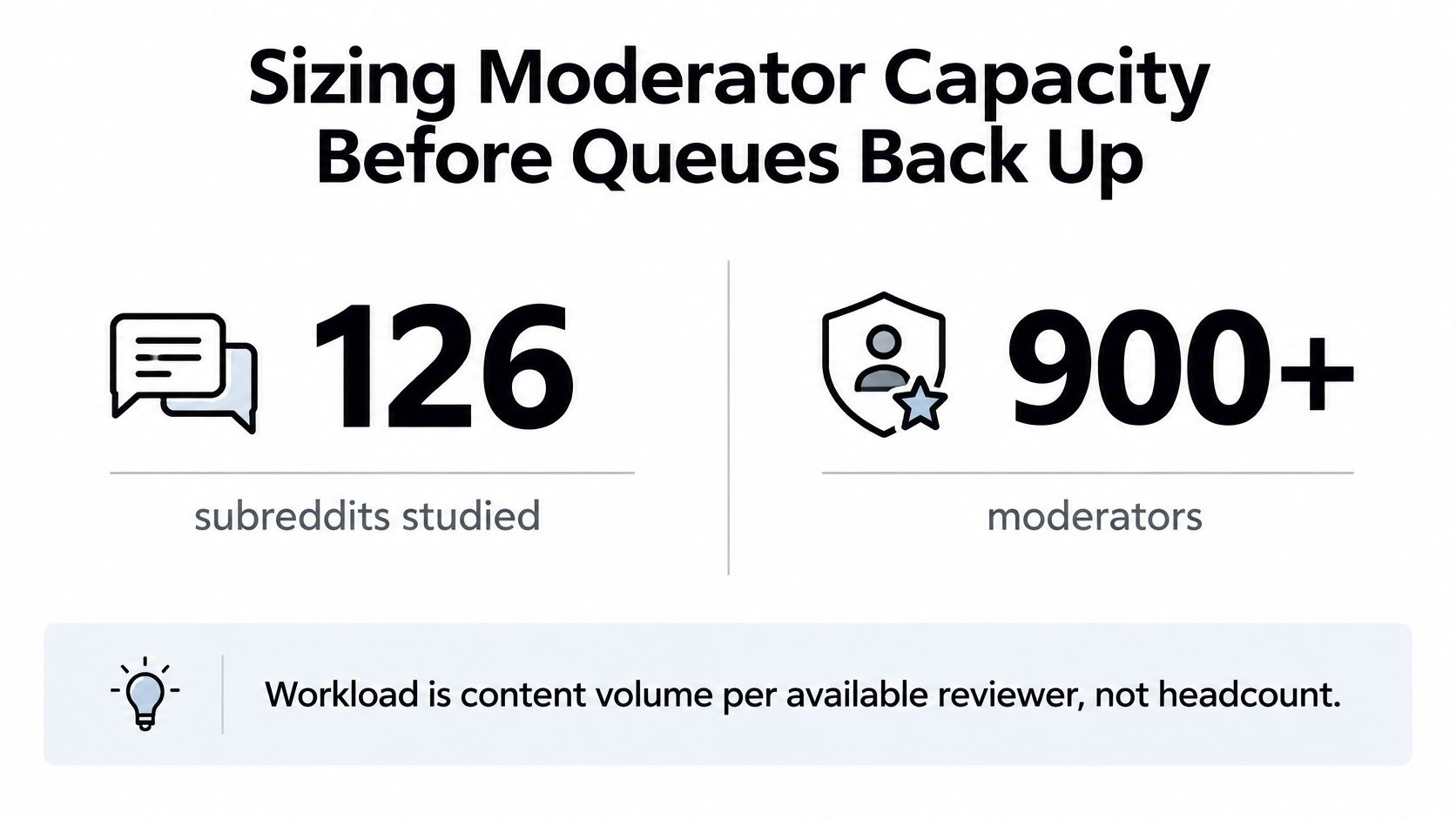
That 43% median explains why governance quality degrades long before your queue chart turns red. When post volume climbs, unseen cognitive and emotional labor expands first. Reviewers start rushing ambiguous edge cases, skipping internal notes, and enforcing rules inconsistently, which weakens community legitimacy weeks before visible backlogs appear.
Three Capacity-Planning Steps to Run Every Quarter
Protect your team's judgment before burnout sets in by building capacity around actual review load:
- Calculate content-to-moderator ratios by channel and severity. A hundred benign emoji comments on TikTok don't equal a hundred heated dispute threads in a support forum. Weight each channel by average review complexity rather than raw message count.
- Reserve explicit roster hours for invisible work. If you schedule reviewers to spend 100% of their shift clearing public replies, policy reviews and escalation hand-offs will get pushed into unpaid overtime or dropped altogether. Budget dedicated off-queue blocks in every weekly schedule.
- Track early strain signals alongside SLA charts. Monitor queue age, review density per hour, escalation frequency, and qualitative reviewer well-being signals (rising error rates, shorter shift notes, higher sick days) so leads intervene early.
Closing the Coverage Gap Without Burning People Out
Industry capacity strain is already severe. A 2025 trust-and-safety needs assessment covering 184 ActivityPub services (representing more than 7 million hosted accounts) reported that the moderator-to-active-account ratio worsened from 1:1,200 to 1:3,500. In that same assessment, one in five moderators reported trauma or burnout, spam stood out as the top issue administrators wanted help solving, and only 16.8% of services offered around-the-clock moderation.
Users still expect serious harm to be handled decisively. The same report cites global opinion research of about 13,500 people across ten countries in which 79% supported removing incitements to violence, underscoring strong public backing for targeted safety enforcement without arbitrary over-moderation.
Closing that gap requires smart division of labor and realistic time-zone coverage. Automate repetitive triage like duplicate detection, language classification, and policy routing, and reserve human reviewers for ambiguous, high-risk, or culturally sensitive calls. For global communities without 24/7 staffing, design explicit overnight escalation rules across time zones so automated filters quarantine high-severity spam and alert an on-call lead only when threat thresholds trip. The operational target isn't maximum automation; it's keeping human reviewer load below the point where judgment and trust begin to slip.
Balancing Member Participation With Governance
A member can post faster than a team can judge risk. That is the practical constraint behind every governance choice: participation creates value, but it also creates noise, repeat questions, bad advice, and disputes that consume queue capacity. Treat governance as a workflow decision, not a personality contest between strict control and open conversation.
Real evidence points to a deliberate trade-off. A 2025 study of a large social Q&A platform published in the Journal of Strategic Information Systems found that involving users in self-governance reduced the total quantity of knowledge contributions while increasing their quality.
Governance trade-off: Giving members a stronger hand in standards often lowers raw post volume while raising the reliability and usefulness of every thread that remains.
Segment Governance Thresholds by Community Purpose
A single rulebook rarely fits every space. Set the level of member control by the job each forum, chat server, or review area is meant to do.
- Customer support spaces: Keep rules tight, verify technical answers through staff or badged experts, and limit informal self-moderation so wrong troubleshooting steps don't break user accounts.
- Product feedback forums: Introduce structured templates and member upvoting or tagging. Say a software team adds required use-case tags to its feature forum. Monthly submission volume may drop, yet product managers get cleaner, deduplicated specs they can scope into a roadmap.
- Peer-learning hubs: Give experienced members meaningful governance roles, such as voting on accepted solutions, flagging outdated guides, and mentoring newcomers, where quality outweighs raw chatter.
- Brand advocacy groups: Keep participation friction lighter while setting firm guardrails against spam, self-promotion, and harassment so organic conversations keep moving.
The trade-off is staffing. Tighter review catches more errors, but it puts more work on named reviewers. Lighter review keeps conversation moving, but pushes ambiguity back into the queue. Pick the threshold you can staff, then watch where reviewers repeatedly step in.
Measure Outcomes Instead of Raw Activity
If your executive dashboard only celebrates monthly post volume, your team will avoid governance changes that make the community more useful. Track contribution quality, repeat participation, issue resolution rate, perceived fairness, and member churn instead.
Use a small audit before changing rules across every channel. Pull a random sample of fifty community threads, score each for clarity and accuracy, and map how many directly resolved a customer issue or informed a product decision. That single audit shows you faster than any vanity engagement chart whether your governance balance is working.
Set the human stop line at the same time. Let routine sorting and drafting handle repeatable work, then keep final calls with people when safety, privacy, account access, billing, or public conflict is involved. Governance holds when the queue stays moving and members can see why a decision was made.
Confirm Your Operating Model Before You Scale
Adding a Discord server or opening a new social channel before your core workflow holds steady just multiplies dropped messages. Expansion decisions belong after a readiness check, not before one. Run these three checks before you widen your channel footprint or hand more work to automation:
- Lock in a named owner and response target for every live channel. Confirm who holds first response, who owns final resolution, and what happens when a ticket sits unanswered past its target window. If any channel lacks a clear answer to even one of those questions, that channel is already over capacity.
- Audit your auto-closure and human-approval boundaries. Verify in writing which low-risk intents may close automatically and which high-stakes categories (billing, account access, safety, privacy, and public crises) stay pinned to a named human approver. The boundary matters more than the volume: one automated reply on a billing dispute costs more trust than a hundred slow answers on routine questions.
- Measure real reviewer load and invisible work for two full weeks. Log both public actions and off-queue coordination time across every active channel. The hidden hours spent hunting context in DMs or re-reading threads are what set your capacity ceiling, and they never appear in a message count.
Your First Practical Step
Don't wait for a six-month transformation roadmap. Merge your active channels into one unified inbox, finalize your top ten intent tags, and switch on your first two high-impact routing rules: billing complaints to finance and clustered outage reports to engineering. Those two routes alone remove the most time-sensitive work from the general queue, which is where response targets slip first.
If you're evaluating software built for this workflow, Sift AI is one option designed around cross-channel orchestration rather than isolated moderation. Sift brings social channels, reviews, and communities (including X, Instagram, WhatsApp, Telegram, Discord, Facebook, and forums) into one queue where agents triage, route, and draft replies for review. Customers can review and send replies themselves, or let agents send replies when they choose. Sift flags low-confidence cases for your team, and sensitive conversations can move to a person with the context attached, backed by SOC 2, ISO 27001, and GDPR readiness.
Whatever stack you run the workflow on, hold the operating principle steady: automate the noise, draft the routine replies, and keep experienced people firmly in charge of refunds, account access, and crisis statements. Automation ends where judgment starts, and that line should be written down, not implied.
Then review one weekly metric with your leadership team every Monday morning: the share of inbound items auto-closed versus escalated, paired with a quick spot-check confirming whether those escalations were the right calls.
Ready to turn scattered social mentions, DMs, and community threads into a measurable workflow with clear SLAs and human oversight? Sift AI brings your channels into one unified queue, filters out spam and duplicates, routes complex issues to the right owners, and keeps your team in control of every high-stakes reply. Explore how orchestration works in practice at Sift AI.