Agentic AI Customer Service: What It Is and How to Run It
"Agentic AI customer service explained: how it differs from assistants, where it works on social channels, and the controls enterprise teams need."
It's 9 p.m., your social care team has logged off, and a billing complaint is gathering replies on X. Nobody's online to tag it, check the account, or tell finance. That's the exact gap agentic AI customer service is meant to close, and it's also where the permission question starts. What may the system do before a person sees it?
Table of Contents
- Agentic AI Versus Assistive and Rule-Based Tools
- What Agentic AI Is and How Its Decision Loop Works
- Social Use Cases and the Permissions Each Needs
- Where Autonomy Should Stop and Humans Take Over
- Social Response SLAs for Urgent Queues
- Benefits Teams Measure and Where the Numbers Stand
- Choose Your First Agentic Workflow Before You Scale
Agentic AI Versus Assistive and Rule-Based Tools
That 9 p.m. complaint exposes the confusion in most vendor pitches. Teams call every AI feature an agent, whether it sends a canned reply, drafts text for a reviewer, or moves a case through your unified inbox. Those are three different operating models, and they carry different risks.
A rule-based chatbot doesn't interpret much. It matches a keyword like refund and fires the reply someone wrote months ago, even if the post is sarcastic, in another language, or attached to a screenshot of a failed payment. It's fast, predictable, and brittle.
Assistive AI is smarter but still waits. It reads context, suggests a tag, and drafts a reply in brand voice inside the composer. A human agent decides whether the draft is right, edits it, and clicks send. Nothing changes in your systems until that person acts.
Rule-Based, Assistive and Agentic Tools Compared
| Model | What it does | Who sets the next step | Social example |
|---|---|---|---|
| Rule-based chatbot | Matches keywords and triggers fixed replies | The person who wrote the rules | Auto-reply to any post containing refund |
| Assistive AI (copilot) | Drafts replies and suggests next actions inside the agent's tools | The agent, who reviews and sends every reply | Drafted reply to a billing complaint waiting in the composer |
| Agentic AI | Interprets a goal, plans steps and uses tools to act within set permissions | The business sets permissions; humans approve high-risk actions | Tags a billing complaint, checks account status, routes it to finance and drafts a reply for approval |
The single difference that matters is whether the system can take a step on its own. An agentic system doesn't stop at text. It can change a status, apply a tag, route a conversation to finance instead of support, cluster duplicate outage reports, or escalate a mention to comms.
That capability is useful at social speed, where volume arrives in public replies, DMs, Discord threads, and forum posts at once. It's also where a wrong tag or an auto-sent reply stops being a minor error and becomes a visible operational mistake.
If the tool only produces text that a person sends, it's assistive. If it also changes a status, routes a case, or acts across a system, it's agentic.
Run that test on your own queue before you buy anything. Pick ten recent conversations and ask what changed without a human click. I would use that line for every workflow discussion that follows, because once a system can act, you need permissions, owners, and rollback, not just better prompts.
What Agentic AI Is and How Its Decision Loop Works
A billing complaint arrives in a public reply. The agent reads it, checks the account, tags the intent, routes it to finance, and drafts a response, all before anyone opens the inbox. That sequence is the decision loop, and the diagram below shows it in its simplest form, from interpreting a request to completing an action with human oversight.
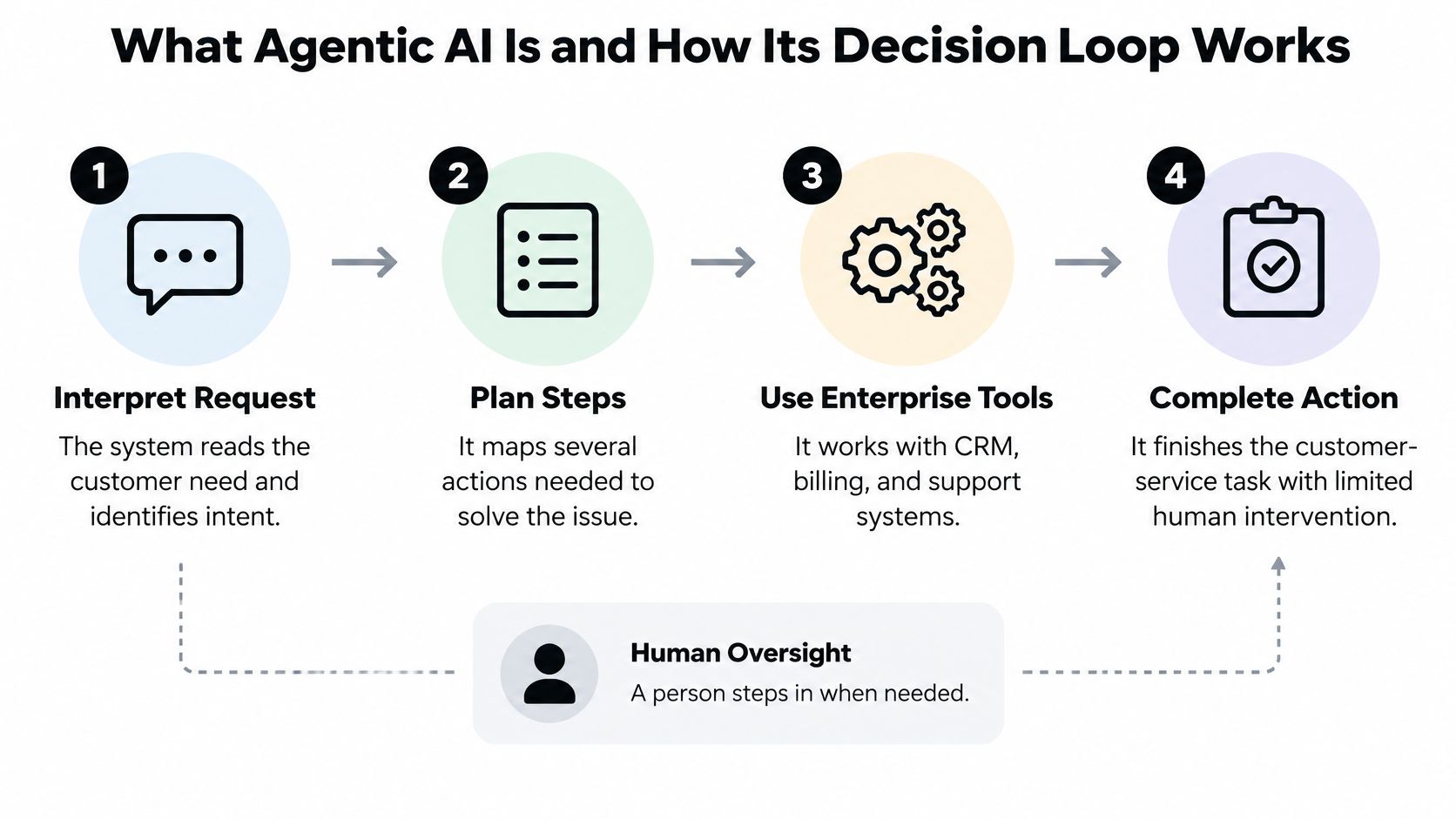
In practical terms, agentic AI interprets a request, plans multiple steps, uses enterprise tools, and completes customer-service actions with limited human intervention. TechTarget's history of chatbots and generative AI traces the path from early rule-based programs like ELIZA to modern generative models, and the operational break is recent. Earlier tools answered questions. An agent can authenticate a user, retrieve account data, classify intent, update a record, and draft or send a response as one connected workflow.
An agentic system works like a receptionist who is also allowed to process a refund up to a set limit. They know which checks come first, which systems to touch, and when they must stop and get a manager.
The Five Stages in a Social Conversation
- Perceive: Read the message, detect language, slang, sarcasm, or an attached image, and identify the likely intent.
- Plan: Choose the steps needed to reach the goal, such as checking account or order status before answering.
- Act: Look up the record, update a tag, route the case to finance or engineering, or draft a reply.
- Check: Compare the result against confidence thresholds and policy, and stop if either fails.
- Escalate or close: Hand the case to an owner with the full conversation, attempted actions, and open issues, or close it.
The check stage decides whether the loop earns its autonomy. A post saying "great, charged twice again" contains no complaint keyword, but it carries billing intent, frustration, and public visibility. The agent needs enough confidence to tag and route it, and a clear rule that it can't promise a refund before finance reviews the account. Each stage maps to a permission. Perceive and plan can run unattended, act needs limits on what it may change, and escalate names the owner who signs off when confidence drops.
The short walkthrough below shows how that kind of loop plays out when interpretation, planning, and tool use happen in sequence.
Sift AI's agents triage, route, research, and reply across social channels, and the business chooses what they do and when to step in. Test any use case with one sentence before you build it. Name the message, the tools it touches, and the step where a person must take over. If you can't name all three, you don't have a workflow yet. You have a demo.
Social Use Cases and the Permissions Each Needs
Social care doesn't arrive as neat tickets. It arrives as billing complaints in public replies, outage reports buried under memes, journalist mentions, impersonator accounts in DMs, and feature requests written in multilingual slang. The agent's job is to sort that mess quickly. The owner's job is to decide what the agent may do about it, and each use case below pairs the scenario with the action an agent can take unattended, the risk tier, and the owner who signs off.
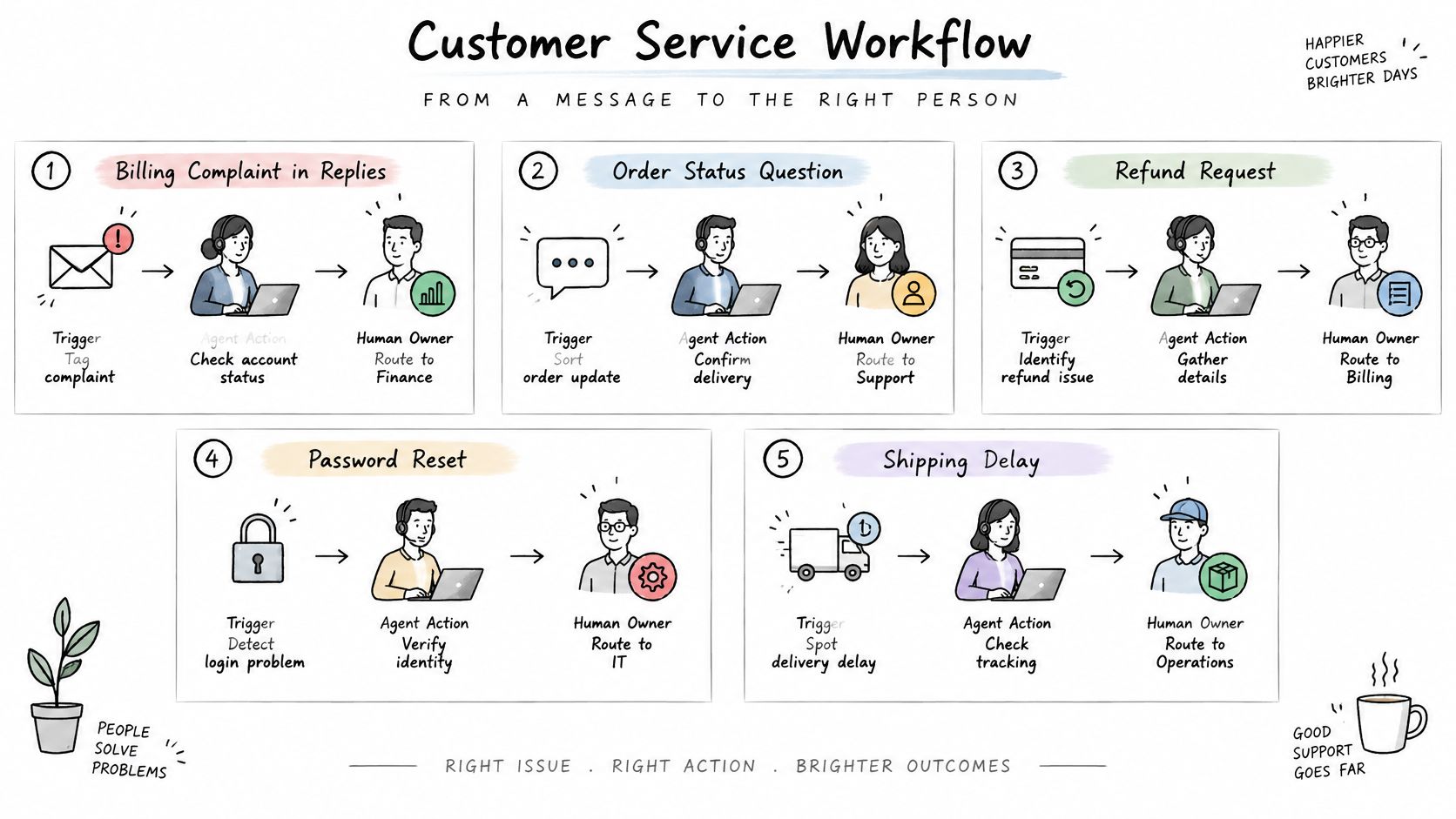
Routing is the first permission question: which queue owns the message, and what is the agent allowed to do before that owner sees it.
Five Scenarios and Their Owners
Billing complaints in replies need speed and restraint. The agent tags the complaint, checks account status, and routes it to finance with the evidence attached. A reviewer approves any refund or credit, because the agent shouldn't move money based on its reading of a frustrated post.
During an outage surge, hundreds of customers may describe the same failure differently across X, Instagram, Discord, and Telegram. The agent clusters those reports, flags the spike to engineering, and drafts acknowledgements. Comms approves the public wording, and engineering confirms what's broken before anyone promises a fix time.
PR risk in mentions works the opposite way. Posts from journalists, high-follower accounts, or anyone using legal or regulatory language shouldn't get an auto-reply at all. The agent's only jobs are to tag the risk, preserve the thread, and route it to comms fast enough for a person to decide whether silence, a reply, or a statement is safest.
Scam waves are a separate triage problem. The FTC's Consumer Sentinel data put reported consumer losses to fraud at $12.5 billion in 2024, and the FTC's social media scams data found that 70% of people who reported being contacted through a social platform said they lost money, with reported losses totaling $1.9 billion. When the agent clusters repeated phrasing, suspicious links, and fake support accounts across replies, DMs, and community posts, it sends the cluster to trust and safety. Humans decide on takedowns and warnings. The agent must never auto-close a suspected scam as spam.
Feature requests in DMs sit at the low-risk end. Triage sorts social conversations by intent and priority, and Tag applies the business's own taxonomy to conversations, so a request reaches product with the customer's wording intact. Our Social Support agents triage, route, and draft replies to social conversations, and the customer chooses when they are allowed to send.
Permissions by Action and Risk Tier
| Action | Risk tier | Agent may | Approval required |
|---|---|---|---|
| Tag and route a feature request from DMs | Low | Tag and route to product automatically | None; sample weekly |
| Reply to a how-to question | Low | Draft and send in brand voice | Sampled audit of auto-closed cases |
| Acknowledge an outage report | Medium | Acknowledge and route to engineering | Engineering owner confirms the status |
| Refund or credit | High | Draft only | Dual approval from finance |
| Change an account detail | High | Draft only, with audit trail | Dual approval and audit record |
| Reply to a public complaint or PR-sensitive mention | High | Draft only | Comms approval before sending |
| Suspected scam or impersonation | High | Tag, preserve evidence, escalate | Trust and safety decides |
Governance matters because an agent can repeat a wrong action across accounts, channels, or regions before anyone notices. Futurum Group's analysis of agentic AI in customer service flags reliability and hallucination management as the hardest problems in deployment, and most enterprise rollouts still keep a person in final control rather than letting agents act unattended. I read that as a warning against treating autonomy as a maturity score.
Each action needs a risk tier, a reversible workflow, dual approval for refunds and account changes, an immutable audit trail, policy version tracking, language and region controls, and sampling of auto-closed cases. Autonomy should expand only where failure is contained and rollback is feasible.
Operating rule: Automate the sorting and drafting, and keep the decision with the owner.
Where Autonomy Should Stop and Humans Take Over
Speed without quality fails in a very specific way. The customer gets a fast answer, doesn't feel understood, and comes back angrier, often in public. Dartmouth's Tuck School summary of agentic AI research found that AI agents can improve service speed without improving service quality, and escalations triggered by detected frustration or skepticism produced worse ratings and more follow-up contacts. A separate U.S. consumer survey in that coverage found 55% of shoppers had to escalate an AI-handled issue to a human, 45% said AI failed to understand their problem, and 69% believed brands should disclose when AI is involved.
Those numbers should change how you design escalation. A frustrated customer isn't a sentiment label to route at the last minute. Frustration changes what a good resolution requires, and a late handoff that loses context makes the human start from zero.
Three Requirements for Controlled Autonomy
- Confidence thresholds: Set a level below which the agent stops, drafts only, or routes the case for review instead of acting.
- Mandatory human categories: Legally sensitive, safety-related, and regulatory conversations go to a person regardless of confidence.
- Complete handoffs: The receiving owner gets conversation history, attempted actions, evidence, and unresolved issues in one view.
Sort every conversation into routine intent or one of five risk types: reputational, emotional, safety, financial, and regulatory. A password reset question is routine. A sarcastic public post about a double charge may carry financial and reputational risk at once. A DM that looks like account help may be a phishing attempt, which makes it a safety case for trust and safety, not a support case for auto-closure.
Public social threads make this harder than a private chat window. Slang shifts by community, images carry the genuine complaint, and a technically correct reply can read as dismissive to everyone watching. Reviewer fatigue adds another failure mode. If humans only see the hardest cases all day, their judgment degrades unless queues are staffed and rotated properly.
Two rules should be essential. A customer can request a human at any point without repeating the story, and containment is never the success measure. Keeping someone away from a person isn't a resolution. It's a metric looking for trouble.
I would force one question before go-live, in a room with support, comms, finance, and trust and safety. Which intents are allowed to end without a person, and who signed that decision? If nobody can answer by intent, your escalation design isn't done.
Social Response SLAs for Urgent Queues
A customer locked out of an account at 11 p.m. does not care which inbox the message landed in. People post support questions on social channels expecting the same speed they would get from a chat window, and patience runs shortest for urgent billing and access problems. The queue has to be built for that expectation, not for the team's office hours.
A single average response time hides the queues that matter. A team can clear praise and simple how-to posts in minutes, leave every billing complaint sitting overnight, and still report a healthy average. I would set the SLA by tier and report each tier separately. Each tier should pair the action an agent may take unattended with the risk that action carries and the owner who signed off on it.
Three Proposed Tiers
- Urgent: Billing complaints, outage reports, and account-access issues enter a monitored queue with a one-hour first-response target. The agent may acknowledge the customer and route the case on its own; a substantive reply waits for the on-call owner to accept it. An alert fires if the case is still untouched as the window closes.
- Standard: How-to questions and feature requests get a same-day target. The agent drafts and sends where its permissions allow, or hands the case to the named owner for that intent.
- Low: General mentions and praise get a daily sweep, mainly to catch sentiment shifts and PR risk hiding in otherwise quiet threads. Draft replies can wait for review. Nothing here justifies an off-hours page.
Agents hold those tiers outside business hours by acknowledging the customer, tagging intent, and routing the case before the morning shift arrives. They do not remove the need for coverage. A named human owner must be on call for the urgent tier, with a clear path to finance for money questions, engineering for outages, and comms when a complaint starts spreading.
Set the alert around the customer's wait rather than the team's convenience. If an urgent case sits for forty minutes without an owner accepting it, the system should escalate to the on-call lead rather than generate another polite holding reply. Acknowledgement buys time once. It does not buy time repeatedly.
Measure first response time per tier, then pair it with what happened after the reply. A fast first response that sends a billing case to the wrong team has met the clock and missed the point. Routing accuracy belongs beside the timer, or teams learn to reply quickly and hand off badly.
Benefits Teams Measure and Where the Numbers Stand
The strongest evidence available concerns AI assistance inside the workflow, where a human still owns the reply. A large field study of customer-support agents found that generative-AI recommendations raised resolved cases per productive hour and reduced customer requests to speak with a manager. Those results support a narrower claim than full autonomy: agents create measurable value when they retrieve context, draft next actions, and keep an approval gate between a suggestion and the customer.
The mechanism matters more than the headline. Retrieval of relevant knowledge, suggested next actions, and response composition cut the time agents spend searching and formulating. Consistent guidance can improve first-contact resolution, so fewer customers feel they need a manager to get a straight answer. That is an orchestration result. The AI prepares better work, and the named owner still decides what the agent may send.
Forecasts point in the same direction while remaining expectations rather than observed savings. In Cisco's May 2025 survey of 7,950 business and technical decision-makers across 30 countries, respondents predicted 56% of their interactions with technology partners would be handled through agentic AI within the following 12 months and 68% within three years. Plan staffing and review coverage against those expectations, and wait for your own queues to prove the deflection.
Metrics That Show Agentic AI Is Working
| Metric | What it tells you | Misleading when |
|---|---|---|
| Resolved cases per productive hour | Throughput gained from AI assistance per agent hour | Gains come with rising repeat contacts |
| Requests to speak with a manager | Escalation demand from customers | Customers give up instead of asking |
| Auto-closure rate | Share of conversations closed without a human | Auto-closed cases skip quality sampling |
| First response time on urgent queues | Speed on billing, outage and access issues | Fast replies are wrong or unhelpful |
| Repeat contact rate | Whether the issue was actually resolved | Auto-closure pushes repeats into a later queue |
No single metric is enough. Auto-closure rate is especially easy to game because closing a conversation is not the same as solving the customer's problem. Pair productivity with escalation demand, repeat contact, and first response time on urgent queues. Review the results by intent and permission tier. A drafted reply approved by a named owner is a different result from an unattended closure on a billing complaint, and a gain in how-to questions should not hide failures in higher-risk queues.
Governance metrics belong beside the service metrics. Track prevented escalations, false-positive routing, irreversible-action rate, rollback time, and audit completeness. Each metric needs a named owner and a threshold for pausing the workflow. An agent allowed to act on a billing case warrants more sampling than one that only tags how-to questions.
Count interventions that stop an automated closure as well. A well-governed workflow should catch its own near misses before customers do, and a rising intervention count can show that the permission boundary is too loose.
A productivity gain counts only when the repeat rate stays flat.
I would report that pairing to executives every week during rollout. If resolutions per hour rise while repeat contacts, manager requests, or corrective interventions also rise, customer service has not improved. The cost has moved downstream and become harder to see.
Choose Your First Agentic Workflow Before You Scale
Start with a low-risk, reversible workflow, not the use case with the biggest promised deflection. I'd pick tagging and routing for billing complaints and feature requests, with drafted replies that a reviewer approves. It touches real volume, proves routing accuracy, and doesn't let the agent send money or public statements on day one.
Six Steps to a Safe First Workflow
- List the top ten intents: Pull them by volume from the last 90 days across replies, DMs, and community posts.
- Mark the risk: Flag every intent that touches money, account access, safety, or public reputation.
- Pick two intents: Choose low-risk, high-volume work where a wrong tag is annoying rather than harmful.
- Name the owners: Assign finance, engineering, and comms owners before go-live, including who covers urgent cases after hours.
- Run shadow mode: Let the agent tag and draft for two weeks without acting, then compare its choices against human tags.
- Sample every week: Review auto-closed cases against your urgent-queue targets and check whether customers came back.
To start with us, a business tells Sift AI what its team needs to sort and answer, and Sift AI maps it to a workflow the team can review. That mapping should show the permission tier and owner for each action, not just a diagram of channels feeding one inbox. Prospective customers can book a demo of Sift AI from the website.
Set go or no-go criteria before shadow mode ends, while everyone can still say no. Go requires tag agreement above the threshold your team agreed, zero high-risk actions without approval, and repeat contact that's flat or falling. Any miss is a no-go until the cause is fixed and the same cases pass again. Don't widen permissions to recover a launch date.
Decision test: Can you reverse the agent's worst likely mistake in minutes, with a named owner? If not, keep it drafting.
Scale by adding one intent or one permission at a time, and re-run the sampling after each change. Language, channel, and region should expand separately too, because slang and policy don't transfer cleanly from Discord to WhatsApp or from one market to another.
The decision was never about how much the agent can do. It's about which specific action it may take, under which threshold, with which person accountable when it's wrong. Get that right for two intents and you have a pattern worth scaling. Skip it, and you're scaling the argument you'll have after the first bad auto-reply.
If your team is sorting billing complaints, outage reports, scam waves, and feature requests by hand across fragmented inboxes, Sift AI gives you one operating system to triage, tag, route, and draft while your reviewers keep approval over refunds, account changes, and public replies. Bring us the workflows you need to sort and answer, and we'll map them into permission tiers your support, comms, finance, and trust and safety owners can review before anything sends. Start your first controlled agentic workflow at Sift AI.