Social Media and CRM: Turning Conversations Into Records
"Learn how social media and CRM connect, with signal mapping, data flows, routing rules, and metrics that enterprise teams can act on."
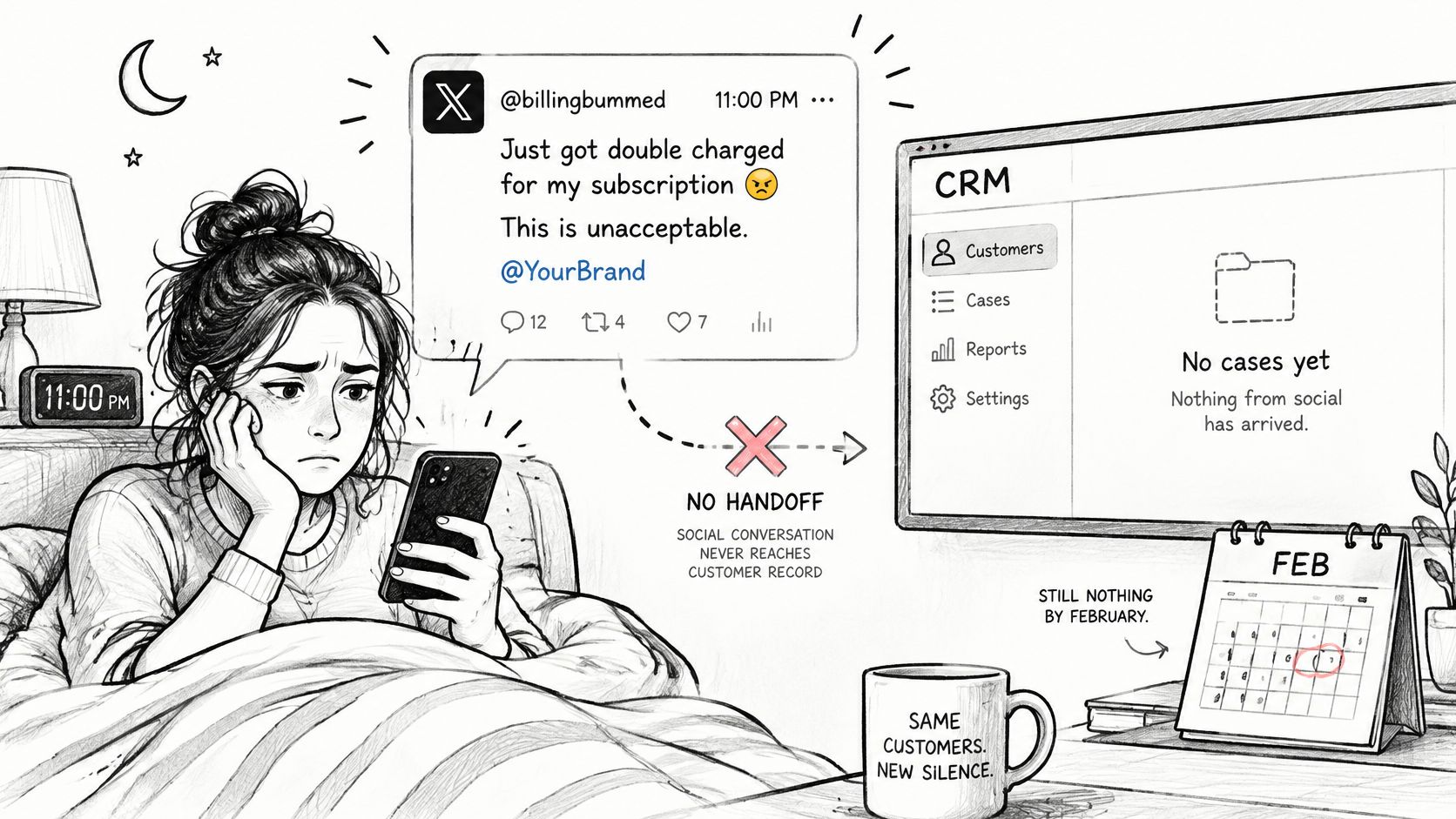
A customer posts at 11 pm that you've charged her twice. By morning, the post has replies, another customer adds a screenshot, and someone on your team has answered from the brand account. Your CRM still shows no case, no billing dispute, and no record that finance needs to act. That gap is where social care breaks down.
Table of Contents
- Why Social Conversations Belong in Your CRM
- Map Each Social Signal to a CRM Record
- How Social Data Flows Into Your CRM
- Platform Limits That Break Routing and SLAs
- Public Replies, Private Handoffs and Escalation Rules
- Intent Detection When Slang, Images and Scams Mix
- Metrics That Show the CRM Link Is Working
- Confirm One Channel Mapping Before You Scale
Why Social Conversations Belong in Your CRM
Say that double-charge post lands on X. The customer doesn't open a ticket or call support. She tags your brand, expects a reply where she posted, and screenshots the result if you ignore her. If nobody converts that post into a case, the next agent starts from zero and asks her to explain it again.
Your CRM works like a filing cabinet. It holds contacts, orders, cases, and consent in tidy records your team controls. Social media is the open counter in front of that cabinet, where customers now bring problems first, in public, in DMs, and in messaging apps you don't control.
The scale makes manual work impossible
That counter isn't a niche channel anymore. By February 2025, the Kepios Digital 2025 Global Overview Report found that 97.3% of connected adults used at least one social network or messaging platform each month, and social media users represented 94.2% of all internet users. At that scale, identity, intent, and service history sit spread across posts, comments, DMs, and WhatsApp threads. No single ticket captures them.
Manual monitoring can't hold that together. A person scrolling mentions will miss the outage report buried in replies, duplicate the contact who already emailed, and lose the timestamp you need for an SLA. You need automated classification, prioritization, and a link from each conversation to a record.
The record isn't wrong because your CRM is weak. It's incomplete because the conversation never reached it.
Closing that distance is the work of social media and CRM integration done properly. It starts with mapping each signal to an object, then building the data flow, respecting platform limits, setting handoff rules, checking intent detection, measuring whether records stay trustworthy, and proving it on one channel before you scale.
Map Each Social Signal to a CRM Record
Don't configure a connector before you can answer three questions for every signal type. Where does it write, what key matches it to an existing record, and which fields must travel with it? Without those answers, you'll import volume and create duplicates faster than your team can clean them.
The table below gives you a working starting map. Adapt the object names to your CRM, but keep the logic.
| Social signal | CRM object | Match key | Fields to store |
|---|---|---|---|
| Public post or mention | Lead, account or case | Handle plus platform ID | Channel, text, timestamp, intent tag |
| Reply to a brand post | Conversation record | Thread ID | Parent post, responder, status |
| Direct message | Contact and case | Verified account link where available | Consent flag, message history |
| Review or rating | Account or product feedback | Order ID if supplied | Rating, product, sentiment |
| Community forum thread | Member profile | Forum user ID | Topic, member role, moderator action |
| Scam or account-takeover report | Security case | Account ID plus platform | Platform, reported loss, owner |
| Feature request in a DM | Product feedback item | Product entity | Theme, count, requester segment |
Prefer deterministic keys every time. A platform ID, thread ID, order ID, or verified account link either matches or it doesn't. Use probabilistic matching, such as similar names or email fragments, only as a fallback, and flag those records for review instead of merging them without any notice.
The two rows that go wrong most often
DMs cause the most damage. Teams often create a new contact from a handle alone, then discover the same person already exists under an email address. I would store the handle on a conversation record first, promote it to a contact only after a verified link, and always carry the consent flag and history so the next agent doesn't ask for details the customer already gave.
Reviews fail differently. A one-star rating without an order ID isn't a service case yet, it's product feedback with sentiment attached. Write it there first. If the reviewer later supplies an order ID in a reply, you can link it to the account and open a case with the original text intact.
Build this sheet for your own channels, including Discord, Telegram, and forums, before you touch any automation. If a signal has no target object, it doesn't get ingested yet.
How Social Data Flows Into Your CRM
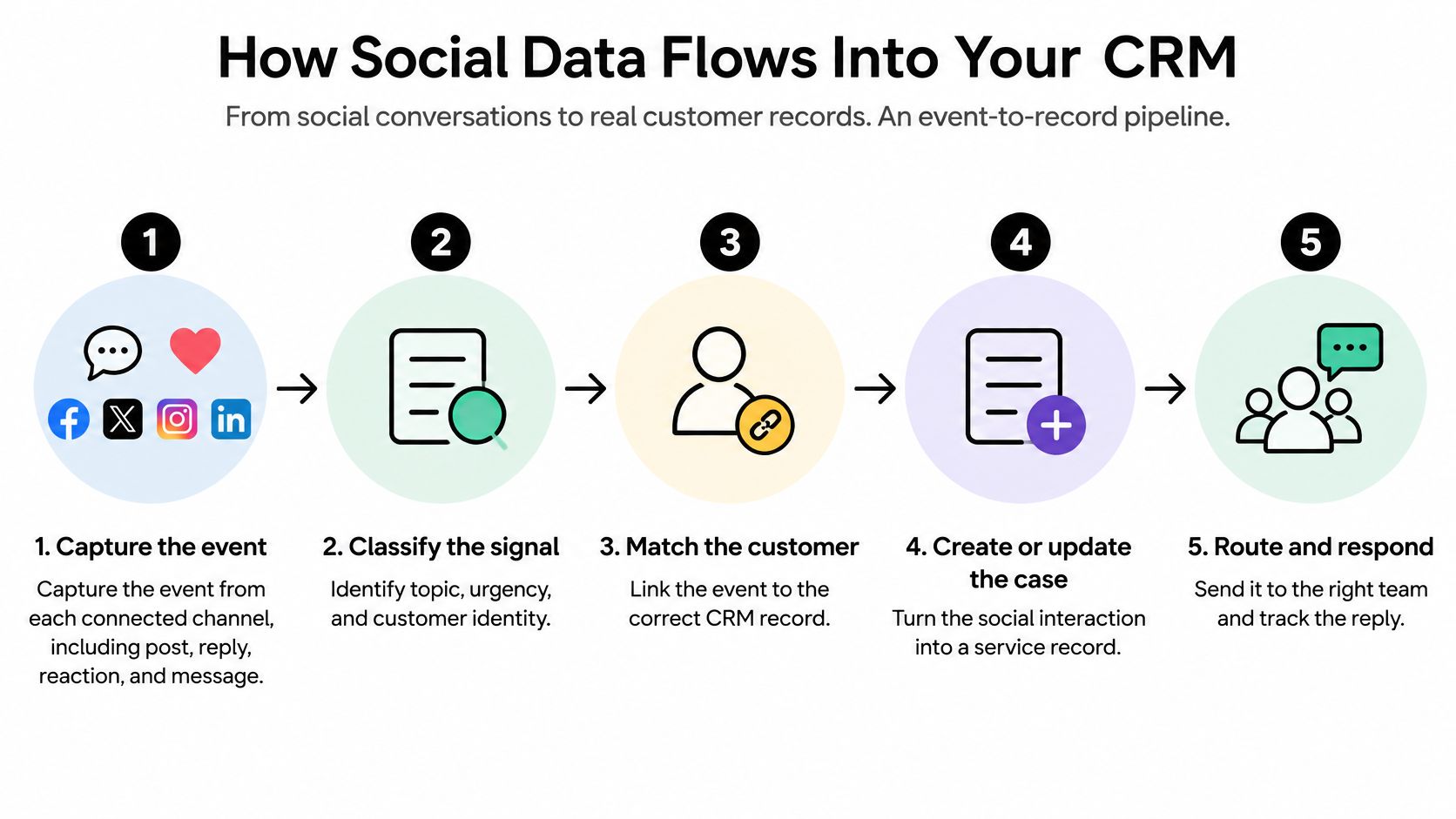
Run social media and CRM as an event-to-record pipeline: every post, reply, or DM that matters becomes a structured, timestamped event on a shared record. Research analyzing more than 1.3 million unique Facebook customer questions treated response time as a measurable service-performance variable, according to academic research on Social CRM. That kind of measurement is only possible when each conversation lands in the CRM as structured data. A publishing integration that displays comments will not get you there.
Trust in those records gets decided at two hidden points: what your connector captures, and the moment a public thread moves into a private channel where consent and ownership rules change.
The six steps that make records trustworthy
Capture the event: Pull posts, replies, reactions, images, and private-message transitions from each connected channel. A platform such as Sift AI brings messages, mentions, and reviews from connected channels together for agents to monitor. The common slip is capturing text only, so a complaint inside a screenshot never becomes an event.
Normalize it: Convert every channel into one schema with channel, author identity, timestamp, intent, urgency, product reference, owner, and resolution status. Missing timestamps break time-to-resolution later, and nobody reconstructs them reliably after the fact.
Classify intent and urgency: Tag billing, outage, feature request, praise, and risk separately, and flag outage, fraud, safety, and high-value-account signals first. Skip this and routing defaults to whoever shouts loudest in public.
Resolve identity: Match deterministically where an ID exists and probabilistically where it doesn't, with uncertain matches held for review. Unresolved identities create duplicate contacts, and duplicates split service history across two records.
Write back to shared objects: Update the same case, contact, account, and product entities other channels use, while preserving source-channel metadata and consent boundaries. A separate social-only case object forces agents to re-key information into the core system.
Route exceptions with context: Send the case to the accountable owner with the original post, thread, and prior messages attached. Routing a naked tag like "billing" without context just moves the detective work to finance.
Timestamp discipline is what makes comparison possible. With consistent arrival and first-response timestamps on every record, you can benchmark your response time against other brands and against your own past performance, which means first-response time has to be calculable from the CRM alone rather than reconstructed from platform inboxes. The same timestamps expose a quieter failure: whether your team is serving loud public accounts ahead of urgent private ones.
Platform Limits That Break Routing and SLAs
Your SLA assumes you saw every message when it arrived. Platforms do not guarantee that. During an outage surge or PR incident, exactly when volume spikes, throttled ingestion can hide the cases you most need to triage, and your reports will still look calm. Each rate limit and reply window below is really a decision about whether the CRM record can be trusted at all.
| Platform rule | What the rule says | Design change |
|---|---|---|
| X API rate limits | Endpoint-specific windows of 15 minutes or 24 hours; HTTP 429 when exceeded | Monitor headers, back off, cache, prefer filtered streams |
| X automated replies | One reply per interaction, to a user who engaged first | Tag and draft once; check whether a reply already exists |
| WhatsApp service window | Opens 24 hours after a customer message or call; a business reply does not extend it | Store expiry timestamp; route follow-ups through approved templates |
| Ingestion gaps during surges | Throttled polling leaves messages unseen at peak volume | Log gaps and measure SLA on complete data only |
On X, limits are endpoint-specific, apply separately to users and applications, and return HTTP 429 when exceeded, with headers showing maximum, remaining requests, and reset time, as set out in X's API rate limits documentation. Build the connector around exponential backoff, caching for repeated results, and filtered streaming instead of polling for real-time data.
Replies carry a separate constraint. X's developer guidelines limit an app to one reply per interaction to a user who engaged first, so an automated workflow should not chase a customer through a thread. Draft once, check whether a reply already exists, and send hard cases to a human.
WhatsApp works on a clock. A customer message or call opens a 24-hour customer-service window, a later customer message refreshes it, and a business reply does not extend it, under the WhatsApp Business Platform service-message rules. After expiry, follow-ups generally need an approved template, so store the expiry timestamp in the inbox and prioritize unresolved cases before it closes.
Audit before you promise
Unclear ownership fails the same way a throttled connector does: a gap nobody notices until the SLA report disagrees with a customer's screenshot. The discipline of checking formal boundaries rather than assuming them is what the parish boundary review process applies to community governance. Audit each connector against the three rules above, log ingestion gaps as first-class events, and document what you cannot see before you set SLA targets.
Public Replies, Private Handoffs and Escalation Rules
Consumers don't agree on where resolution should happen. Recent research summarized in Sprout Social's State of Social Media found that 55% of consumers prefer sending a direct message rather than complaining publicly, while among public complainants, 33% want the brand redirected into DMs and 28% expect the issue resolved in the comments. A single "move to DM" script will frustrate a large share of them.
Moving fast to private reduces public exposure, but it can force repeated authentication and lose context if the thread doesn't travel. Staying public helps when dozens of people share the same outage or policy question, because one visible answer prevents duplicate inquiries. I would decide using four inputs every time: issue sensitivity, urgency, customer preference, and public value.
| Case type | Stay public | Move to private channel | Create CRM case and owner |
|---|---|---|---|
| Product outage or known defect | Yes, with status update | Only for account-specific impact | Yes when an account is affected, owner engineering |
| Billing dispute | Acknowledge once, then move | Yes | Yes, owner finance |
| Account access or suspected fraud | No, acknowledge only | Yes | Yes, owner trust and safety |
| General policy or product question | Yes, one standard answer | No | No, unless repeated |
| Crisis or PR risk | Yes, with comms approval | No | Yes, owner comms |
| Feature request | Yes if it has public value | Optional | Yes, product feedback item |
A worked handoff
Say the double-charge post arrives publicly. You acknowledge it once, without account details, invite the customer into a private channel, and open a finance case with the original post attached. Sensitive conversations are routed to the customer's team with context attached, so finance sees the timestamp and wording instead of a summary typed from memory.
Control matters here. Customers can review and send replies themselves, or let agents send replies when they choose, and that choice should differ by case type. Teams comparing channels sometimes look at AI live chat for service businesses to see how private, synchronous conversations handle review and sending. Apply the same discipline on social. Draft for review on billing and fraud, and reserve automatic sending for low-risk, standard answers.
Practical rule: Write your handoff policy as one line per case type before you use the table. If an agent can't state the default channel and owner from memory, the rule isn't ready.
Intent Detection When Slang, Images and Scams Mix
Keyword rules read "great, charged twice again" as praise. Literal sentiment scoring misses sarcasm, memes, code-switching between languages, and complaints that live inside an image with no caption. It also flags peer-to-peer chat in a forum as a service request when nobody asked your team for anything.
Customers spread service across platforms, too. In one 2025 U.S. consumer study cited in the Emplifi Social Pulse Consumer Brand Survey 2025, Facebook was selected by 55% of frequent users and Instagram by 47% for service. Each platform brings different slang, formats, and image habits, so one keyword list won't hold.
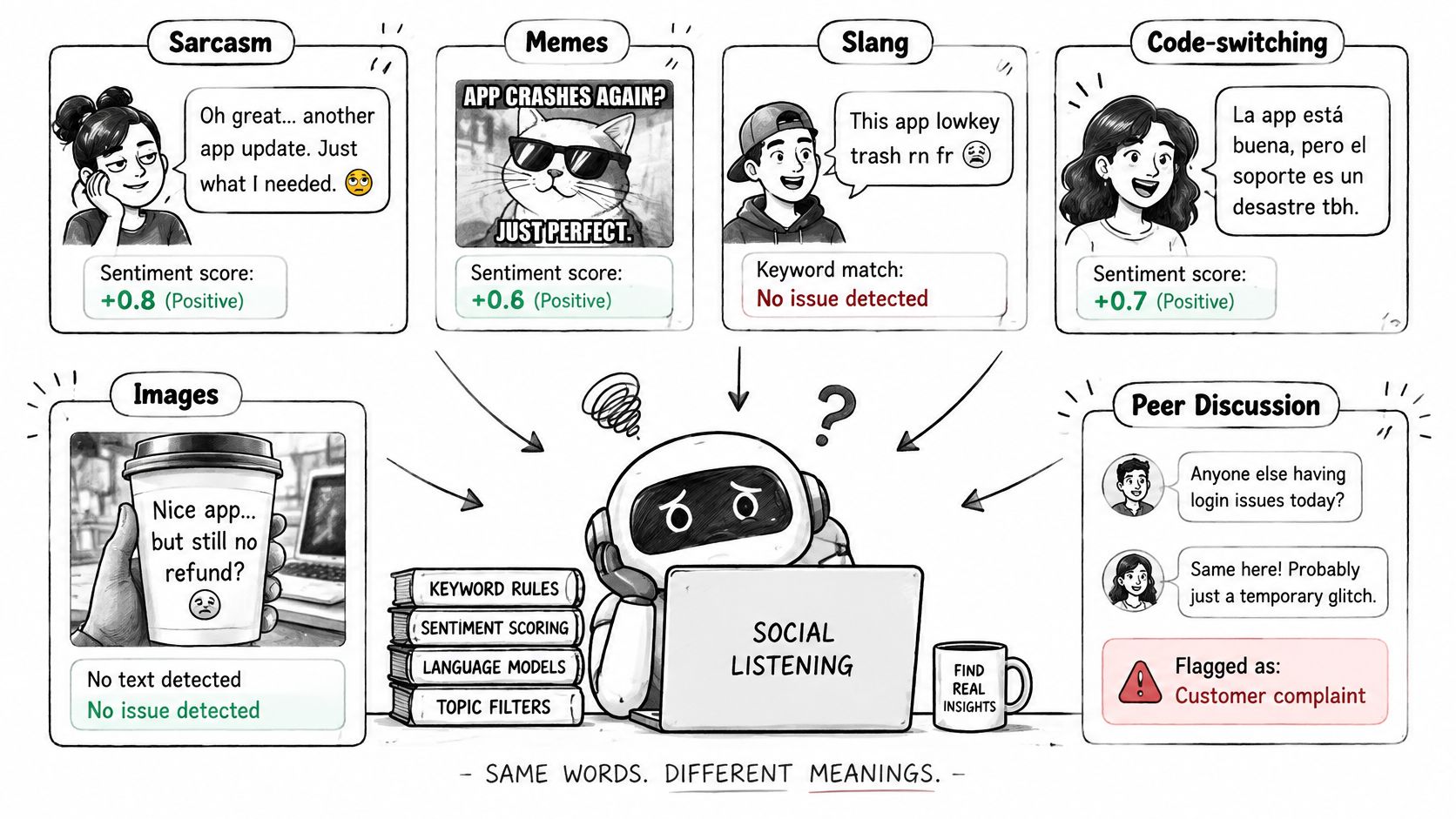
The goal isn't maximum automation. It's high-confidence automation with measurable abstention, where the system acts only when it's sure and hands off cleanly when it isn't.
A three-part operating model
- Tag intent with confidence: Attach a confidence level to every tag. Below your threshold, the message abstains from automation and goes to a human reviewer instead of receiving a guessed reply.
- Test by language and modality: Measure false-positive escalations, missed high-severity cases, and inappropriate automated replies separately for each language and for image-based posts. A strong overall score can hide a failing language.
- Mark automated actions on the record: Tag every auto-tag, auto-route, and auto-close on the CRM record itself. Reviewers need to see what automation touched before they trust the history.
Scams need their own path, not a moderation queue. Tag scam and account-takeover reports separately from billing complaints, route suspected payment fraud to finance and takeovers to trust and safety, and watch for the same pattern appearing across X, Instagram, and WhatsApp at once. A pattern across channels is a security case, not three unrelated mentions.
Before you enable any auto-action, sample twenty ambiguous messages per language, score routing against a human label, and fix the failures. If scores don't hold on sarcasm and images, keep humans deciding.
Metrics That Show the CRM Link Is Working
Speed expectations leave little slack. In Salesforce's State of Service report, 83% of customers surveyed by Salesforce expected to interact with someone immediately when contacting a company. One global response target can't meet that across public posts, DMs, and WhatsApp, so set service-level objectives per channel.
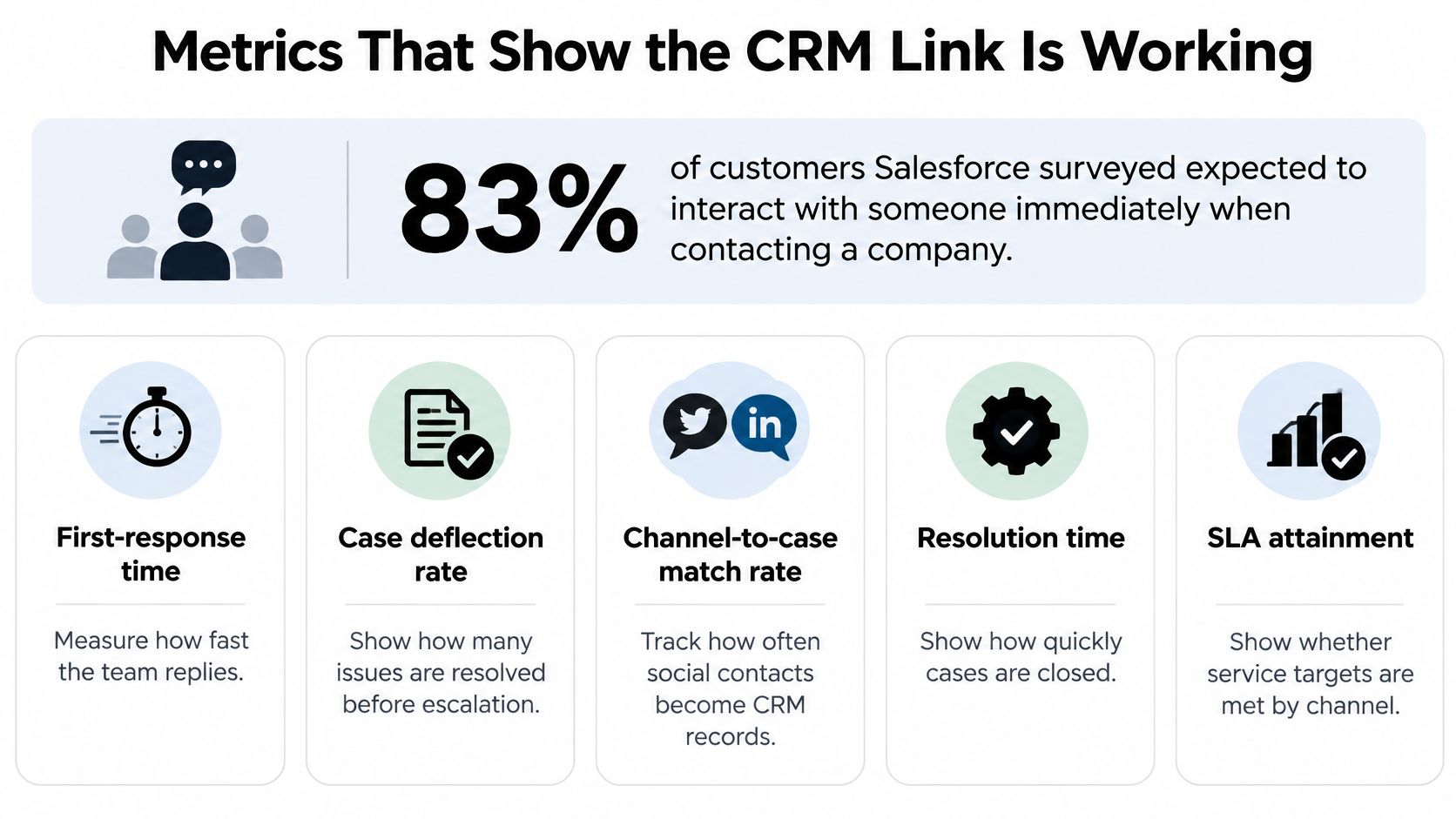
| Metric | Definition | Why it matters | Owner |
|---|---|---|---|
| First-response time | Time from customer message to first human or agent reply, by channel | Tests channel-specific SLA | Social care lead |
| Time to resolution | Time from first message to closed status in the CRM | Shows whether handoffs slow cases | Operations lead |
| Public-to-private handoff success | Share of moved cases resolved without the customer repeating details | Measures handoff quality | Social care lead |
| Repeat-contact rate | Share of customers who return on the same issue within a set period | Reveals missed or incomplete answers | Insights lead |
| Escalation accuracy | Share of escalations that the receiving team accepts as correct | Tests routing rules | Trust and safety or finance owner |
| Auto-closure rate | Share of cases closed without a human, reported with the human-verified share | Shows automation effect | Operations lead |
| CRM sync latency and duplicate rate | Delay between social event and CRM record, and share of duplicate contacts | Tests integration health | Engineering owner |
The first six metrics test experience and routing. The last one tests whether the integration itself is sound, and it's the one teams skip until duplicates corrupt reporting. Pair quantitative fields, wait time, handling time, responder, channel, and outcome, with qualitative content from messages and surveys. Numbers alone won't tell you whether a fast reply helped.
Governance belongs in the same dashboard. Track consent and sharing boundaries for personal information on every record. We share personal information only with service providers that run Sift AI, in business transfers such as a merger or sale of assets, and to comply with legal obligations, and your CRM fields should make those limits auditable.
For executive reporting, roll metrics up by channel and segment. Never report an auto-closure rate without the human-verified share beside it, or leadership will reward closing cases rather than resolving them.
Confirm One Channel Mapping Before You Scale
Start where failure costs most. Pick the channel carrying the most service volume and the most consequential cases, usually where billing or account complaints arrive first. Don't launch on X, Instagram, TikTok, Discord, Telegram, WhatsApp, and forums at once and hope the mapping generalizes. It won't.
Prove it on one channel
- Map the signals: Use the mapping table for that channel only, naming the CRM object, match key, and fields for each signal type.
- Write one handoff rule: State the public acknowledgment, the private move, and the escalation owner in a single line agents can follow.
- Configure the pipeline: Build capture, normalization, classification, identity resolution, write-back, and routing for that channel, and log ingestion gaps against its platform rules.
- Set three targets: Commit to first-response time, handoff success, and sync latency before you expand anywhere else.
Keep the orchestration clear. The system handles triage, tagging, routing, and drafting, while people approve replies and own refunds, account access, and crisis decisions. Sift brings social, reviews, and communities into one queue for the team. Its Social Support agents triage, route, and draft replies to social conversations, and the customer chooses when they are allowed to send. Triage sorts social conversations by intent and priority, so your reviewers spend time on decisions, not sorting.
At 30 days, compare results against your three targets. Review a sample of escalations with finance, engineering, or trust and safety, whichever owns your hardest cases, and check whether they accepted the routing as correct. Widen to the next channel only when handoff success and escalation accuracy hold. If they don't, fix the mapping or the confidence threshold on the channel you have, because scaling a shaky map just multiplies duplicate records and reviewer fatigue across every new inbox.
If your social conversations aren't becoming trustworthy CRM records, Sift AI gives your team a unified inbox across social and community channels, with AI that filters noise, tags intent, routes cases to support, finance, engineering, comms, or trust and safety, and drafts replies for human review. Start with one channel mapping, prove handoff success and escalation accuracy, and then scale with records your whole team can trust.