Role Based Access Control: How Roles Keep Social Ops Safe
"Learn how role based access control works for social care and community teams, from roles and permissions to separation of duties and audit trails."
A new starter logs into your unified inbox on Monday morning and can already read refund disputes, legal complaints, and executive escalations. Nobody meant to grant that access. Somebody copied a colleague's permissions to save time. That shortcut, repeated across X, WhatsApp, and Discord, is how social operations lose control of who can see and do what.
Table of Contents
- What Role Based Access Control Means for Social Teams
- Why RBAC Pays Off in Social Operations
- How Users, Roles and Permissions Connect
- Designing Roles for a Social Operation
- Least Privilege and Separation of Duties in Practice
- Where Plain RBAC Breaks and What to Add
- How to Run an Access Review Your Auditor Will Accept
- Confirm Your Role Map Before the Next Review
What Role Based Access Control Means for Social Teams
Say your care team has forty people. On day one, a new agent gets copied access from a senior colleague because the queue is busy. She can now see the whole inbox, including refund disputes, legal complaints, and threads marked for PR risk. Her job is answering delivery questions on Instagram. Her access says otherwise.
Role based access control fixes that mismatch. People don't receive permissions one by one. They receive them through roles that mirror job functions, such as responder, escalation manager, comms approver, and auditor. Change the job, change the role, and access follows. If you want a plain primer before redesigning your own map, how role-based access control works lays out the basic mechanics.
The model isn't a vendor invention. The NIST publication on role based access controls traces it to David Ferraiolo and Richard Kuhn's paper published on October 13, 1992, at the 15th National Computer Security Conference. They formalised RBAC to address limits of discretionary access control, where a resource owner assigns permissions user by user and drift follows every reorganisation. Their model defined roles as collections of permissions, user to role mappings, role hierarchies, role activation during a session, and constraints on membership and activation.
Three models side by side
Access control models compared
| Model | Who Decides Access | How Access Is Granted | Social Ops Example |
|---|---|---|---|
| Discretionary access control (DAC) | Resource owner | Permissions set user by user | A team lead grants one agent access to a shared inbox |
| Role based access control (RBAC) | Administrator against job roles | Users inherit permissions from assigned roles | Every tier-1 agent receives the responder role |
| Attribute based access control (ABAC) | Policy engine evaluating attributes | Rules check attributes such as region, channel or sensitivity | Only EU-market agents see EU customer DMs |
ABAC is the next step when a job title isn't specific enough. A policy engine checks region, channel, or data sensitivity before it allows an action. You don't need to commit to one model permanently. Start by naming which model you run today, then test it on the three channels you manage most, such as X, WhatsApp, or Discord. If you can't say who decides access on each one, that's your first finding.
Why RBAC Pays Off in Social Operations
Roles pay off only when they stay tied to real jobs. A role named after a person rebuilds the user by user problem with a nicer label. Keep roles job-shaped, and four benefits follow.
- Faster onboarding: A new agent joins the responder role and inherits the right queues, saved replies, and brand voice settings. Nobody builds thirty individual grants on her first morning, and her access matches every other responder's access.
- Lower administration cost: Your escalation process changes, so billing complaints in replies now route to finance after one public exchange. You update the escalation manager role once. Every assigned person follows the new rule, which is why RBAC became the predominant model for advanced access control where reducing administration cost and complexity matters.
- Smaller blast radius: A responder's account gets phished during a scam wave. That account carries no export rights, no routing rule edits, and no access to audit logs. The attacker gets a narrow working role, not the keys to customer data.
- Clearer compliance evidence: An auditor asks who can publish public statements or export DMs. You show one role to permission map instead of reconstructing years of individual grants from ticket history. Least privilege and separation of duties become checkable facts.
A copied account is not a role. It's an undocumented permission set with a person's history attached.
Count how many people in your operation hold access by direct grant today. Each one is onboarding speed, containment, or audit clarity you haven't realised yet. That count, not your role diagram, tells you where you stand.
How Users, Roles and Permissions Connect
Think of a hotel keycard. The guest is the user. The card is the role. The floors and rooms it opens are the permissions. The front desk doesn't rewrite every guest's door list when policy changes. It changes one card type, and every holder's access changes with it.
Here's that structure drawn out for an inbox team.
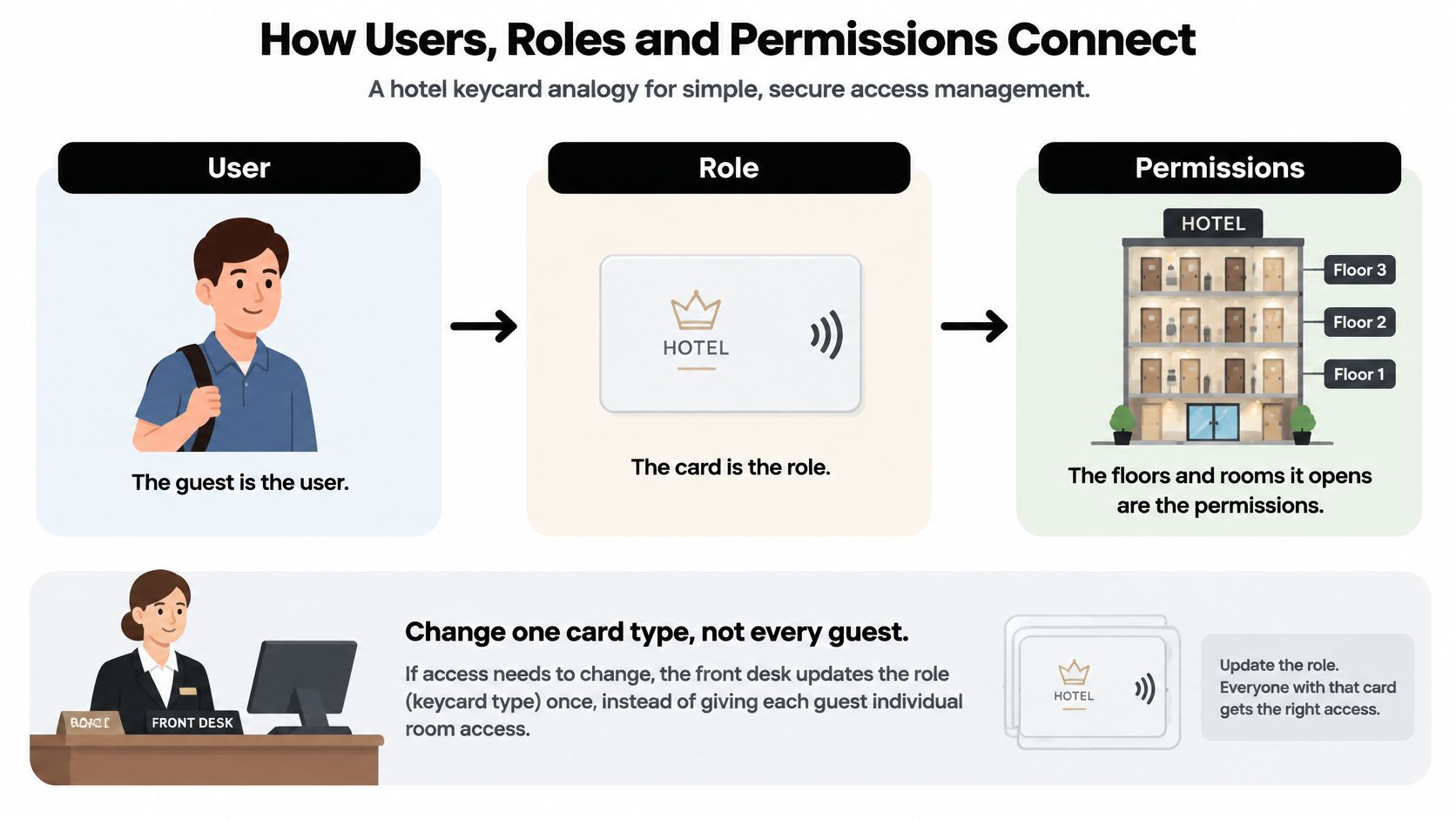
RBAC works as a policy graph with two association layers. The NIST model for role based access control separates users to roles from roles to permissions, and a request is authorised only when the subject has an assigned or activated role, that role is authorised for the subject, and the requested transaction is permitted through the role, subject to constraints.
Roles and permissions in a social inbox
Roles map to functions like these.
- Social-care agent: Triages assigned threads and drafts replies in brand voice.
- Escalation manager: Owns crisis escalation and SLA risk.
- Finance reviewer: Handles billing complaints and refund disputes.
- Engineering responder: Works outage-tagged threads and reproduction details.
- Communications lead: Approves public statements.
- Auditor: Reads logs and role history.
Permissions are separate operations. Viewing a sensitive conversation, exporting data, approving an AI-generated reply, and modifying routing rules are four different permissions. One role may carry the first and none of the others.
NIST defines four cumulative levels. Core or flat RBAC covers basic assignment. Hierarchical RBAC lets senior roles inherit junior permissions. Constrained RBAC adds separation of duty rules. Symmetric RBAC requires administrators to review assignments in both directions, role to permission and permission to role.
This short walkthrough shows the assignment flow in motion.
I would apply one design rule before anything else. Keep roles job-oriented and permissions operation-specific. Don't build user-specific roles, because they recreate access control list complexity under a new name.
Try it on paper. Sketch three users, two roles, and four permissions from your own inbox. If one permission doesn't fit either role cleanly, you've found a role you haven't defined yet.
Designing Roles for a Social Operation
A payments outage hits at 9 a.m. Reports arrive across X, Instagram, and WhatsApp, with screenshots and multilingual slang that keyword filters can miss. Engineering needs reproduction details, Comms needs to approve a holding statement, and Care needs to keep answering. The title “community manager” does not tell you which channels, markets, or escalation decisions someone should control.
Job-oriented roles start from the work, not the org chart. The OWASP Authorization Cheat Sheet describes role relationships as potentially many-to-many and hierarchical, while least privilege means assigning only the privileges needed for a job. One person can hold several narrow roles instead of receiving broad access through a single title.
Seven roles and their boundaries
Social operation roles and their boundaries
| Role | Can View | Can Act On | Must Not Do |
|---|---|---|---|
| Social-care responder | Assigned threads and linked order context | Draft and send replies within brand voice | Export data or change routing rules |
| Finance escalator | Billing escalations routed to finance | Open finance cases and add internal notes | Reply publicly to customers |
| Trust and safety reviewer | Flagged phishing and impersonation reports | Hide content and mark scam waves | Approve comms-sensitive replies alone |
| Comms approver | Drafts marked for PR risk | Approve or reject public statements | Close tickets they did not open |
| Engineering responder | Outage-tagged threads and reproduction details | Post internal status and log bug tickets | Access customer personal data beyond the thread |
| Auditor | Audit logs, role history and review records | Export audit reports | Change any role or permission |
| Administrator | Role configuration and assignments | Create and edit roles | Approve their own role changes |
These boundaries assign distinct decisions to distinct tiers. Responders can draft and send, but cannot export data or change routing. Finance escalators handle billing cases without replying publicly, and auditors can inspect access records without altering them.
A tiered structure works only when each tier owns a defined decision. A staffing guide for campaign field directors describes layered teams where each tier owns distinct decisions. In a social inbox, define those decisions around channel access, market responsibility, and escalation authority rather than relying on job titles alone.
Automation belongs in the same access design. Sift AI agents triage, route, research, and reply across social channels, while the business chooses what they do and when to step in. Set boundaries for automated actions just as you do for staff roles.
Draft your role list from recent escalations, not from the org chart. Escalations show where work changes hands; titles may hide those handoffs.
Review routing decisions to finance, engineering, comms, and trust and safety. Recurring handoffs can point to a role worth defining. A one-off favour is better treated as a temporary exception than built into permanent access.
Least Privilege and Separation of Duties in Practice
Trust isn't a permission level. A trusted employee with one broad role can still send the wrong public reply during an outage surge, export a DM history to the wrong place, or close a case nobody reviewed. Good controls assume capable people working under pressure, not bad intent.
Least privilege means assigning no more authority than a user needs for the job. Separation of duty prevents one person from combining conflicting capabilities. The NIST role based access control project frames both as explicit policy properties, and notes the standard behind them, ANSI/INCITS 359-2004, revised as INCITS 359-2012. Authentication alone doesn't authorise an action. The active role and its permitted transaction must also satisfy policy.
The draft approve publish chain
Walk one high-risk reply through the chain. An agent triages and drafts a response to a legal complaint in mentions. A supervisor approves the high-risk communication. A separate comms role authorises publication. No single account performs all three steps, so reviewer fatigue or a misread thread can't travel straight to the public timeline.
Two forms of separation enforce that chain.
- Static separation: The system blocks conflicting role assignments from the start, so one person never holds both comms approver and auditor.
- Dynamic separation: The system blocks conflicting roles from being active in the same session or transaction, even if a senior staffer legitimately holds both assignments.
Set two switches before you write any role. First, decide whether agents may send replies at all. Second, decide which drafts must go to a reviewer first. In our setup, the customer decides when the team reviews drafts and when agents are allowed to act. Agents send replies only when sending is enabled. Otherwise the team reviews and sends the replies itself.
Check three conflicts first in your current map. Look for anyone holding draft and publish, case closure and audit, and routing rule edits and escalation approval. Those pairs cause the most damage in social operations because they combine action with the control meant to check it.
Where Plain RBAC Breaks and What to Add
A “community manager” role can mean moderation on one channel, customer replies across several markets, or access to sensitive escalations. The title alone does not show which permissions the account inherits. Role assignment becomes unreliable when old grants, nested groups, and changing duties accumulate across systems.
Three failure patterns
- Accumulation after moves: An agent transfers from care to community and keeps finance escalation rights from the old role. Without a clear owner for removal, the access remains.
- Dormant entitlements: A contractor's campaign access sits unused after a project ends. It still grants access if the account is compromised.
- Nested groups: A community manager role inherits a group that includes data export. The role name suggests moderation, but its effective permissions reach further.
Design roles around the work, not just the job title. Scope access by channel, market, escalation class, data sensitivity, and action type. A moderator for a Spanish-language forum may need no access to billing conversations on WhatsApp. The same principle applies to protecting access to HR systems: the permissions required for a job can exceed what its title suggests.
Automated agents need the same attention to scope. Give each agent its own identity, a named owner, and a task-scoped role with separate read, write, and export permissions. Narrow those permissions when a conversation becomes sensitive. Sift flags low-confidence cases for the business's team, and sensitive conversations can move to a person with the context attached.
Measure this quarterly: Track inappropriate-access rate, review completion, and revocation time. Role count alone does not show whether access is controlled.
These measures help show whether permissions still match the work. If access remains after a transfer, the role map has stopped reflecting who needs to do what.
How to Run an Access Review Your Auditor Will Accept
Auditors don't accept intentions. They accept evidence that assignments were checked, conflicts were tested, and removals were recorded. This six-step workflow produces that evidence.
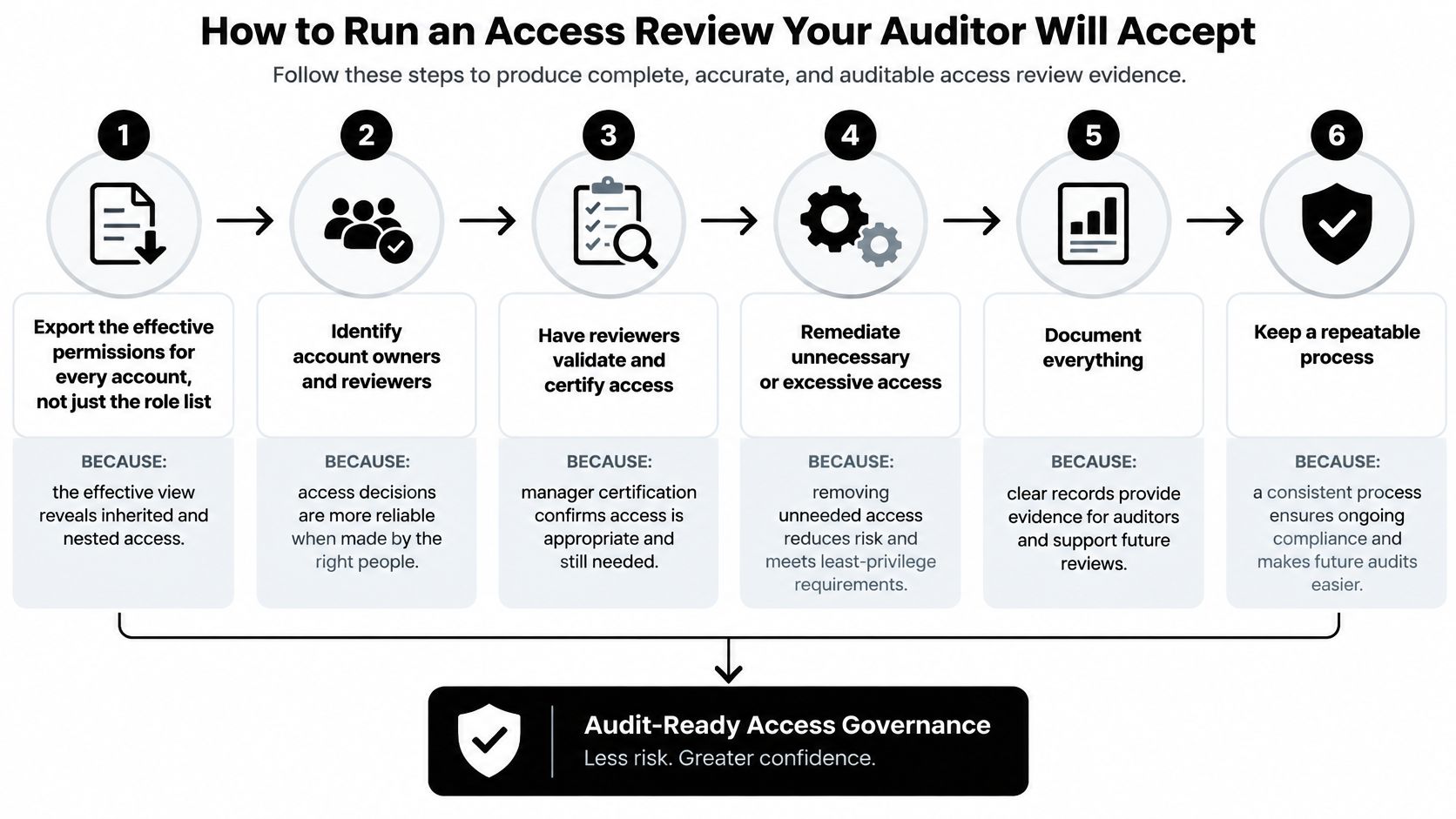
- Export effective permissions for every account. Don't review the role list alone, because the effective view reveals inherited and nested access that role names hide.
- Compare each assignment with the current job. Flag anything left from a previous role, a finished campaign, or cover for a colleague's leave.
- Test three authorisation checks per sensitive action. The NIST RBAC FAQs require role assignment, role authorization, and transaction authorization before a user performs a transaction. The role must be assigned, active and authorised for that person, and the specific transaction, such as viewing a thread, replying publicly, exporting data, escalating to finance, or changing a workflow rule, must be permitted through the role.
- Remove dormant accounts and unused entitlements. Record who approved each removal, so a later question has a named answer instead of a shrug.
- Confirm separation of duty. Verify nobody holds both draft approval and publish rights on the same class of content, and no auditor can change roles.
- Sign off with each role's named owner. Retain the record with the date, reviewer, and outcome for every flagged item.
What a passing review looks like
Audit trails should show role activation and transaction-level decisions, not just logins. A reviewer needs to reconstruct who acted, under which role, on which thread, and why the system allowed it.
You're done when every privileged role has an owner, every flagged entitlement has a decision, and every removal is traceable to an approver. Anything less is a spreadsheet exercise your auditor will send back.
Confirm Your Role Map Before the Next Review
You don't need a full review to find your worst gaps. Twenty minutes with your current role list will surface most of them. I would run this check this week, before the next outage surge or campaign launch creates urgent, undocumented grants.
Start by counting the roles in use. Flag any role with no written boundary, because an unbounded role drifts first. If nobody can state what a role must not do, it effectively permits anything its holders attempt.
Next, list every person holding more than two roles. Ask whether each combination is needed for the job they do today, not the job they did during last year's reorganisation. Combinations are where separation of duties fails.
Then pick your three highest-risk permissions and trace each one.
- Exporting customer data: Confirm it sits apart from roles that answer customers daily.
- Changing routing rules: Confirm the holder can't also approve escalations those rules create.
- Publishing public statements: Confirm a different role reviewed the statement first.
Check your automated agents separately. Confirm each one has its own identity, a named owner, and a task-scoped role, rather than inheriting a person's access. An agent that drafts replies doesn't need export rights just because its supervisor has them.
Decide who approves the next change to a sensitive role before that change is requested. Approving after the fact turns your control into a notification.
Sift AI's unified inbox lets care, community, and comms teams work from one place while each role sees only what its job requires. That structure only holds if you maintain it. Set the next review date now, and commit to tracking inappropriate-access rate, review completion, and revocation time at every review from here on.
Bring your X, Instagram, TikTok, Discord, Telegram, WhatsApp, and forum queues into one unified inbox where role based access control decides who triages, drafts, approves, and publishes on every thread. Sift AI filters noise, tags intent, and routes billing, outage, and PR risk cases to the right owners while your team keeps the hard calls. Visit Sift AI to see how scoped roles keep social operations fast without making them fragile.