Spam Filtering Software That Scales Across Channels
"Discover how modern spam filtering software combines ML, routing, and analytics to cut noise across email, social, and community channels"
A care lead opens the unified inbox on Monday morning and sees 3,400 new mentions. Most are bot-driven crypto pitches, scam DMs, or low-effort engagement bait. The queue has outgrown human review, but a blunt block rule could also hide a billing complaint, a partnership inquiry, or a customer warning that an outage is spreading.
That's the operational problem with spam filtering software today. The job isn't to build a higher wall around an inbox. Teams need a triage layer that recognizes intent, routes urgent messages to the right owner, and auto-closes only content that's safe to discard. A missed customer escalation can cost more than several junk messages left for review.
Email research shows why this balance matters. A large evaluation found that supervised filters could eliminate 98% of spam while losing only 0.1% of legitimate email, but the same work emphasizes that practical deployment depends on keeping false positives extremely low, not merely maximizing spam capture (Cormack's evaluation of content-based spam filtering). The lesson carries directly into social care: protect the signal before you optimize the noise score.
This guide is for social care and customer service teams handling support through social channels. It focuses on unified inbox design, routing, reviewer workflows, channel coverage, and the human approvals that keep automation from turning a customer's legitimate message into a silent failure.
Table of Contents
- Why Spam Filtering Software Is Now a Triage Problem
- From Rules to Context-Aware Agents
- Email Gateways Versus Unified Social and Community Inboxes
- The Enterprise Feature Checklist That Actually Matters
- Deploying Across Social and Community Channels
- Tuning for Precision Without Drowning Reviewers
- Measuring ROI Beyond Spam Blocked
- Buyer Evaluation Checklist and Demo Questions
Why Spam Filtering Software Is Now a Triage Problem
A social care lead doesn't experience spam as an abstract security category. They experience it as a queue where a genuine refund question sits beside ten identical investment pitches, or where a customer's outage report is buried under replies containing suspicious links.
On X, the pattern may look like coordinated replies beneath a product announcement. On Instagram, it may be repetitive comments attached to a campaign post. In Telegram, scammers can blend into a fast-moving group conversation, while WhatsApp DMs may contain a real customer asking about a charge alongside automated promotion. Each message needs a decision, not merely a label.
The first decision is whether the content is obviously worthless. The second is whether it might contain human intent. The third is who should own it if it does. A message that mentions a payment issue belongs with finance or customer care, while a report about a broken feature may need engineering. A public allegation with reputational risk may require communications review.
Practical rule: Auto-close obvious noise. Quarantine uncertainty. Route plausible customer intent to a human.
That rule changes how teams should assess top social media moderation platforms. A platform that reports impressive blocking but offers weak quarantine recovery, limited routing, or no audit trail can create more operational risk than a slightly less aggressive system with clear reviewer controls.
Why over-filtering costs more
A spam-heavy queue wastes reviewer time, but an over-filtered queue damages trust in a less visible way. Customers may repeat the same complaint across channels, escalate publicly, or abandon a support attempt when their first message disappears into quarantine. The social care team then sees the consequence as churn risk, PR risk, or an SLA miss rather than as a filtering error.
That's why the right target isn't “block everything suspicious.” It's preserve high-value intent while removing repetitive noise. The filter should understand that a new account posting a generic crypto pitch is different from a new customer asking about a failed payment, even if both contain a link.
The strongest operating model keeps humans in the loop for hard calls. AI can identify patterns, tag likely intent, draft a reply, and send a case to the right team. A person should approve sensitive responses, handle ambiguity, and own escalation decisions.
From Rules to Context-Aware Agents
Spam detection has developed through three practical generations. Understanding the differences helps teams avoid buying a modern label wrapped around an old workflow.
Generation one uses rules
The first generation is the bouncer with a paper list. Teams write keyword rules, maintain blocklists, inspect sender reputation, and use pattern matching to reject known forms of abuse. This approach works well when the pattern is stable. A repeated scam phrase, suspicious domain, or known account can be stopped quickly.
Attackers adapt easily, though. They change spelling, add punctuation, swap characters, or move the same pitch into an image. A rule that catches one version of a crypto promotion may miss the next version posted with altered text or a different account.
Rules still belong in the stack because they're transparent and fast. They're useful for hard policy decisions, known abuse patterns, and channel-specific controls. They shouldn't carry the entire burden of intent classification.
Generation two learns patterns
Machine-learning filters act more like a seasoned host reading body language. They score features from labeled examples, including text patterns, links, account behavior, and other signals. Bayesian systems, for example, calculate the statistical probability that a message is spam from prior analysis of labeled spam examples (comparative research on anti-spam methods).
This approach recognizes combinations that a keyword list misses. It can identify repeated phrasing, unusual link density, and behavior associated with automated campaigns. It still tends to classify the message as an object, though. It may know that a post resembles spam without understanding the conversation around it.
Generation three uses context
Context-aware agents work more like a concierge who checks whether a guest is expected. They can weigh sender history, channel norms, reply chains, previous interactions, and the intent expressed in the current message.
That distinction matters when spam and customer support share the same surface. A short “please help, I was charged twice” message shouldn't be treated like low-effort engagement bait just because it comes from a new account. A meme in a Discord thread may be harmless community behavior, while the same link pattern in a support reply may deserve review.
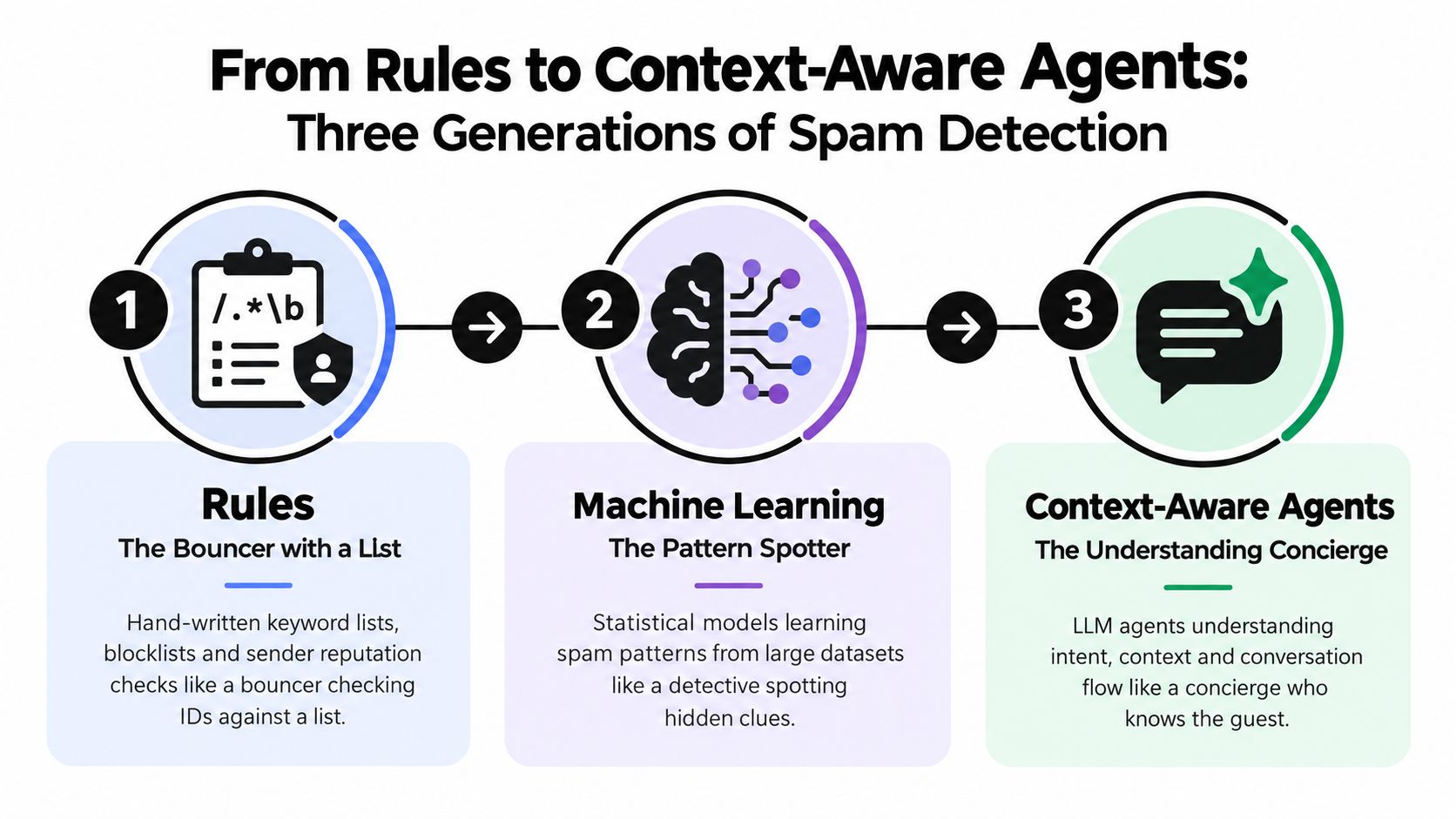
The practical progression is rules for certainty, machine learning for patterns, and context-aware agents for judgment support. No generation eliminates the need for people. The third generation gives reviewers better evidence before they decide whether to close, route, or escalate.
Email Gateways Versus Unified Social and Community Inboxes
Email gateways and unified social inboxes solve different visibility problems. An email gateway operates at the mail edge, examining sender information, headers, body content, and links before a message reaches an employee. A social inbox works downstream, ingesting platform events and normalizing them into a queue where teams can score, tag, route, and respond.
| Dimension | Email Gateway | Unified Social/Community Inbox |
|---|---|---|
| Primary coverage | Email sent through the organization's mail flow | X, Instagram, TikTok, Discord, Telegram, WhatsApp, forums, and other connected channels |
| Strongest use case | Bulk mail, phishing, malware, and sender-level abuse | Customer intent, public replies, DMs, community threads, and cross-channel triage |
| Main signals | Sender identity, headers, links, message body, reputation | Conversation context, account behavior, channel norms, intent, media, and routing history |
| Silent-failure risk | A social message bypasses the gateway entirely | Email rules are never tuned or synchronized with the social workflow |
| Human workflow | Quarantine and release in a mail security console | Review, tag, route, escalate, draft, and resolve in an operational inbox |
Gateways remain excellent at email threats. Microsoft's historical log describes a single worst spam day on January 8, 2004, with a sample archive containing 227.6 MB of spam across roughly 19,000 messages, alongside 61.8 MB of viruses in about 3,500 messages (Microsoft's history of email growth pressure). That infrastructure problem hasn't disappeared. It has expanded across more communication surfaces.
Where each model fails
An email gateway can't see an Instagram reply that never enters the mail system. It won't understand a Telegram thread, a Discord escalation, or a Reddit moderator queue unless another system forwards the event. Social tools, meanwhile, can miss mail-specific threats if their rules aren't connected to the organization's email controls.
Sender hygiene still matters for outbound email. Teams working on authentication and deliverability can use practical guidance on how to improve sender reputation, but that work doesn't solve social triage. A customer who replies to a brand post isn't governed by the same path as a marketing message sent from the company domain.
The operational answer is usually layered coverage. Keep email security at the mail edge, then use a unified inbox for social and community intent. Don't assume one system's quarantine represents the organization's full communication risk.
The Enterprise Feature Checklist That Actually Matters
Enterprise buyers often start with detection rate. That's understandable, but incomplete. Independent testing shows why precision needs equal attention. In Virus Bulletin's June 2025 VBSpam review, several systems recorded zero false positives on that test set, while spam-capture rates still varied, including 99.995% for Bitdefender GravityZone Premium, 99.964% for FortiMail, and 99.709% for Mimecast (Research and Markets' anti-spam software market report). A controlled email result doesn't automatically predict performance in multilingual social threads or fast-moving communities.
| Feature | Risk It Defends Against | Precision Tradeoff |
|---|---|---|
| Broad channel coverage | Support requests bypassing email controls | More sources create more context, but also require channel-specific tuning |
| Multilingual and multimodal understanding | Slang, altered spelling, memes, screenshots, and link-bearing abuse | Aggressive interpretation can mistake humor or cultural shorthand for spam |
| Intent-based routing | Billing, outage, product, PR, and trust issues entering one generic queue | More routing categories require clear ownership and fallback paths |
| Quarantine review | Legitimate messages disappearing without recovery | Strong review tooling lets teams use cautious thresholds |
| Compliance controls | Improper retention, access, or handling of sensitive conversations | More controls can slow investigation unless permissions and audit logs are usable |
| Drift analytics | Old rules degrading as campaigns and language change | Monitoring creates work, but hidden drift creates larger backlogs |
Precision is an operating decision
A buyer should ask what happens to a message at each confidence level. Obvious spam can be auto-closed. Graymail can be tagged and held for sampling. Probable customer intent should enter the support workflow, even when the message includes a suspicious link.
Dataset quality matters as well. A systematic review found that common benchmark corpora were heavily skewed toward spam, including TREC 2005 with 39,399 spam messages out of 52,790 total, Enron-spam with 16,545 out of 20,170, and TREC 2007 with 25,220 out of 50,199 (systematic review of email spam filtering). Accuracy can look strong on an imbalanced test while operational false positives remain unacceptable.
Your checklist should therefore include confusion matrices, channel-specific samples, quarantine recovery, reviewer audit trails, and drift reporting. A feature matters only if it protects a real workflow.
Deploying Across Social and Community Channels
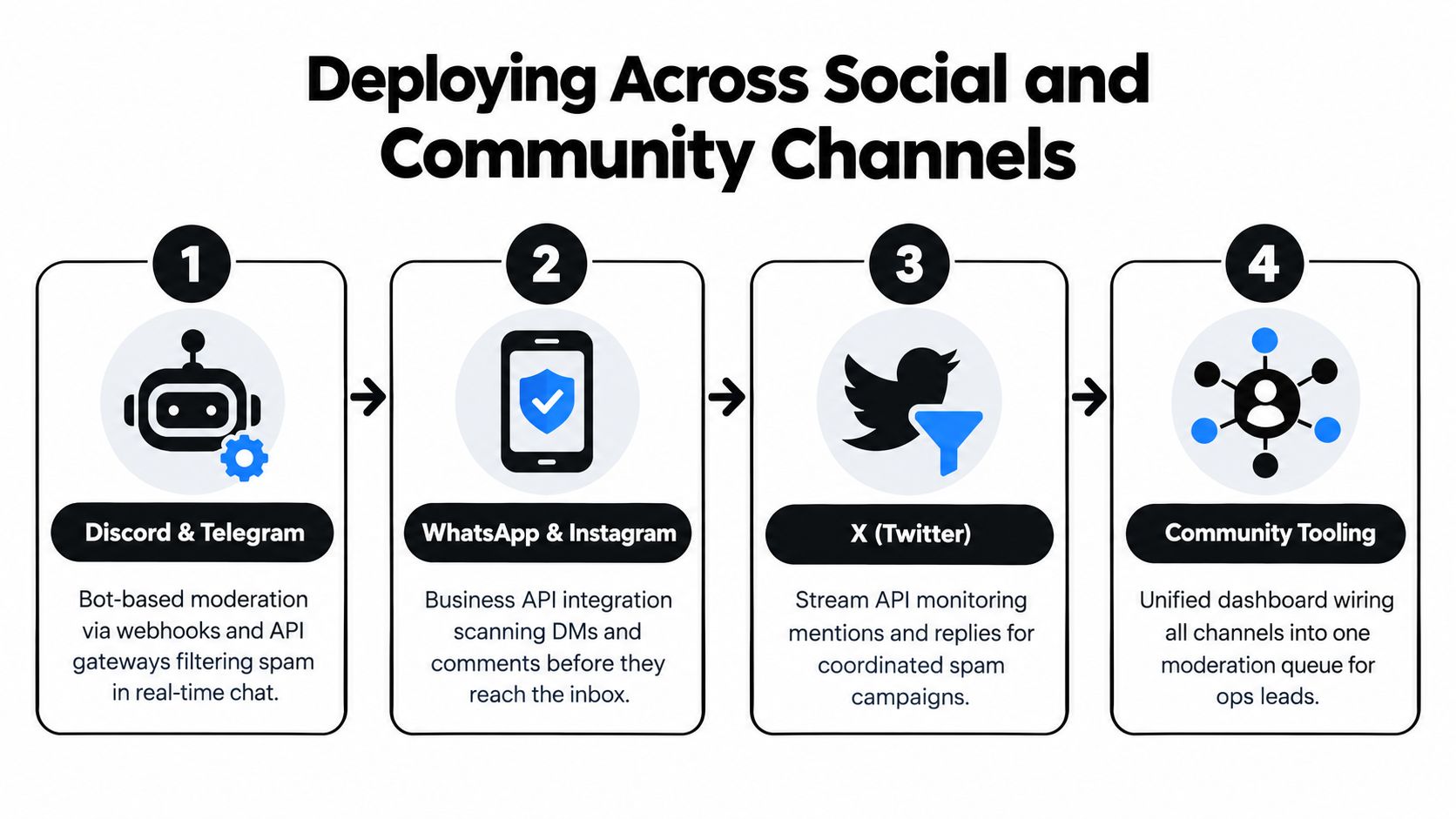
Deployment succeeds when the ingestion path matches each platform's mechanics. The classification logic can be shared, but the data arriving from Discord isn't shaped like an Instagram comment, and a Telegram bot doesn't behave like an X mention stream.
Start with community channels
Discord and Telegram usually need bot-based moderation, webhook ingestion, and role-based escalation. A Discord bot can flag repeated promotional posts, send uncertain items to a moderator queue, and preserve the thread context for review. Telegram workflows need similar event handling, with special attention to fast-moving groups where a scam wave can spread through replies before a human sees it.
Keep the first policy narrow. Close repeated, obvious promotional content, while sending possible support questions or account reports to a human. Role-based routing prevents every moderator from reviewing every event.
Connect business messaging and visual surfaces
WhatsApp and Instagram require platform-native integrations. WhatsApp Business API workflows often depend on approved templates for outbound handling, while Instagram brings together DMs, comments, replies, images, and links. Media hashing and content scoring can help identify repeated abuse, but image context still needs careful review when a screenshot contains a billing error or an account warning.
Add public mention streams last
X and Reddit workflows depend on mention streams, replies, keywords, and moderator queues. Use keyword pre-filtering to reduce obvious volume, then apply machine-learning or contextual scoring to the remaining messages. For a product launch, the same phrase might indicate a genuine feature request, a coordinated campaign, or harmless community banter.
Channel-native rate limits shape the tuning window. Ingestion delays can make a rule appear ineffective when the event arrived late. Log timestamps, preserve the original platform identifier, and make it possible for reviewers to trace a message from source to disposition.
The wiring varies more than the underlying principle. Ingest the event, preserve context, classify intent, route ownership, and keep an auditable human override.
Tuning for Precision Without Drowning Reviewers
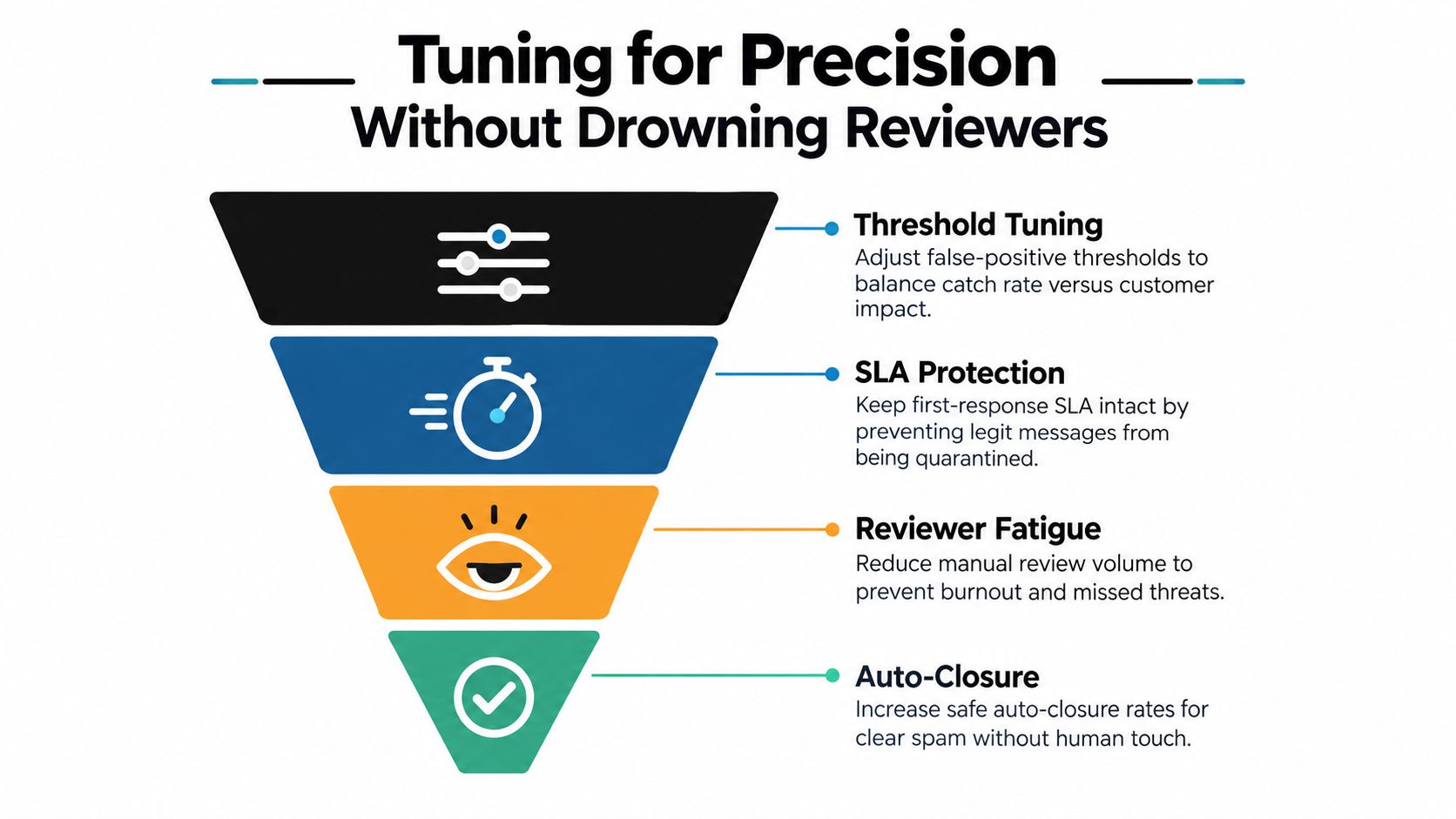
A precision setting is useful only when it changes an operational outcome. If a stricter threshold lowers visible spam but sends genuine billing complaints into quarantine, the dashboard may look cleaner while the first-response SLA gets worse.
Start by separating clear spam, uncertain content, and plausible customer intent. These categories need different actions rather than one binary block decision. A duplicated crypto pitch can be auto-closed. A suspicious message asking whether a card was charged twice should be routed to care or finance for review.
Use a threshold ladder
A threshold ladder gives the team more control than a single cutoff:
- High confidence: Auto-close obvious spam and retain the reason for the decision.
- Middle confidence: Tag as graymail, suppress duplicate alerts, and sample for review.
- Low confidence: Route to the relevant queue, with the model's signals visible to the agent.
- Sensitive intent: Require human approval for finance, security, outage, legal, or PR-related messages.
Reviewer corrections should feed the next tuning cycle. If agents repeatedly restore messages from quarantine, the team has evidence of a false-positive pattern. If reviewers keep closing the same campaign manually, the system needs a stronger rule, better examples, or improved grouping.
Test before promotion
Run new policies in shadow mode before they change customer-visible behavior. Compare predicted actions with reviewer decisions, then inspect the disagreements by language, platform, account type, and message format. This catches a rule that works on English text but fails on multilingual slang, memes, screenshots, or short replies.
Quiet-hour policies can help on low-stakes channels, but never use them for outage, billing, safety, or crisis queues. Tuning is a weekly operating practice, not a launch checkbox. The objective is to protect reviewer attention and customer access at the same time.
Microsoft Research's low-false-positive analysis reinforces the tradeoff. At the same low false-positive rate, logistic regression reduced missed spam by as much as 20% relative, while Naive Bayes reduced missed spam by as much as 40% relative (Microsoft Research on learning at low false-positive rates). The practical lesson is simple: optimize around the errors your care team can least afford.
Measuring ROI Beyond Spam Blocked
“Spam blocked” is a useful activity count, but it's a weak ROI metric by itself. It rewards aggressive filtering even when the system creates more quarantine work, increases repeat contacts, or hides high-value customer intent.
A better framework starts with protected agent time:
Input volume minus false-positive review minutes equals usable capacity.
Then connect that capacity to average handle cost, first-response SLA, escalation speed, and the number of genuine messages resolved without unnecessary reassignment. A system that closes obvious noise but routes outage reports directly to engineering may create more value than one that reports a higher block count.
| Metric Category | What It Measures | Why It Beats Spam Blocked % |
|---|---|---|
| Reviewer minutes reclaimed | Time removed from repetitive manual checks | Shows whether automation reduces labor pressure |
| False-positive recovery | Legitimate messages found in quarantine | Exposes customer-impacting errors |
| First-response SLA | Speed of response to real support intent | Connects filtering to customer experience |
| Auto-closure quality | Whether closed items were safely disposable | Separates useful automation from hidden risk |
| Routing accuracy | Messages reaching finance, engineering, comms, or care | Measures operational coordination |
| Repeat-contact rate | Customers returning because the first message failed | Reveals silent filtering failures |
Scenario math makes the point. A 40-agent care team that loses 90 seconds per misfire across 200 misfires a day burns roughly 20 hours weekly ([scenario figures provided in the verified brief]). The cost isn't limited to those minutes. Agents also lose context, queues become harder to scan, and brand voice suffers when replies are rushed.
Track these metrics monthly, then inspect them by channel and intent. Reviewer fatigue is an early warning sign. If agents distrust the queue, they'll either over-review everything or approve automation without enough scrutiny. Both outcomes weaken social care quality.
Buyer Evaluation Checklist and Demo Questions
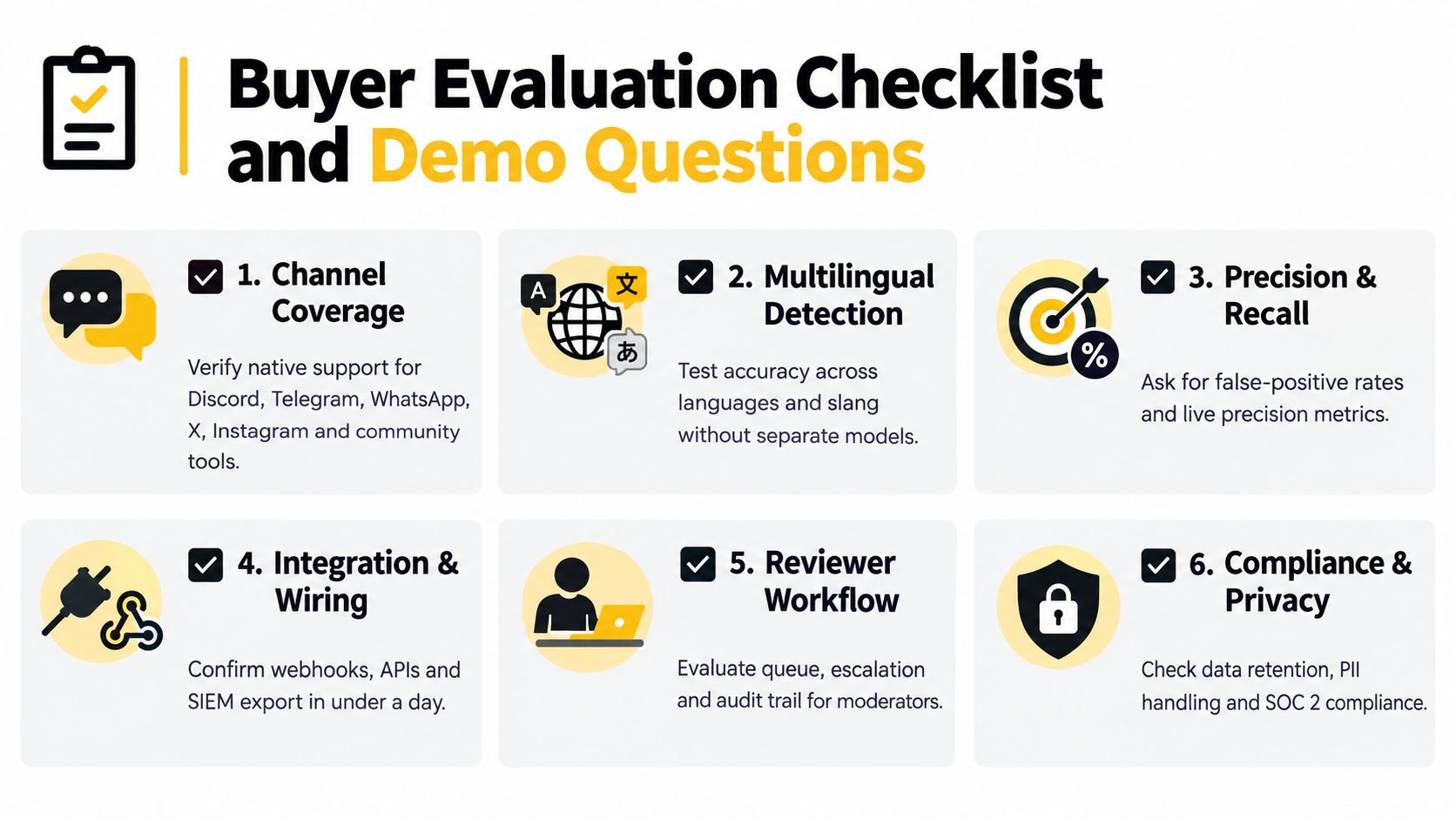
Put the evaluation into six risk buckets before a vendor shows you a polished dashboard.
- Channel coverage: Verify native or reliable connected workflows for Discord, Telegram, WhatsApp, X, Instagram, and adjacent community tooling. Ask whether the system preserves reply chains, media, author history, and platform identifiers.
- Multilingual and multimodal understanding: Test slang, sarcasm, screenshots, memes, audio, and altered spellings. A text-only demonstration won't reveal whether the filter can distinguish a billing screenshot from promotional imagery.
- Precision and recall: Request false-positive reporting, false-negative analysis, confidence scores, and precision-recall curves. Don't accept a single detection percentage without the operational error counts behind it.
- Routing and quarantine: Inspect the reviewer queue. Confirm that agents can restore a message, record a reason, route it to finance or engineering, and see what the model used to classify it.
- Compliance and privacy: Check GDPR, DSA, regional retention, PII handling, permissions, audit logs, and data residency. Sensitive social conversations shouldn't become an uncontrolled training corpus.
- Integration depth: Validate webhooks, APIs, exports, and case synchronization with Zendesk, Sprinklr, Salesforce, and your case-management CRM. Confirm that a closed item remains traceable across systems.
Five questions to ask live
- Can you classify a planted edge case in front of us? Use a multilingual billing complaint, a meme, a suspicious link, and a genuine VIP escalation.
- Show the quarantine workflow. How many actions does a reviewer need to restore, route, annotate, and audit a message?
- Where are the precision-recall curves? Ask to see results by channel, language, message type, and confidence band.
- How often do models and rules get retrained or recalibrated? Request the feedback path from reviewer correction to production behavior.
- What happens when a genuine VIP customer is caught? Look for immediate alerts, restoration, routing, audit history, and safeguards against a repeated mistake.
Sift AI fits this orchestration model by providing a unified inbox across social and community channels, AI-based noise filtering, intent tagging, routing, escalation, and AI-drafted replies, with humans retaining approval and ownership of sensitive decisions. Evaluate it against the same evidence standard as any other platform, especially quarantine recovery, channel-specific precision, and CRM synchronization.
Sift AI brings social, community, and messaging signals into one operational workspace, so your team can filter obvious spam while routing billing complaints, outage reports, and PR risks to the right owners. Visit Sift AI to see how context-aware triage can protect reviewer time without hiding the customers who need help.