Role Based User Access for Social Ops Teams
"Learn how role based user access keeps social care, community, and ops teams secure at scale — and how Sift AI maps roles, permissions, and audits."
At 9:47 a.m., a billing complaint lands in a public reply thread. A junior social care agent picks it up, sees an angry customer, and responds with a refund promise the team can't honor. The agent had admin rights, so the reply goes live before a billing specialist or communications lead reviews it. PR has to clarify the promise, while trust and safety flags the account for additional risk.
That incident isn't caused by a bad intention. It's caused by an access model that gives one person too much authority in a fast-moving environment. Role based user access creates boundaries around who can view private DMs, route tickets, publish replies, export user data, approve sensitive language, or change workflows. For social operations teams, those boundaries protect customers, brand reputation, and the people handling the queue.
Table of Contents
- Why Role Based User Access Matters in Social Operations
- How Role Based User Access Actually Works
- RBAC Compared to ABAC and Other Access Models
- Enterprise Design Patterns for Role Based User Access
- Mapping Role Based User Access to Sift AI
- Keeping Role Based User Access Honest Over Time
- A 30-Day Audit Checklist for Social Ops Leaders
Why Role Based User Access Matters in Social Operations
A unified inbox compresses many kinds of work into one operating surface. Public mentions, billing complaints, private DMs, outage reports, feature requests, scam waves, and PR-sensitive posts may all arrive beside one another. The person who can triage a conversation shouldn't automatically be able to export an audience, delete a post, or approve a statement about a service incident.
Role based user access addresses that problem by assigning permissions to job functions instead of handing broad control to individual accounts. A Tier 1 agent can classify inbound messages, apply tags, and route a ticket. A senior care agent can take an escalation and coordinate with finance. A communications or legal lead can approve a public response when the wording carries reputational or regulatory risk.
NIST describes RBAC as a model that centralizes authorization through roles, rather than assigning permissions directly to users. That structure simplifies administration because a person changing jobs can move to a new role without rebuilding their access one permission at a time. NIST's explanation of RBAC features and motivations connects that model to more manageable enterprise administration.
Least privilege limits the blast radius
The practical security principle is least privilege. Each person receives the access required for the work, and nothing more. NIST defines least privilege as selectively assigning privileges so a user has no more authority than needed to perform the job. NIST's RBAC implementation guidance explains why that constraint matters when teams design operational permissions.
That boundary matters when an account is compromised, a contractor leaves, or an agent accidentally opens the wrong customer record. It also supports separation of duties. The agent handling a payment dispute shouldn't be the same person who approves and closes the associated refund when the workflow requires independent review.
The access model must also account for external support teams, offshore coverage, and temporary contractors. A contractor may need access to public replies for a defined queue while remaining blocked from private DMs, audience exports, and role administration. Teams reviewing access for security frameworks or privacy obligations can then connect permissions to documented responsibilities and audit events. Leaders who need broader infrastructure context can also consult this resource on Houston managed IT access control while defining their own operational boundaries.
Practical rule: If a person can publish, export, delete, and administer from the same role, the role is probably describing convenience rather than a real job function.
The hard questions aren't limited to whether RBAC is enabled. Social ops leaders need to decide which roles exist, which queues each role can access, how exceptions expire, who approves elevation, and what the audit trail must prove after an incident. Those design decisions determine whether access control supports fast triage or quietly creates another source of operational risk.
How Role Based User Access Actually Works
Start with three objects: user, role, and permission. NIST's RBAC FAQ describes the model's historical development and its focus on assigning access by job function rather than by individual account.
A user is any human or service account that touches the social inbox. That may be a Tier 1 agent, a care manager, a trust and safety reviewer, an analyst, or a billing-system webhook that updates a ticket. A role is a named bundle of responsibilities, such as Triage Agent, Escalation Lead, Trust and Safety Reviewer, PR Approver, or Read Only Analyst.
A permission is an atomic action. Examples include reply_to_dm, assign_conversation, delete_post, view_pii, and export_audience. RBAC attaches those permissions to roles, then assigns users to roles. It doesn't create a separate permission puzzle for every person.
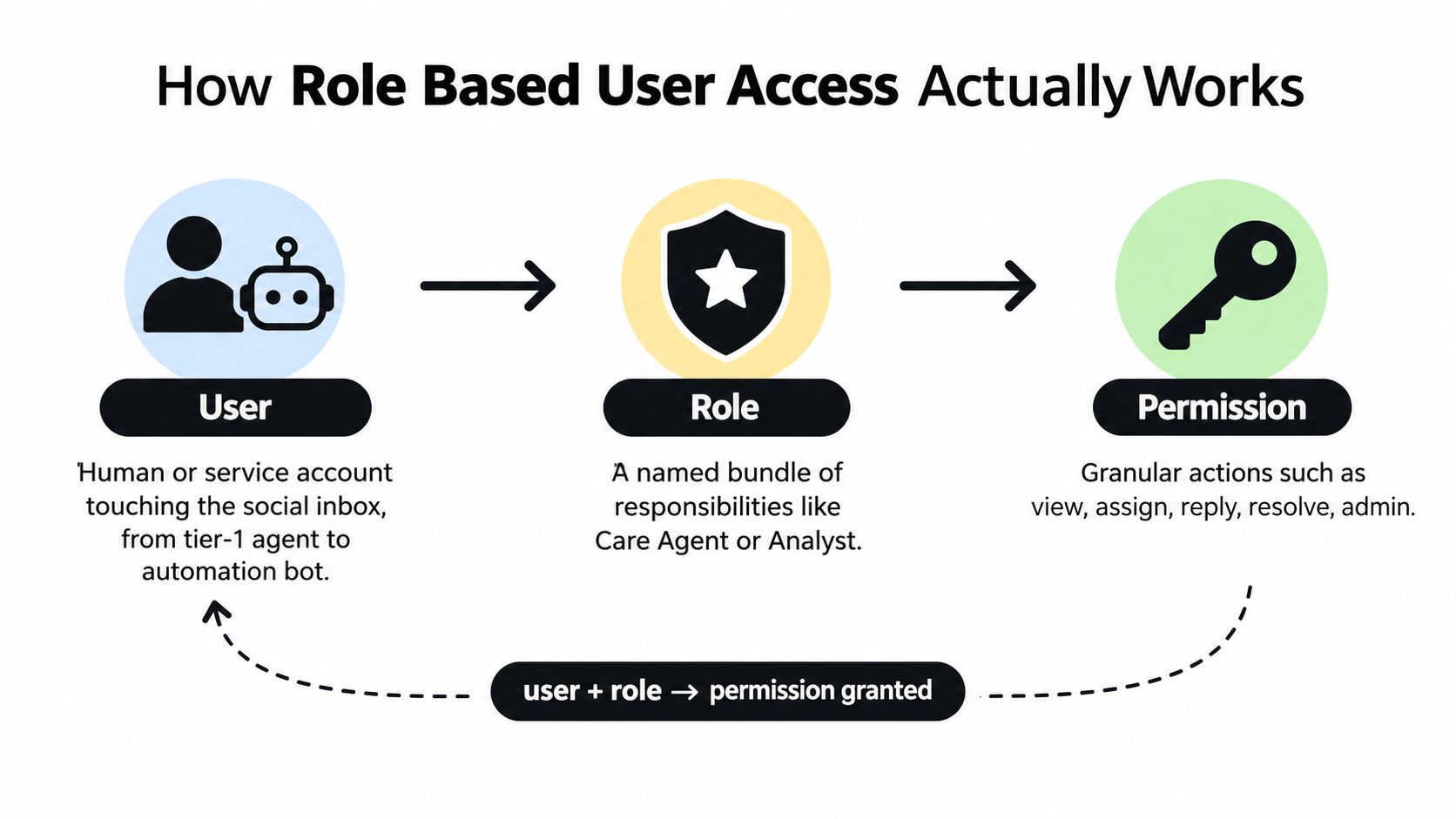
From role definition to an access decision
Consider a Tier-2 Billing Lead. The role might include view_pii, reply_to_dm, and assign_conversation, because that person needs to investigate account issues, communicate privately with customers, and send work to finance. The same role can exclude delete_post and export_audience, which belong to a narrowly controlled Trust and Safety or administrative function.
This distinction separates role definition from role assignment. The definition describes what the job can do. The assignment connects a particular user to that job. When a new escalation hire joins, an administrator assigns the Billing Lead role instead of manually recreating every permission.
NIST's technical description adds an important enforcement chain. A transaction requires role assignment, role authorization, and permission authorization before the system allows it. The NIST RBAC model description also identifies least privilege and separation of duty as core controls.
Sessions add another layer. A user may hold a role but activate it only within an approved scope, queue, time window, or incident workflow. A senior role can also inherit permissions from a junior role through a hierarchy, although inheritance must be reviewed carefully because one broad parent permission can affect every child role.
For adjacent operational governance, the distinction between a defined control and the person assigned to operate it also appears in areas such as Loopfour AP best practices. The domain differs, but the principle is familiar: responsibilities should be explicit, assignable, and reviewable.
RBAC Compared to ABAC and Other Access Models
The decision isn't whether to use RBAC. It's whether role-based rules match the way your social operation changes during a normal shift, an outage, or a crisis.
RBAC bundles permissions into predictable roles. It maps cleanly to team structures, queue ownership, and shift schedules. Auditors can ask which role could publish a reply or export a thread, and administrators can answer without reconstructing a collection of individual grants. The weakness appears when every exception becomes a new role. A care team can end up with separate roles for each queue, language, region, campaign, and temporary escalation.
Attribute-based access control, or ABAC, evaluates attributes at decision time. Those attributes might include conversation sensitivity, agent location, time of day, ticket priority, channel, or whether an incident is active. ABAC can express a rule such as, “An agent may draft a refund reply during an approved shift, but only a billing lead may publish it.” The trade-off is harder debugging. When access is denied, the team has to inspect multiple attributes and policy conditions instead of checking one role assignment.
Access control lists, or ACLs, attach permissions directly to users or objects. That can be understandable for a very small team with a limited number of queues. It becomes difficult to govern as people change jobs, coverage expands, and the same customer issue appears across multiple channels.
| Model | How It Decides Access | Best Fit in Social Ops | Main Trade-Off |
|---|---|---|---|
| RBAC | A user receives permissions through an assigned role | Stable care, comms, finance, product, and trust and safety functions | Role explosion when exceptions multiply |
| ABAC | Runtime policies evaluate user, resource, and context attributes | Dynamic restrictions around sensitive conversations, shifts, locations, or incident states | More complex policy testing and troubleshooting |
| ACL | Permissions attach directly to users or objects | Small teams with simple queues and few changes | Administration becomes fragmented at enterprise scale |
| PBAC | Policies express business rules that govern actions | Cross-functional rules such as approval thresholds and incident controls | Policy ownership and interpretation can become unclear |
| ReBAC | Access depends on a relationship to a resource or conversation | Community structures, account ownership, or customer-case relationships | Relationship data must remain accurate and available |
Policy-based access control, or PBAC, often overlaps with ABAC because both can express conditions beyond a static role. Relationship-based access control, or ReBAC, is useful when access depends on who owns a customer case, belongs to a community, or is connected to a particular resource.
A practical selection rule
RBAC usually wins when responsibilities are stable, onboarding speed matters, and the organization needs clear audit language. ABAC earns its complexity when the same person's access must change dynamically based on queue sensitivity, operating hours, geography, or incident state. ACLs are reasonable only for a small operation where administrators can still understand every direct grant.
Many mature social operations combine them. RBAC establishes the baseline, while contextual policies handle exceptions without creating a new role for every temporary condition. That combination keeps the org chart understandable without pretending every access decision is static.
Enterprise Design Patterns for Role Based User Access
Mature deployments rarely rely on one flat list of roles. They use a small set of structural patterns that reflect how social work moves from intake to resolution.
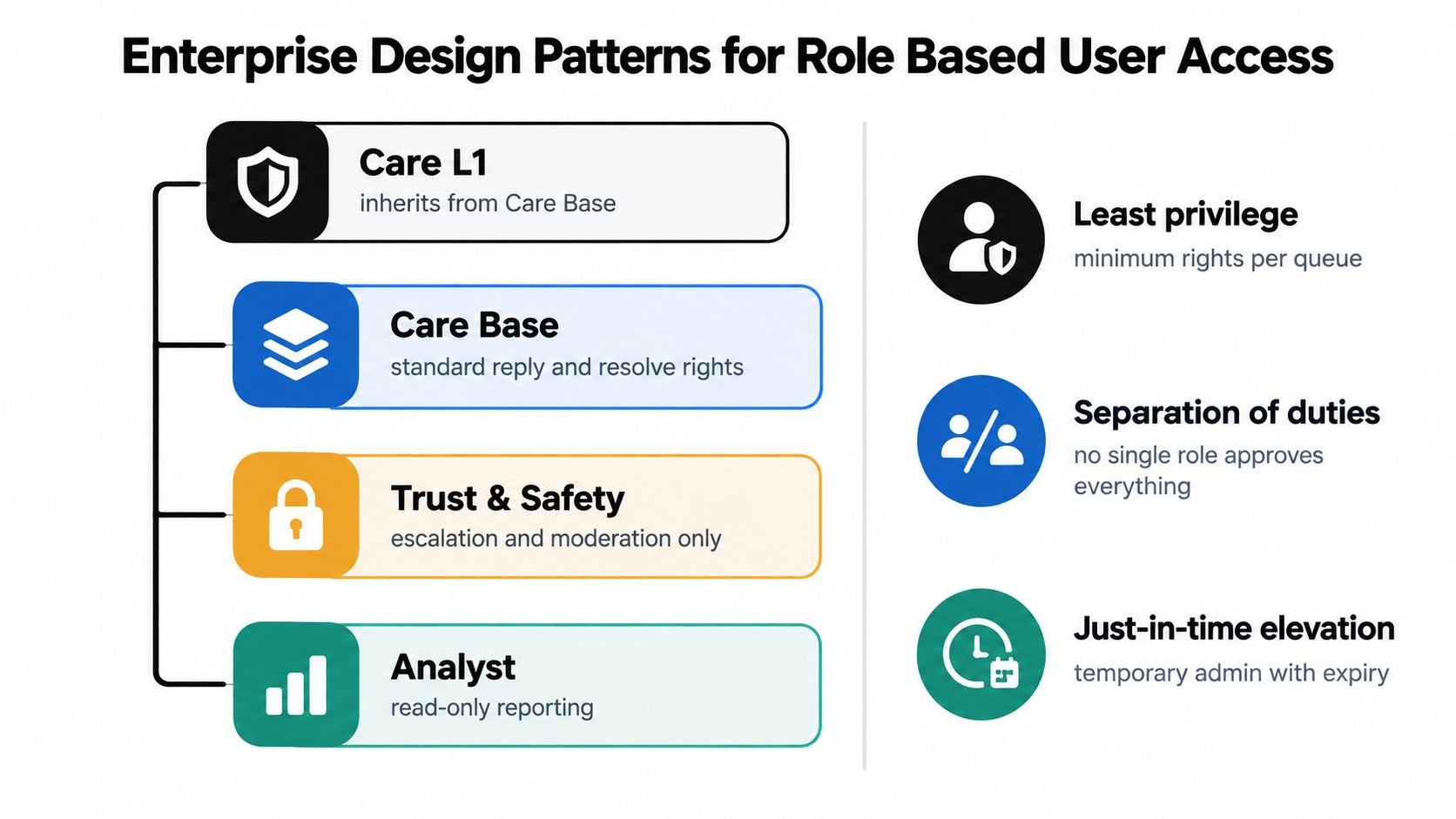
Build inheritance with restraint
A role hierarchy can reduce duplication. Care Base might contain standard view, reply, tagging, and resolve permissions. Care L1 inherits those rights and adds the ability to handle a broader queue or escalate a case. The hierarchy should follow real responsibility, not seniority alone.
Trust and Safety may inherit selected administrative capabilities, but it shouldn't automatically inherit every workflow-management permission. Analyst is better treated as a read-only reporting role than as a junior operational role, because its purpose is visibility rather than action.
Inheritance saves maintenance, but it can conceal privilege. Every parent role change should be evaluated for its effect on child roles. A clean hierarchy is valuable only when managers can explain it without opening a permissions spreadsheet.
Separate conflicting work
Separation of duties is particularly important for billing complaints and refunds. The agent who investigates a payment dispute can collect context, view the relevant customer information, and route the case to finance. The person who approves the refund should have a different responsibility, with an audit record connecting the decision to the original case.
The same principle applies to public communications. A care agent can draft a response to an outage surge, while a communications lead approves language that could affect public expectations. Trust and Safety can review abuse reports without receiving unrestricted access to unrelated customer exports.
Mine roles from actual behavior
Role mining starts with the inbox, not the org chart. Review reply tags, queue assignments, ticket metadata, escalation paths, and the actions people perform. If several agents repeatedly handle multilingual DMs and route feature requests to product, that workflow may justify a defined capability or queue scope.
Role mining can also expose accidental privilege. An agent may have admin rights because a former manager granted them during a crisis, even though the agent's daily work consists only of triage and replies. Removing that unused access is easier when the team compares role definitions with observed work.
Least-privilege zones make the model concrete:
- Public-reply zone: Draft and publish rights for approved channel queues.
- Private-DM zone: Access to sensitive conversations and customer details.
- Administrative zone: Role, workflow, export, and deletion controls.
These zones help incident responders identify where an error occurred and which permissions need temporary suspension. They also align with broader workforce administration concerns, including the HRMS benefits for EU businesses when joiner, mover, and leaver events must stay connected to access decisions.
Mapping Role Based User Access to Sift AI
The useful test is whether the access model follows the work from intake to closure. In Sift AI, role management can use default or custom roles, with administrators selecting which queues and features each role can access before assigning those roles to specific users.
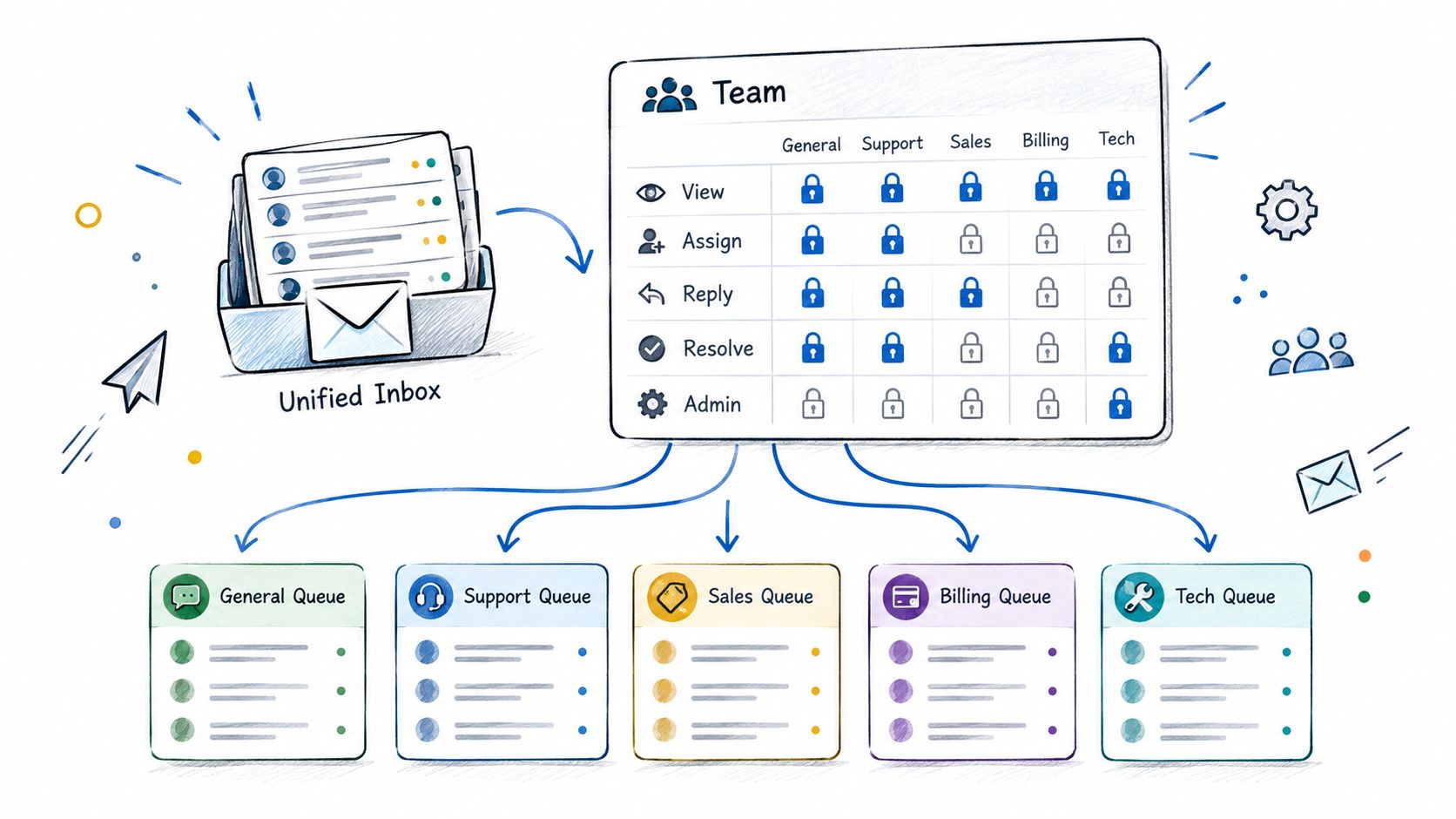
A manager can think about permissions in operational terms: view, assign, reply, resolve, and admin. Queue scope matters as much as the action. A Billing Care role may view and reply to billing DMs, assign conversations to finance, and resolve routine cases. A Comms role may review PR-sensitive mentions and approve public wording. A Trust and Safety role may handle abuse reports and scam waves without seeing every private customer conversation.
Follow a billing complaint through the workflow
A customer's public billing complaint enters the unified inbox. Routing identifies the intent and sends the conversation to Billing Care, where a Tier 1 agent can tag the issue and assign it to a specialist. If the case requires a refund decision, the specialist needs the Refunds permission or must route the case to someone who has it.
That sequence keeps the initial agent useful without making the agent omnipotent. The team can handle a surge in replies while preserving the distinction between triage, investigation, approval, and closure. Humans still decide whether the customer qualifies for a refund and whether the response fits the brand voice.
Every state change should be attributable. An administrator or security reviewer needs to determine who replied, who reassigned the conversation, who changed its status, and who exported the thread. IBM documents how RBAC audit logging can capture events such as adding or removing a user from a role, changes made by role administrators, and activity on the RBAC administration page. IBM's RBAC audit logging documentation describes a structured trail for those administrative events.
Operational test: A manager should be able to reconstruct the path from mention to resolution without asking five people what happened.
Sift AI's audit view can support that review by exposing the user and action associated with a workflow event. Modern RBAC audit records can also include policy lifecycle events and authorization outcomes. Red Hat Developer Hub's RBAC audit log documentation shows the value of recording whether a request was allowed or denied alongside actions such as create, update, and delete.
The following product walkthrough provides another way to inspect how permissions fit into the operating surface:
Keeping Role Based User Access Honest Over Time
Configured RBAC can still fail in daily operations. A role may be technically present while no one knows who owns it, why it exists, or whether its permissions still match the queue it serves.
The first failure mode is role bloat. A Care L2 role starts with basic reply and assignment rights, then accumulates permissions for exports, campaign work, escalation overrides, and temporary incident coverage. Inheritance makes the problem harder to see because a user may receive rights from a parent role that nobody remembers changing.
The second is orphaned access. A contractor leaves, but the Trust and Safety assignment remains active. The third is stale access, where a promotion adds an admin scope and no one removes it after the person moves into a different operational job.
Evidence that the model is drifting
The identity governance problem is visible in recent survey data. In a 2025 survey of 502 U.S. enterprises, 73.9% of respondents agreed that people have access to systems and applications they don't require, while 56.8% said cloud-based user access control such as RBAC would most improve IGA ROI. Those findings appear in the 2025 State of IGA report from Omada.
A separate 2025 zero trust survey of IT, security, and engineering professionals in the U.S. and Canada found that 56% said companies granted access based on role or need, while 46% used groups or teams. Tailscale's 2025 zero trust report points to an enforcement gap. A role may be documented without being consistently applied across groups, exceptions, and legacy grants.
| Drift Signal | What It Looks Like | Sift AI Detection |
|---|---|---|
| Role bloat | A queue role inherits actions unrelated to its daily work | Compare assigned permissions with queue activity and unused capabilities |
| Orphaned access | A departed contractor still appears in an active role | Reconcile user status with current role assignments |
| Stale grant | A former manager retains admin or export scope | Flag elevated actions outside the user's current queue responsibilities |
| Hidden exception | One user receives direct treatment that bypasses the standard role | Review authorization events and unusual assignment changes |
| Unclear ownership | Nobody can approve or retire a role definition | Require an owner for each custom role and workflow scope |
The 2026 analysis referenced in the Omada material reports that 76% of organizations cannot immediately revoke standing access once it's no longer needed. A new regulatory requirement, a queue breach, an offboarding event, or a crisis escalation should trigger a review rather than wait for a calendar exercise.
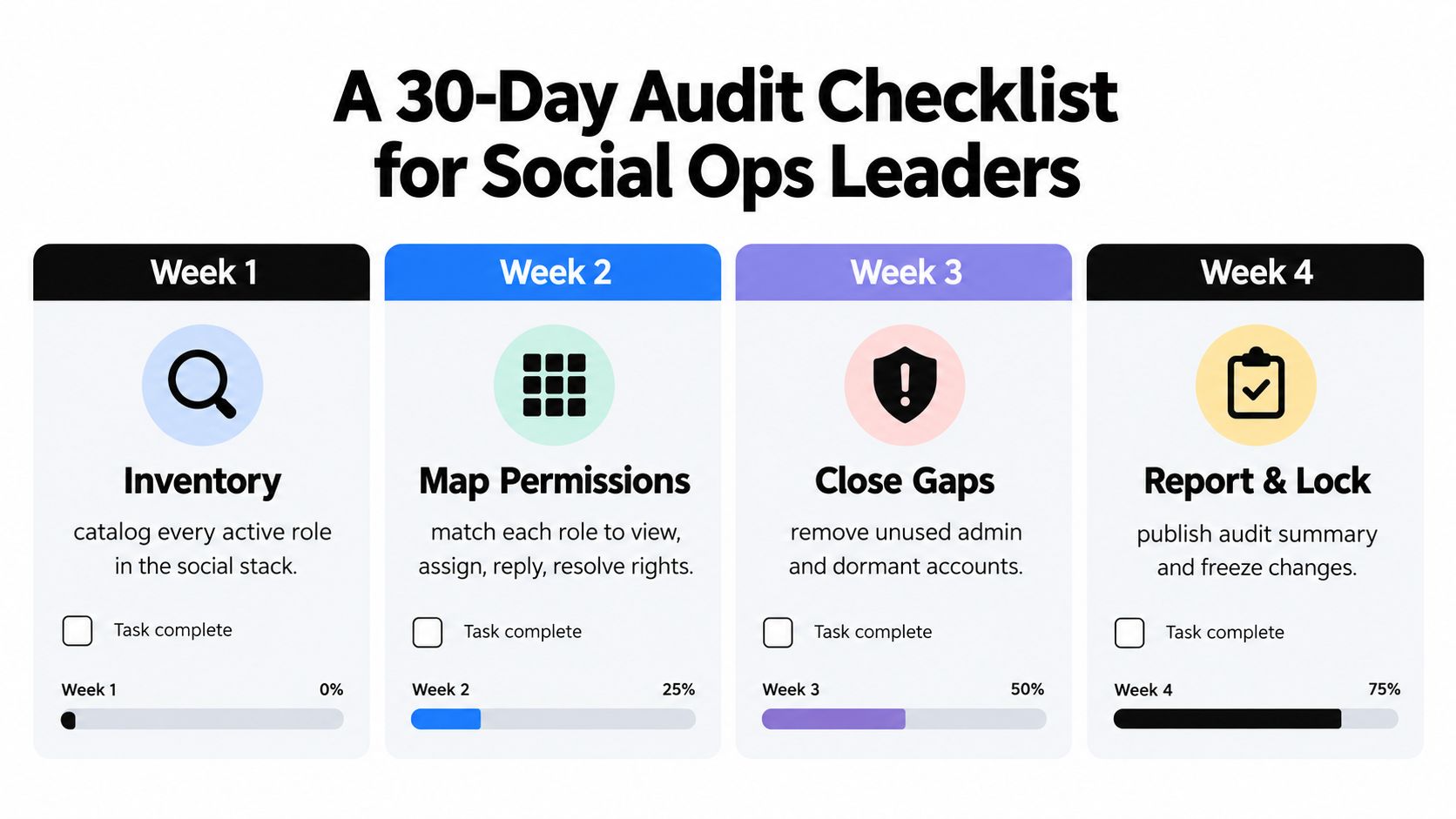
A 30-Day Audit Checklist for Social Ops Leaders
A useful access audit produces evidence that an operations leader can act on. It doesn't end with a spreadsheet that lists roles without showing whether those roles match actual conversations, queues, and decisions.
Week one and week two
Week one, inventory the stack. Catalog every active role across the social inbox, identify each role owner, and flag definitions that no longer map to a current team or queue. Record the count of orphaned roles and note whether each permission is still required for routing, tagging, replying, resolving, exporting, deleting, or administration.
Week two, reconcile people and roles. Review joiner, mover, and leaver events from the prior quarter. Compare those changes with current Sift AI role assignments, including contractors, temporary coverage, service accounts, and people who moved from care into comms, finance, engineering, or product.
The comparison should answer a straightforward question: does the role assignment reflect the work this person performs today? Capture median time to revoke access after a leaver and separate approved temporary elevation from permissions that remained in place.
Week three and week four
Week three, test least privilege. Sample 20 representative tickets across public mentions, private DMs, billing issues, outage reports, feature requests, and escalation paths. Confirm that the person who closed each ticket held the matching permission scope and that the workflow didn't require an unexplained privilege expansion.
Week four, inspect audit evidence. Review audit log exports for direct mentions, DM exports, and bulk-delete actions. Check whether each action is attributable to a named user, whether denied requests are visible, and whether role or policy changes have an accountable administrator.
Publish a one-page scorecard with these signals:
- Role ownership: Count of active roles without a named owner.
- Revocation speed: Median time to revoke access after a leaver.
- Attribution coverage: Percentage of reviewed actions attributable to named users.
- Privilege discipline: Number of escalated tickets resolved without privilege expansion.
- Permission drift: Count of unused or unexplained elevated permissions.
Keep the scorecard tied to the surfaces where work happens. Role assignments, queue scopes, permission changes, routing events, and audit logs should be reviewable without creating a separate manual process that agents will avoid. The goal isn't to stop agents from moving quickly. It's to make sure speed doesn't depend on giving everyone the keys.
Sift AI unifies social and community operations in one command center, with AI that filters noise, tags intent, routes mentions and DMs, drafts replies, and keeps humans responsible for approvals and hard decisions. Visit Sift AI to see how role based user access, queue permissions, routing, and audit visibility can support a more controlled social care operation.