Role Based Access Control Models: A Practical Guide
"Explore role based access control models, from classic RBAC to ABAC and PBAC, with patterns for enterprise social platforms and unified inbox teams."
A customer is already angry in your mentions. They've posted about a double charge on X, sent a DM on Instagram, and followed up on WhatsApp because nobody answered fast enough. Your team isn't short staffed. You're stuck because the person who can see the case can't see billing, the person who can approve a refund can't post the reply, and nobody's sure who can do both without breaking a control.
That's not a staffing problem. It's a role based access control models problem, and it decides whether your unified inbox moves at social speed or creates a second queue of internal permissions tickets.
Table of Contents
- Why Role Models Decide What Your Inbox Can Actually Do
- Core RBAC Vocabulary for Social-Care Teams
- The Four NIST RBAC Components in Plain English
- Hierarchical RBAC Versus Constrained RBAC Versus Symmetric RBAC
- Seven Baseline Roles for an Enterprise Social Platform
- How RBAC Compares to ABAC and PBAC
- Why More Roles Is Not More Secure
- Modeling Shared Inboxes, Contractors, and AI Agents
- Audit Fields Every Social-Care RBAC Log Must Capture
- Mapping a Spam Wave End to End Across Roles
- Quick Reference for Choosing a Role Model
- Frequently Asked Questions About Role Based Access Control Models
Why Role Models Decide What Your Inbox Can Actually Do
A billing complaint lands in replies at 9.02. AI tags it billing intent, pulls the account context, routes it to support, and drafts a holding reply in brand voice. So far, the automation works.
Then the case needs finance. The charge looks wrong, the customer is threatening to post screenshots, and comms wants visibility before the thread spreads. If your finance specialist can read assigned billing cases, view the relevant customer fields, and approve a credit inside the same record, you'll resolve it in one handoff. If that specialist can only see a finance queue with no thread history, you'll copy details into another tool and lose the SLA while you wait.
What the model answers
Good role design answers who can do what, when, with whose data, and on whose authority across X, Instagram, TikTok, Discord, Telegram, WhatsApp, and forums. It governs routing, escalation, auto-closure, draft approval, and access to personal data, not just login access.
You don't need hundreds of roles to get this right. You need a small set tied to real jobs, reviewed against least privilege, and enforced consistently. For practical guardrails on that discipline, CEFCore's RBAC best practices is a useful companion to the operational choices in this guide.
Core RBAC Vocabulary for Social-Care Teams
Skip vendor jargon and use the shared language your security reviewer already expects. The ANSI/INCITS 359 definition of the five RBAC element types gives you users, roles, permissions, operations, and objects, and each term maps cleanly to inbox work.
The diagram below translates those terms into a social-care setup you can use in a vendor RFI.
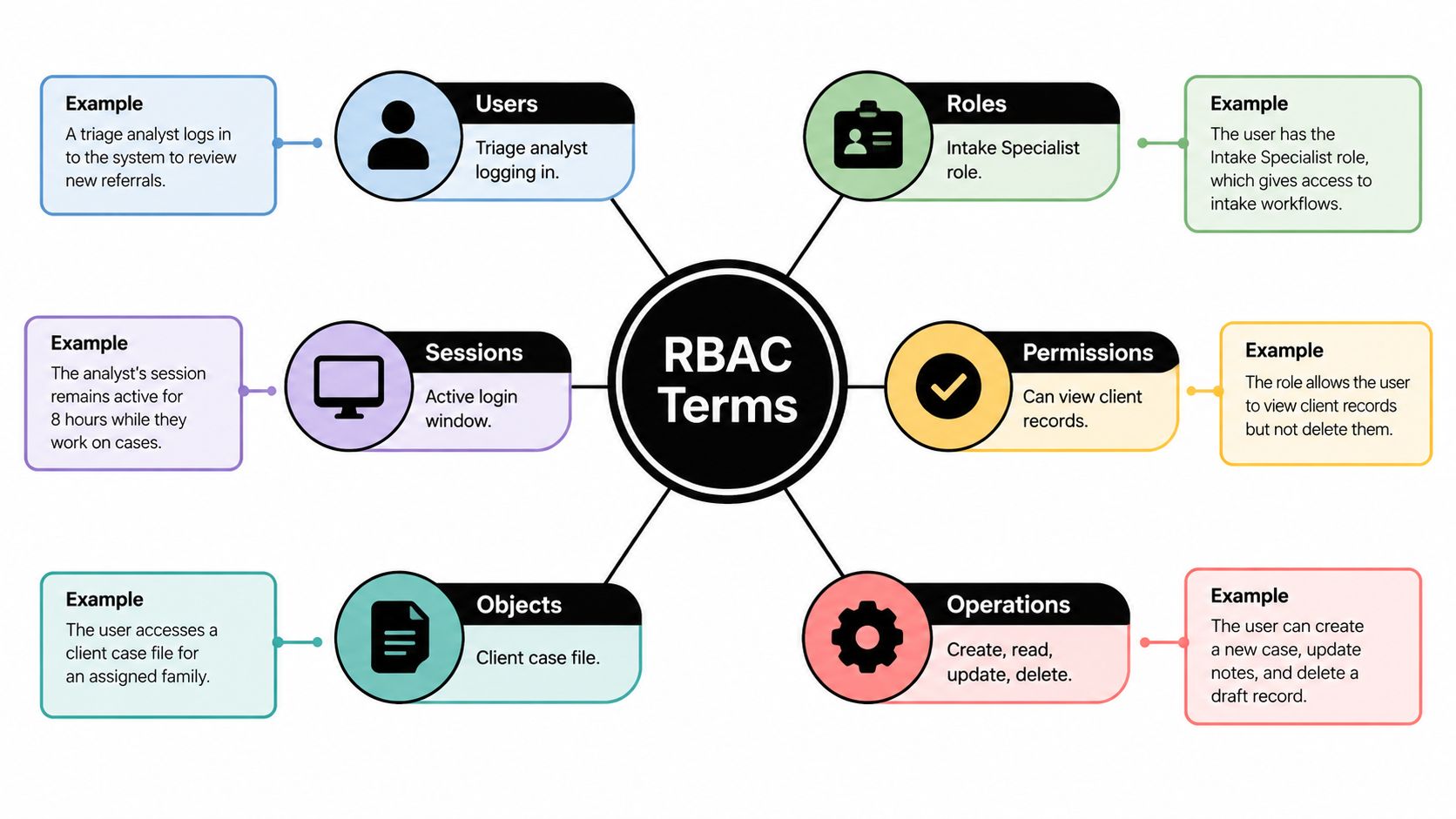
- User: A triage analyst, contractor, service account, or AI agent signing in to act.
- Role: A job bundle such as agent, escalation reviewer, or comms lead. Users get roles, roles get permissions.
- Permission: Approval to perform an operation on an object, such as view customer contact details or approve a refund.
- Operation: The action itself, including read, route, send reply, close case, export, or change queue criteria.
- Object: What the action touches, such as a DM, mention, customer record, routing queue, or analytics view.
- Session: The active login window where a user activates only the roles needed for that shift or incident.
Name roles after jobs people recognize. Routing rules, SLA reports, and audit exports all read better in role language than in a list of individual permissions. If a manager can't explain a role in one sentence, don't ship it.
The Four NIST RBAC Components in Plain English
RBAC didn't start as a SaaS feature. NIST's history of role-based access control at NIST in 1992 traces it to David Ferraiolo and Richard Kuhn's 1992 paper, which mediated access through roles instead of assigning permissions directly to each user. The model became ANSI/INCITS 359-2004, effective February 3, 2004, and was later revised as INCITS 359-2012 and reaffirmed as INCITS 359-2012 (R2022).
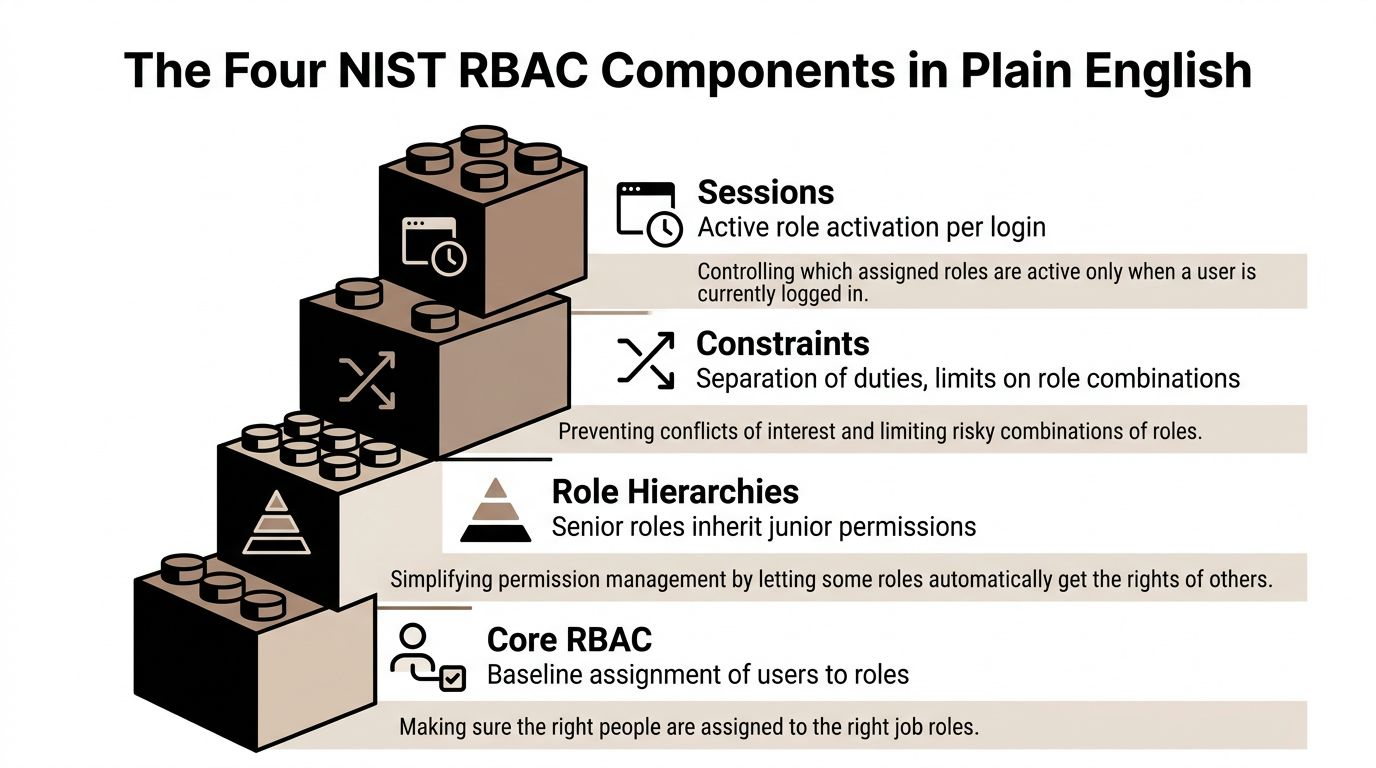
The stacked view below shows the four components you'll assemble whether your vendor labels them or not.
Core and hierarchical RBAC
Core RBAC is mandatory in NIST's standardized RBAC reference model with four components. It covers user-to-role assignment, permission-to-role assignment, and role activation in a session. That's your baseline wiring.
Hierarchical RBAC adds inheritance. A support supervisor inherits an agent's case handling permissions and gains review rights on top, so you don't duplicate assignments. Use it sparingly. Deep hierarchies hide effective permissions, and hidden permissions fail audits.
Separation of duty
Static Separation of Duty blocks conflicting memberships at assignment time. Dynamic Separation of Duty lets a user hold two conflicting roles but prevents activating both in the same session.
Keep refund initiation and refund approval apart. That's the control your finance lead will ask about first, and it's the one teams most often forget in a hurry.
Hierarchical RBAC Versus Constrained RBAC Versus Symmetric RBAC
Don't treat these as levels you climb. They're different governance postures, and the right first choice depends on your team shape and risk.
The NIST RBAC model as a cumulative four-level architecture runs from flat RBAC through hierarchical RBAC and constrained RBAC to symmetric RBAC. Flat RBAC establishes the core assignments. Each later level adds a specific capability, not general maturity.
Pick the posture that matches your risk
Hierarchical RBAC fits a stable org chart. If supervisors need everything agents need plus approvals, inheritance saves admin work. It fails when seniority doesn't equal data need, which is common when a comms lead outranks an agent but shouldn't see billing records.
Constrained RBAC fits regulated work. If you handle payments, financial promotions, or other sensitive approvals, lead with separation of duty. NIST's specification that no user may hold both roles in an SSD pair means the conflict is blocked even if the user never activates both roles. That's strict, and for refund approval it should be.
Symmetric RBAC fits teams with a dedicated admin function. It gives administrators parity when reviewing both user-role and permission-role relationships. That's valuable for trust and safety or IT teams who must answer two questions equally fast, who has this role and what can this role reach.
Don't enable everything on day one. Start flat, add hierarchy only where inheritance is obvious, then add constraints around money, exports, and public replies.
Seven Baseline Roles for an Enterprise Social Platform
Start with seven roles. Add an eighth only when a real job can't be expressed by the set below and an attribute condition can't handle the difference.
- Triage analyst: Reads incoming mentions and DMs, corrects intent tags, routes to queues. No customer record exports, no approvals.
- Agent: Replies from approved drafts, updates cases, closes resolved work. Sees assigned queues, not finance or trust and safety internals.
- Escalation reviewer: Approves sensitive replies, reassigns SLA risk cases, overrides auto-closure. Can't change role assignments.
- Finance specialist: Views billing related cases and approves or rejects credits within scope. Can't post public comms statements.
- Comms lead: Approves public replies during incidents, pins updates, owns holding statements. No billing approval.
- Trust and safety: Acts on scam, abuse, and impersonation queues, restricts accounts where your policy allows it. No refund approval.
- Admin and read-only auditor: Admin configures queues, roles, and routing criteria. Auditor reads logs, assignments, and analytics without acting on cases.
| Role | Can read | Can route | Can approve | Can administer |
|---|---|---|---|---|
| Triage analyst | Inbound queues | Yes | No | No |
| Agent | Assigned cases | Own queues | Drafts within policy | No |
| Escalation reviewer | Escalated cases | Yes | Sensitive replies | No |
| Finance specialist | Billing cases | Finance queue | Credits in scope | No |
| Comms lead | PR risk cases | Comms queue | Public statements | No |
| Trust and safety | Abuse queues | Risk queues | Enforcement actions | No |
| Admin | Configuration views | Rules | Role changes | Yes |
| Read-only auditor | Logs and reports | No | No | No |
Review membership when people change teams, not just when they leave. Stale roles are where permission creep starts.
How RBAC Compares to ABAC and PBAC
Lead with RBAC. Add attributes where role alone is too broad. Reach for policy based control only when you have mature data classification and owners who will maintain the policies.
The comparison below scores the three models on the criteria that matter in a social-care buying decision.
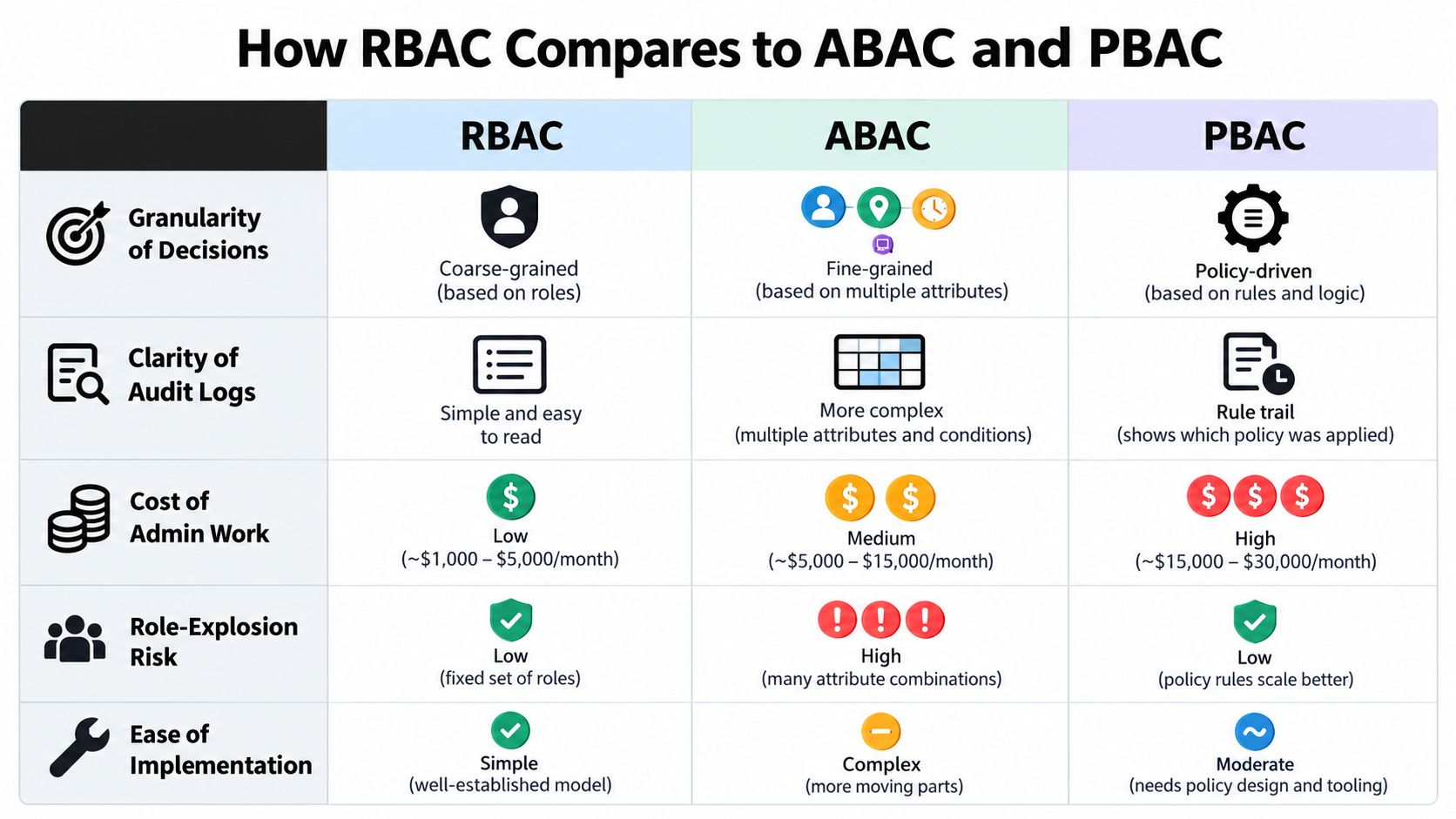
RBAC wins on clarity. Role membership explains most decisions in language auditors, managers, and agents understand. Admin cost stays low while jobs are stable, and role explosion is the main risk to watch.
ABAC wins on granularity. NIST SP 800-162 on ABAC evaluating subject, object, operation, and environment attributes describes decisions based on attributes such as department, object sensitivity, requested action, location, or time. That's how you limit a finance specialist to billing cases for assigned regions, or an incident commander to approvals during an active incident. The cost is explainability. If you can't show which attributes drove a decision, your audit answer weakens.
PBAC wins on portability of business rules across systems, but it demands disciplined policy ownership. Most social ops teams don't need that as their first layer.
Authentication still sits underneath all three. Authorization decides what a verified identity may do, while strong sign in controls reduce account takeover risk. For a plain language primer you can share with non-security stakeholders, 2FA for secure payments covers the second factor basics that pair with any authorization model.
The short video below is worth sharing with stakeholders who are still treating these models as interchangeable vendor labels.
Why More Roles Is Not More Secure
More roles feels safer. Often it isn't.
NISTIR 7316 on role engineering difficulty and role explosion identifies the failure pattern clearly. When decisions depend on time, location, training, or data sensitivity, teams invent ad hoc roles for every combination. Then nobody can explain effective access, admins make mistakes, and urgent work waits for a role nobody on shift holds.

Social incidents expose this fast. A PR risk thread moves from support to engineering, finance, comms, and trust and safety inside an hour. If each hop needs a different permanent role, you'll either over provision everyone in advance or slow the response while an admin grants access manually. Both outcomes are bad. One expands risk incrementally, the other expands it publicly while the thread grows.
Use elevation instead of permanent expansion
Keep durable baseline roles small. Add just-in-time elevation for incidents, with a stated purpose, a short time window, approval from the accountable owner, and automatic revocation. Layer attribute conditions for region, channel, language, or case sensitivity instead of minting a new role for each variant.
Track approval latency, stale-role count, emergency-access frequency, and post-incident revocation completion. If emergency access becomes routine, your baseline roles are wrong. Fix the baseline, don't normalize the workaround.
Design rule: If a role exists for one person, one week, or one incident, it's probably an elevation, not a role.
Modeling Shared Inboxes, Contractors, and AI Agents
Classic RBAC assumes one employee, one job, one set of actions. Your inbox doesn't work that way. You run shared queues, regional contractors, service accounts, and AI that tags, routes, drafts, and sometimes prepares actions for approval.
Model those actors explicitly. NIST research on RBAC limits for administration and policy dependencies highlights gaps around strict separation between users and administrators and circular policy management problems. You'll feel those gaps when an admin can grant themselves broader queue access, or when a delegated action can't be traced to a human decision.
Separate the audit dimensions
Record actor, principal, delegated authority, resource, action, purpose, and time window as separate fields. If an AI agent drafts a refund reply, the agent is the actor drafting, the human approver is the principal authorizing the send, and the approval event proves the boundary held.
That separation is also how you govern machine assistance without handing it a human's full role. For a focused discussion of that boundary, restricting AI agent cosigner access is worth reviewing before you let any agent execute beyond drafting.
Apply the same logic to contractors. A Discord community contractor gets a purpose built role for assigned servers and queues, with an end date and no export rights. Don't copy an employee role and promise to clean it up later. Later is how stale contractor access survives contract end.
Require dual approval for high risk sends, credits, exports, and enforcement actions. Make revocation fast enough that a manager can pull delegated access during the same incident, not after a ticket queue clears.
Audit Fields Every Social-Care RBAC Log Must Capture
An activity feed isn't an audit trail. Your log must prove why an action was allowed, not just show that it happened.
Capture these fields on every authorization decision and every sensitive action:
- Subject: The user, contractor, service account, or AI agent requesting access.
- Role or attributes evaluated: The active role, plus region, channel, case sensitivity, or incident status where attributes apply.
- Resource: The message, queue, customer record, or configuration object touched.
- Action: Read, route, send, approve, export, close, or administer.
- Decision: Allow or deny, recorded for denied attempts too.
- Policy version: The exact role or policy definition in force at decision time.
- Timestamp and delegation chain: When it happened, who approved delegation, and when that authority expires.
Policy version is the field teams skip most often. Without it, you can't prove a March approval followed March rules after April role changes. Your SLA review also suffers, because you can't separate a routing delay caused by workload from one caused by a denied permission or a missing approver.
Hand this list to your security reviewer before implementation. If a platform can't export these fields in a usable form, treat that as a product gap, not a reporting preference.
Mapping a Spam Wave End to End Across Roles
A scam wave hits X mentions and Instagram DMs at the same time. Accounts impersonate your support handle, reply to customers with fake refund links, and push victims toward Telegram. Volume spikes, legitimate billing complaints get buried, and comms starts asking whether you need a public warning.
Step by step through the role checks
1. Intake and tagging. The unified inbox ingests mentions and DMs across channels. AI tags fraud intent, clusters near duplicate messages, and suppresses obvious noise from agent queues. The system actor needs permission to read inbound objects and write tags. It doesn't need permission to send replies or view full billing records.
2. Triage routing. A triage analyst reviews the cluster, confirms the scam pattern, and routes it to trust and safety. The role check allows read and route on inbound queues. It denies enforcement actions, so triage can't restrict accounts on suspicion alone.
3. Trust and safety action. Trust and safety reviews evidence, acts on impersonating accounts under your policy, and marks affected customer threads for follow up. This role can approve enforcement, but separation of duty denies refund approval. That boundary matters when a victim asks for money back in the same thread.
4. Comms escalation. Because impersonation creates PR risk, the case escalates to the comms lead. Comms can approve a public warning post and a pinned reply. Comms can't view unrelated billing details for every affected customer, and shouldn't need to.
5. Finance handoff. Where a customer paid a scammer after contact in your mentions, finance receives a scoped case with the relevant thread and billing fields. A finance specialist can approve a goodwill credit if your policy allows it, but can't edit the public statement. The agent who initiated the request can't approve it.
6. Closure and review. Agents send approved follow ups, close resolved victim cases, and leave scam clusters open for pattern review. The auditor later checks subject, role, resource, action, decision, and policy version for each step, plus response time against your SLA.
The flow works because each hop checks a narrow permission, not general seniority. Nobody needs full inbox access to do their part, and reviewer fatigue drops because approvers only see decisions they're accountable for.
Quick Reference for Choosing a Role Model
Sequence the rollout. Week one, ship flat roles for the seven baseline jobs and deny by default. Week two, add hierarchy only where supervisors inherit agent work. By week four, add separation of duty around money and public statements, plus just-in-time elevation for incidents. Add ABAC conditions when region, language, channel, or sensitivity starts multiplying roles.
Platforms differ in how they expose this. For example, Sift AI provides default and custom roles that administrators can assign to specific queues and features, with read, write, and manage permissions at queue level. Judge any platform the same way, by whether role, queue, and approval controls can be reviewed together.
| Model | Best for | Avoid when | Governance owner | Audit footprint |
|---|---|---|---|---|
| Flat RBAC | Small stable teams | Deep approval chains | Social ops lead | Simple role lists |
| Hierarchical RBAC | Clear supervisor inheritance | Seniority differs from data need | Ops and IT | Effective permission review |
| Constrained RBAC | Refunds and regulated approvals | Tiny teams with shared duties | Finance or risk owner | Conflict rule evidence |
| Symmetric RBAC | Dedicated admin teams | No admin capacity | IT or trust and safety | Both assignment views |
| Hybrid RBAC plus ABAC | Regional and incident based access | Attributes have no owner | Platform security | Role plus attribute record |
| PBAC | Portable business policies | Immature data classification | Security architecture | Policy version trail |
Frequently Asked Questions About Role Based Access Control Models
Who is accountable when an AI agent sends a refund reply using a human role
The human principal who approved the send is accountable. Don't let the agent borrow a person's role invisibly. Log the agent as actor, the approver as principal, the delegated scope, and the approval event. Require dual approval where money or public statements are involved, and keep the agent limited to drafting until that approval exists.
How do we grant temporary billing access during an outage
Use just-in-time elevation, not a permanent role change. Scope it to billing tagged cases, a named incident, and a short time window. Require owner approval, record the purpose, and revoke automatically when the window ends. Review every elevation in the post incident check, including cases the person viewed but didn't act on.
How do we prove a contractor only saw assigned customers
Give the contractor a scoped role tied to assigned queues, then add attribute filters for region, channel, language, or server where needed. Prove it from the log by showing subject, active role, attributes evaluated, resources read, decisions made, and policy version. If you can't produce denied attempts as well as allowed reads, your evidence is incomplete.
How many roles should we start with
Start with the seven baseline roles covered earlier, plus a read-only auditor separated from admin. Add roles only when a durable job exists that those roles and attribute conditions can't express. Retire roles nobody holds, and challenge any role held by exactly one person for a long period.
If your unified inbox already routes billing, outage, and PR risk cases across support, finance, comms, and trust and safety, your role model needs to keep those handoffs fast without giving everyone access to everything. Sift AI brings social and community channels into one operating system with AI triage, routing, drafted replies, and role based controls so humans can approve the decisions that matter. Visit Sift AI to see how your team could run those permissions, queues, and escalations in one place.