Online Brand Monitoring That Actually Catches What Matters
"Practical online brand monitoring guide for social care, community, and ops teams. Learn workflows, triage rules, and metrics that turn mentions into action."
Updated November 4, 2026
Monday at 9:14 a.m. looks the same in a lot of social care teams. The weekend queue is bloated. Replies are piling up under a launch post. A billing complaint is sitting in one Slack thread, a product bug report is buried in Instagram DMs, and someone from Comms wants to know why a journalist mention sat untouched for most of the morning.
That's usually the point where teams say they have a monitoring problem. Most of the time, they don't. They have an ownership problem.
Plenty of teams already collect mentions. They have dashboards, saved searches, alert rules, maybe even sentiment charts. What they don't have is a working system that answers three basic questions fast enough to matter: what is this, who owns it, and how fast do they need to act? Until those answers exist, online brand monitoring is just intake without operations behind it.
Table of Contents
- When Mentions Pile Up and Nobody Knows Who Owns Them
- What Online Brand Monitoring Really Means for Ops Teams
- Core Components That Decide Whether Monitoring Works
- Metrics Worth Tracking and the Vanity Numbers to Drop
- Keyword Alerts Versus a Real Triage and Routing System
- How Routing and Escalation Playbooks Read Under Pressure
- Your 30 60 90 Plan to Make Brand Monitoring Operational
When Mentions Pile Up and Nobody Knows Who Owns Them
The failure pattern is predictable because it starts small.
A product launch drives a spike in replies on X, a burst of creator content on TikTok, and screenshots in Discord and Reddit. Support sees account issues in public mentions. Product sees feature complaints. Comms spots one post from a reporter and assumes someone else handled it. Nobody is wrong individually. The system is wrong.
How the gap forms
Teams create the gap between mentions collected and issues resolved in four ways:
- They monitor channels, not workflows. The social team watches mentions. Support watches tickets. Community watches forums. Each team sees only its own queue.
- They tag emotion instead of intent. “Negative” doesn't tell you whether the post is a refund request, an outage report, a scam warning, or a journalist probe.
- They rely on tribal ownership. If the same issue could belong to Support, Finance, Product, or Comms, it usually belongs to nobody until someone escalates manually.
- They keep the SLA in a deck. A response standard that isn't tied to a queue, owner, and timer won't survive a busy day.
I've seen teams spend more time debating where a mention belongs than it would've taken to resolve it. That's what breaks trust internally. It's also what customers and reporters experience externally as silence.
The queue doesn't fail when volume rises. It fails when the handoff logic was never clear in the first place.
What the broken front door looks like
A broken monitoring program has familiar symptoms:
- Shared inbox drift: high-risk items sit next to low-value chatter and nobody clears either well.
- Reviewer fatigue: agents read too much noise, so the important posts start to look ordinary.
- Late escalation: the post gets noticed only after it has spread across comments, DMs, forums, and screenshots.
- No audit trail: leaders can't reconstruct who saw the issue, when it was routed, or why it stalled.
That's why I don't treat online brand monitoring as a listening report. I treat it as the front door of an operations stack. If the front door is broken, every downstream team inherits the mess. Support misses SLAs. Comms reacts late. Product gets anecdotal signal instead of structured feedback. Executives get dashboards that describe the chaos after the fact.
What Online Brand Monitoring Really Means for Ops Teams
For ops teams, online brand monitoring isn't “seeing what people say about us.” It's the continuous collection of brand signals across social channels and communities, normalized into a unified inbox, then triaged, routed, and escalated to an owner against an SLA.
That definition matters because it changes the finish line. Monitoring is not done when a mention appears on a dashboard. It's done when the right team has it, with enough context to act, and a clock is running.
Monitoring versus listening
Social listening is useful. It helps teams understand patterns, themes, sentiment, and campaign response over time. But listening often stops at aggregated insight.
Monitoring for ops teams has a different job:
- Capture the mention, DM, reply, review, or forum thread.
- Normalize it into one queue with channel context attached.
- Tag the actual intent, not just the tone.
- Route it to the right owner.
- Escalate if the owner doesn't act within the required window.
A social care leader should be able to say this plainly: listening explains what's happening in aggregate. Monitoring decides what happens next.
One mention from raw post to owned work
Take a simple example. A customer replies under a promotional post on Instagram saying they were charged twice and can't get support to answer.
A functioning monitoring flow doesn't leave that in the social media manager's queue as “negative sentiment.” It should move like this:
- Ingestion: the reply lands in the unified inbox with the source post, author, timestamp, and linked campaign context.
- Classification: the system tags it as billing complaint, likely refund-related, public visibility high because it sits under a brand post.
- Routing: ownership goes to Care or Billing, not to whoever happens to be on channel duty.
- SLA assignment: the mention gets a response-time target based on risk and channel.
- Escalation: if no one picks it up in time, the system pushes it higher.
That's operations. Everything short of that is collection.
The channels changed, so the definition has to change
Teams also need a wider definition of what “brand mention” means now. Traditional text-only monitoring misses too much. Recent coverage of multimodal listening points out that visual social listening analyzes images and videos for brand mentions, logo detection, and product usage patterns that text-based monitoring misses entirely, which is why more teams are expanding beyond classic text mention tracking (multimodal monitoring trends in marketing metrics).
That's especially relevant if you need to guard your brand from cyber criminals. Scam accounts, fake offers, manipulated screenshots, and impersonation attempts rarely arrive in a neat text format. Ops teams need monitoring that understands public replies, creator clips, forum threads, and visual misuse together.
Core Components That Decide Whether Monitoring Works
The easiest way to diagnose a weak monitoring program is to stop asking which tool you use and start asking where the handoff breaks. It almost always breaks inside one of five components.
Channel coverage
If the system only watches tagged social mentions, it misses where the hardest issues surface. Customers post billing complaints in replies, creators post product failures in video, communities discuss workarounds in Reddit threads, and power users document edge cases in forums or Discord.
Single-channel coverage creates false confidence. You're not seeing the whole issue, just the version of it that happened to pass through one feed.
Classification and intent tagging
A lot of programs fall apart. Vague tags such as positive, neutral, and negative don't support action. Ops teams need labels such as complaint, outage report, churn risk, scam warning, bug report, feature request, journalist inquiry, or policy risk.
A text-only sentiment layer won't carry enough context on its own. A 2024 empirical study found that sentiment analysis in online brand monitoring degrades when posts include sarcasm, pragmatic nuance, non-English text, or image-based cues, in part because many monitoring systems still rely on unimodal text-only classifiers (2024 study on sentiment analysis limits in brand monitoring).
Practical rule: If the tag doesn't tell you who should act, the tag isn't useful enough.
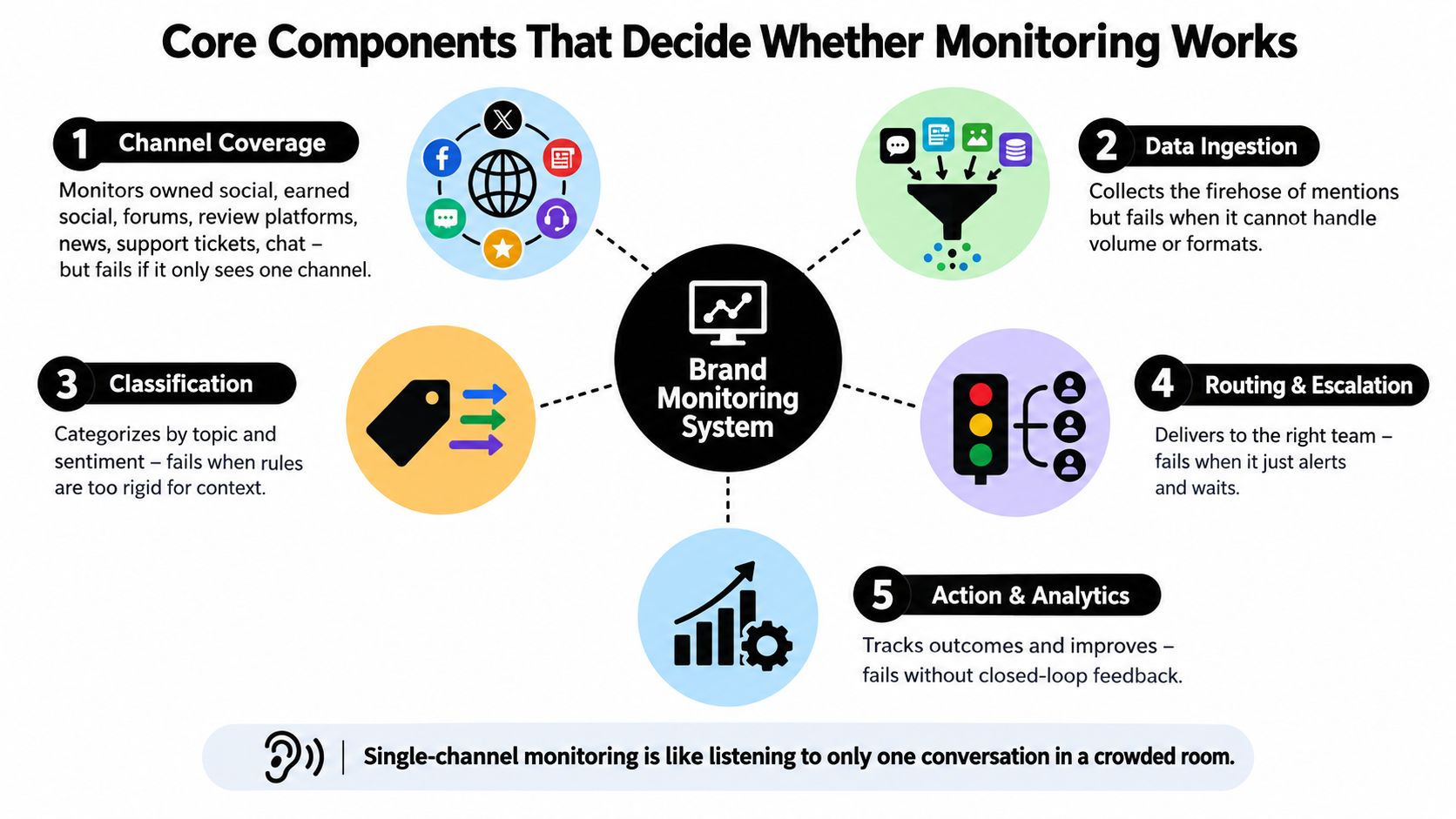
Routing and escalation
Routing is where monitoring becomes operational or dies as theater.
A working rule doesn't just say “alert the team.” It maps tag plus entity plus channel context to a queue, owner, and SLA. If the post mentions a duplicate charge, comes from a customer account, and sits under a viral post, it shouldn't wait in a general social queue. It should move to the billing or care owner with priority attached.
Escalation needs similar precision. Security gets scam waves. Legal gets potentially defamatory or policy-sensitive claims. Comms gets journalist and reputation-risk mentions. Engineering gets outage clusters and reproducible bug patterns.
Action and analytics
Most dashboards over-measure awareness and under-measure action. What matters operationally is whether the mention moved, who owned it, how long it took, whether it escalated, and whether it closed.
If you're evaluating systems, broad market roundups can be useful for understanding the options of top SME reputation monitoring platforms. The selection test, though, is whether the platform supports these handoffs cleanly. Sift AI is one example built around unified intake, AI tagging, routing, draft replies, and human approval. That's closer to how social care teams work than a reporting-only setup.
The integration principle
Each component is only as good as the next handoff it feeds.
- Coverage without classification creates noise.
- Classification without routing creates a labeled backlog.
- Routing without escalation creates silent failures.
- Analytics without action data creates executive theater.
That's the whole system test. Don't ask whether monitoring works. Ask whether the next team can act without re-reading the mention from scratch.
Metrics Worth Tracking and the Vanity Numbers to Drop
The cleanest monitoring programs measure operational health, not dashboard activity. If a metric doesn't help you clear work, protect SLA performance, or improve routing logic, it probably doesn't deserve weekly attention.
The operational metrics that matter
| Metric | What It Tells You | Why It Matters | Risk of Overweighting |
|---|---|---|---|
| Time-to-Detect | How long it takes from intake to first meaningful tag | Shows whether the queue is readable fast enough | Teams may over-optimize speed while tagging badly |
| Time-to-Own | How long it takes from tag to assigned owner | Exposes handoff friction between teams | Fast assignment can hide poor owner quality |
| First-Response Time within SLA | Whether the assigned team answered in the required window | Ties monitoring directly to service performance | Can reward shallow replies if quality isn't reviewed |
| Resolution Rate by Channel | Which channels actually get handled to completion | Reveals whether work is closing, not just being answered | Can penalize channels with inherently complex cases |
| Escalation Rate by Category | Which issue types need higher-level intervention most often | Helps tune playbooks and staffing | A lower rate isn't always better if teams under-escalate |
These metrics need owners and cadences.
- Time-to-Detect: owned by social ops, reviewed weekly
- Time-to-Own: shared by ops and functional leads, reviewed weekly
- First-Response Time within SLA: owned by care leadership, monitored daily
- Resolution Rate by Channel: owned by channel managers and care leads, reviewed weekly
- Escalation Rate by Category: owned by ops plus Comms, Product, or Trust leads, reviewed monthly
Why response time belongs in monitoring
This is not just a support metric. It's a monitoring metric because the first useful action often starts in social channels and communities.
Customer expectations are unforgiving here. One benchmark says 76% of customers expect a response within 24 hours, while about 53% expect a reply within one hour on X, and complaint messages can push that one-hour expectation to roughly 72% (social media customer service benchmarks). Another survey of more than 1,000 users ages 16 to 55 found 52% expected a brand reply within an hour, including 10% within 5 minutes, 22% within 30 minutes, and 20% within an hour, while only 9% would tolerate more than 24 hours (social reply expectations survey).
The vanity numbers to demote
A dashboard can stay green while the queue gets worse.
The usual offenders:
- Total mention volume: useful for capacity planning, weak as a health metric on its own
- Average sentiment score: directional at best, too blunt for routing decisions
- Share of voice: fine for market context, poor at telling care teams what to do today
- Engagement rate on monitored posts: often interesting to marketing, rarely useful for triage
Keep those for trend reads if you need them. Don't let them crowd out the queue metrics that tell you where work is stalling.
Keyword Alerts Versus a Real Triage and Routing System
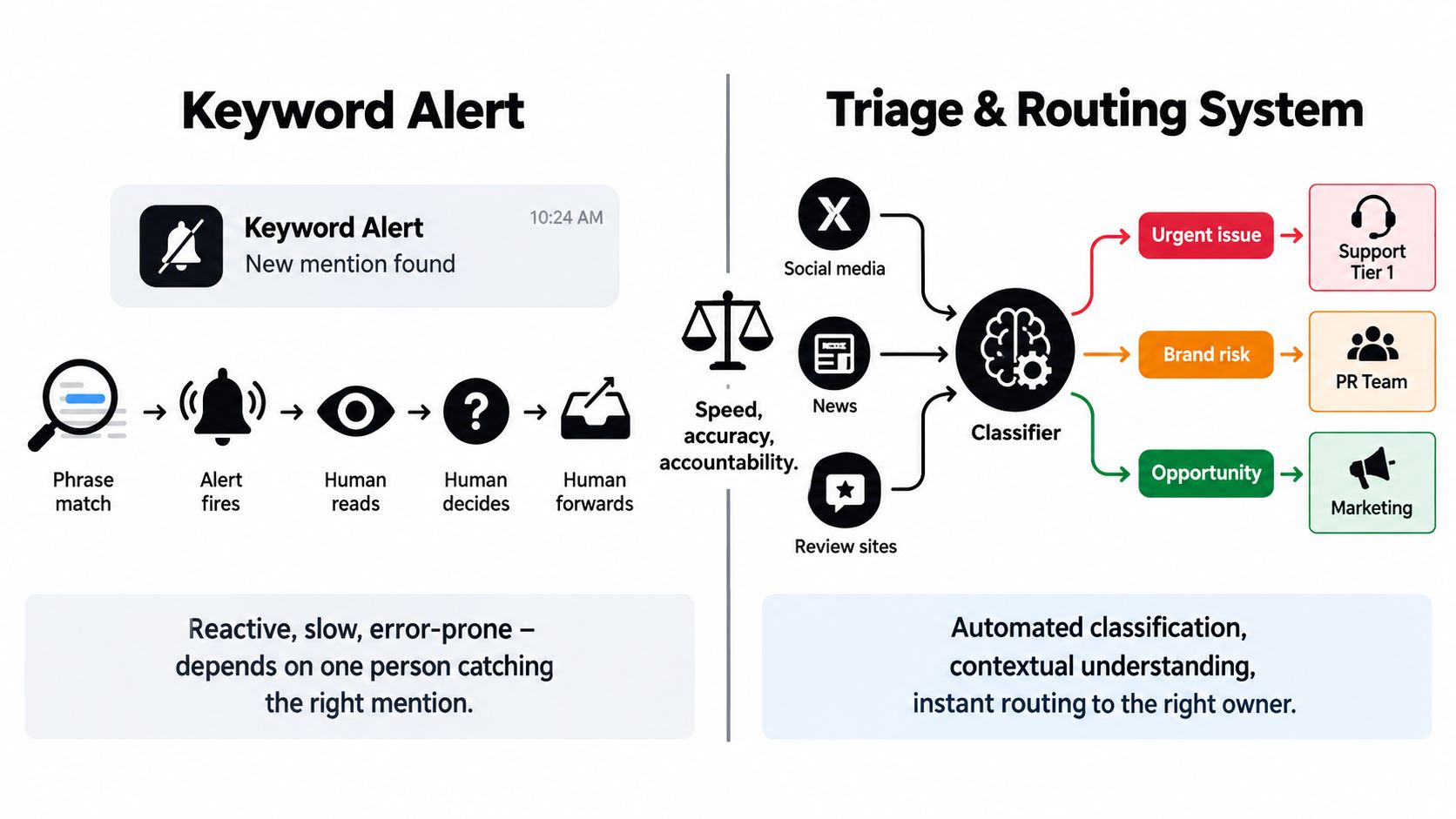
A keyword alert is a notification method. It is not an operating model.
That distinction matters most on bad days. During a launch, a pricing change, a scam wave, or an outage, keyword alerts produce exactly what they were designed to produce: more alerts. Then a human has to read them, interpret them, decide whether they matter, and manually forward them to whoever might own them.
What keyword alerts actually do
A keyword setup usually follows a thin chain:
- phrase matched
- alert fired
- human opened it
- human judged intent
- human forwarded it
- maybe someone acted
That can be enough for a very small team or a narrow monitoring use case. It's not enough when the queue spans X, Instagram, TikTok, Discord, Telegram, WhatsApp, reviews, and forums.
What a triage and routing system adds
A real monitoring stack ingests the same mention stream but adds structure before a person ever opens the item:
- Contextual classification by likely intent and urgency
- Queue assignment to the correct owner or team
- SLA timestamping so inaction becomes visible
- Escalation logic when timers lapse or risk rises
- Auditability so leaders can inspect the path later
The trade-off is simple. Keyword alerts are easier to set up. Triage systems take more design work up front because you need taxonomies, owner maps, and routing rules. But once volume rises, keyword alerts shift the burden onto people. Triage systems shift the burden onto process and automation.
The enterprise decision criteria
When teams compare these models, I'd evaluate them on four dimensions:
- False-positive load: how much junk reaches humans
- Ownership clarity: whether each mention lands with a responsible team
- Case history: whether there's a record of the route, action, and escalation
- Integration depth: whether the queue connects to case management, CRM, and internal workflows
There's also a customer expectation problem underneath this. Social response time is defined as the time between a customer message and the brand's first reply, which is why unified inbox workflows depend so heavily on routing, escalation, and contextual lookup before an answer goes out (response time definition for social teams).
Keyword alerts help you notice. Triage and routing help you operate.
How Routing and Escalation Playbooks Read Under Pressure
When the queue gets ugly, you find out fast whether your playbook is real or decorative. Good playbooks read like dispatch logic. Bad ones read like principles.
A practical routing model has to tell agents and systems what happens next when the mention is messy, public, or time-sensitive.
Here's a visual version of that logic before the scenarios.
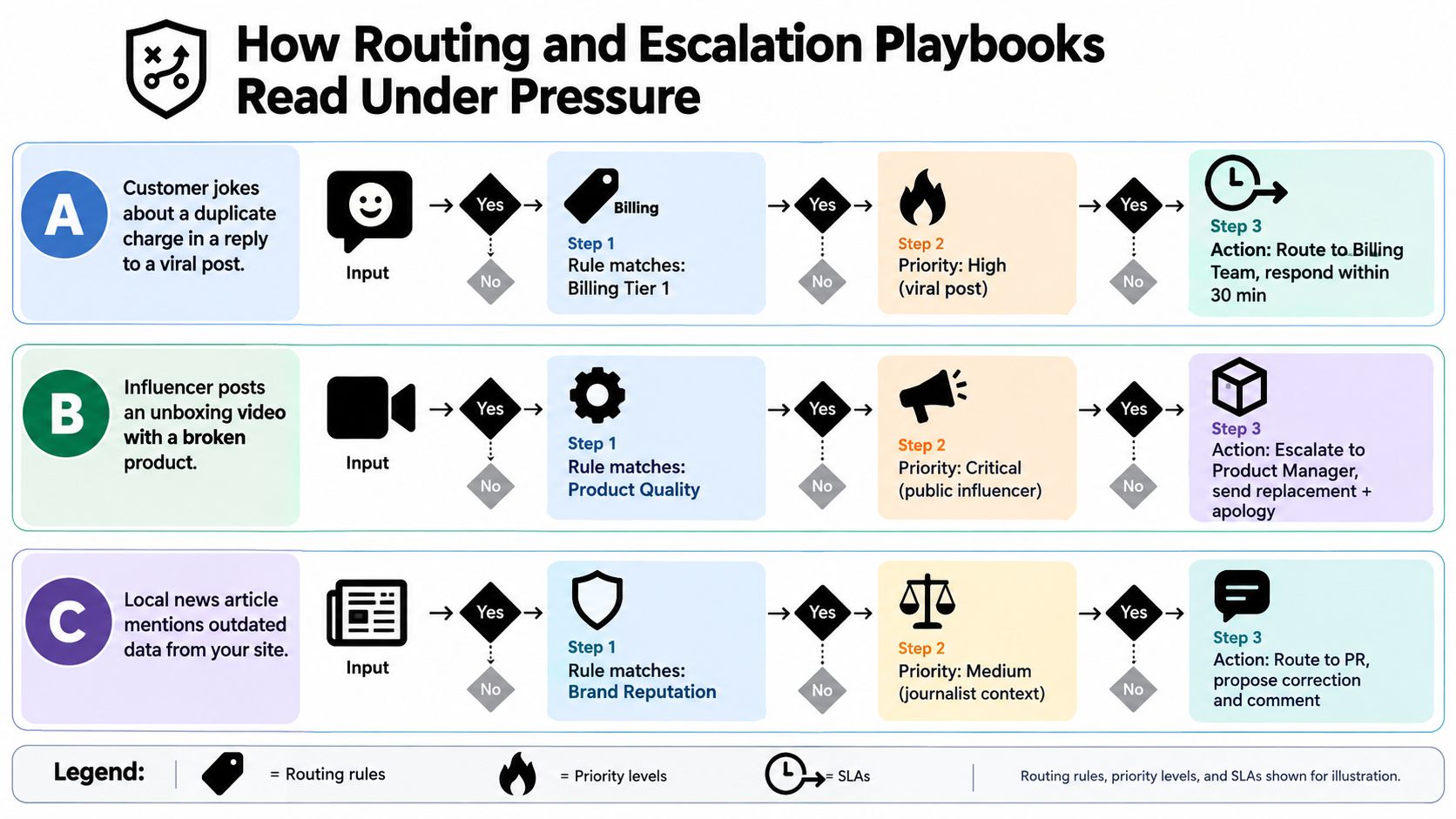
Scenario A with billing language inside a joke
A customer replies under a viral brand post with something like, “Love getting charged twice for this.” Half the team reads it as sarcasm. One agent wants to reply publicly. Another wants to DM. Finance hasn't even seen it.
The playbook should cut through that immediately.
- Intent tag: billing complaint
- Visibility tag: high, because it sits under a viral post
- Owner: Billing or Care Tier 2, depending on your org design
- Public action: acknowledge quickly, move account detail handling to DM or secure channel
- Escalation trigger: no owner action inside the defined high-priority window
Text-only systems often stumble. Sarcasm and pragmatic nuance are exactly the kinds of signals that can throw off automated sentiment scoring, especially when teams rely on text-only classifiers and skip human review for edge cases, as highlighted in the earlier research.
Scenario B with outage noise across multiple communities
An outage rarely arrives politely in one place. It hits X first, then Reddit, then Discord, then support DMs, then creator comments recycling screenshots and guesses.
The routing playbook should change operating mode, not just generate more tasks.
- Queue rule change: pause low-priority topic rules
- Incident mode: route suspected outage mentions into a dedicated incident channel
- Owner map: page the on-call lead, engineering liaison, and social care lead
- Agent guidance: use approved macros or drafts, avoid ad hoc speculation
- Escalation trigger: sustained surge or unresolved incident age
A stronger monitoring framework can materially improve this kind of triage. One 2025 framework reported an ensemble classifier averaging F1 = 0.89 across datasets and languages, outperforming individual baselines by 7 to 12%, while identifying 92% of expert-verified sentiment-shift events with an average alert latency of 3 hours (2025 social-listening framework findings). For ops leaders, the takeaway isn't the model brag sheet. It's that better multilingual handling, entity resolution, and ensemble classification reduce false negatives when incidents spread unevenly across channels.
A short walkthrough helps teams pressure-test their own setup:
Scenario C with a journalist mention that looks ordinary
A journalist tags the brand in a thread about industry practices. It isn't overtly hostile. It also isn't a normal customer service interaction.
This should never sit in a general response queue.
Route by consequence, not by tone.
The right path usually looks like this:
- Intent tag: media inquiry or reputation risk
- Owner: Comms
- Secondary review: legal if policy, disclosure, or claims risk is present
- Work object: create a draft response queue, not a casual social reply
- Escalation trigger: no Comms owner assigned within the designated media-response window
Under pressure, routing logic should remove judgment calls from the first minute. Humans still make the hard decisions. The system's job is to make sure the hard decisions reach the right humans in time.
Your 30 60 90 Plan to Make Brand Monitoring Operational
No team needs a giant rebuild on day one. They need a disciplined sequence that turns monitoring from a reporting function into a queue with owners, timers, and review loops.
Days 1 to 30
Start with the current mess, not the dream architecture.
Audit where mentions come from now: public posts, replies, DMs, reviews, forums, community channels. Then inspect the gaps. Which channels aren't captured, which alerts are noisy, which queries are too broad, and which issue types don't have an owner.
By the end of this phase, you want a unified inbox in place and a first-pass taxonomy that maps intent to team.
Days 31 to 60
Automation earns trust or loses it.
Deploy AI-assisted triage for obvious spam, duplicate noise, language detection, and first-pass tagging. Keep humans in the loop while you validate routing logic against historical tickets, known incidents, and unresolved queues. Don't flip full automation on until reviewers agree that the tags and owners are directionally reliable.
Operator check: Shadow-score old tickets before you trust a live queue. Historical mismatches reveal bad rules faster than meetings do.
Days 61 to 90
Now harden the system.
Add escalation paths by function. Wire the right analytics into weekly operations review. Lock in success criteria that executives can understand without translation: first-touch time by tier, resolution rate by channel, escalation volume by category, and whether the queue is clearing cleanly.
Here's the rollout structure I'd use in an exec review:
| Phase | Objective | Deliverables | Owner | Exit criterion |
|---|---|---|---|---|
| Days 1 to 30 | Establish visibility and ownership basics | Channel audit, query cleanup, unified inbox, initial taxonomy, SLA tiers | Social ops lead | Every priority mention type has a named owner and inbox path |
| Days 31 to 60 | Validate triage and routing logic | AI-assisted spam filtering, language detection, routing rules, shadow scoring on historical work | Social ops plus care leadership | Reviewers trust the routing enough to use it live with human approval |
| Days 61 to 90 | Operationalize escalation and review cadence | Escalation matrix, analytics dashboard, weekly triage review, monthly trend review | Ops lead with cross-functional owners | Teams can show how mentions move from intake to action with measurable queue health |
One more thing matters here. Coverage has to match where conversations happen. Broader reporting on brand monitoring tools has noted the shift toward forum and community surfaces, along with growing demand for unified dashboards and CRM-connected workflows rather than discovery-only monitoring (market summary of brand monitoring trends). That tracks with what ops teams already know. The hard work isn't spotting that a mention exists. It's determining whether Finance, Engineering, PR, Support, or Community needs to own it now.
If your monitoring program can't answer that quickly, it isn't operational yet.
Sift AI gives social care and ops teams one command center for the work described here: a unified inbox across social and community channels, AI that filters noise and tags intent, routing to the right owners, and drafts that humans can approve before anything goes live. If you're trying to turn online brand monitoring into a real operating system instead of another dashboard, visit Sift AI.